Castle Destruction
Castle Destruction

Castle Destruction

Action

| KhoGames

Play on PC with BlueStacks or from our cloud

  • Overview
  • Game Features
  • How to Play

Page Modified On: November 28, 2025

Play Castle Destruction on PC or Mac

From the innovators and creators at KhoGames, Castle Destruction is another fun addition to the World of Action games. Go beyond your mobile screen and play it bigger and better on your PC or Mac. An immersive experience awaits you.

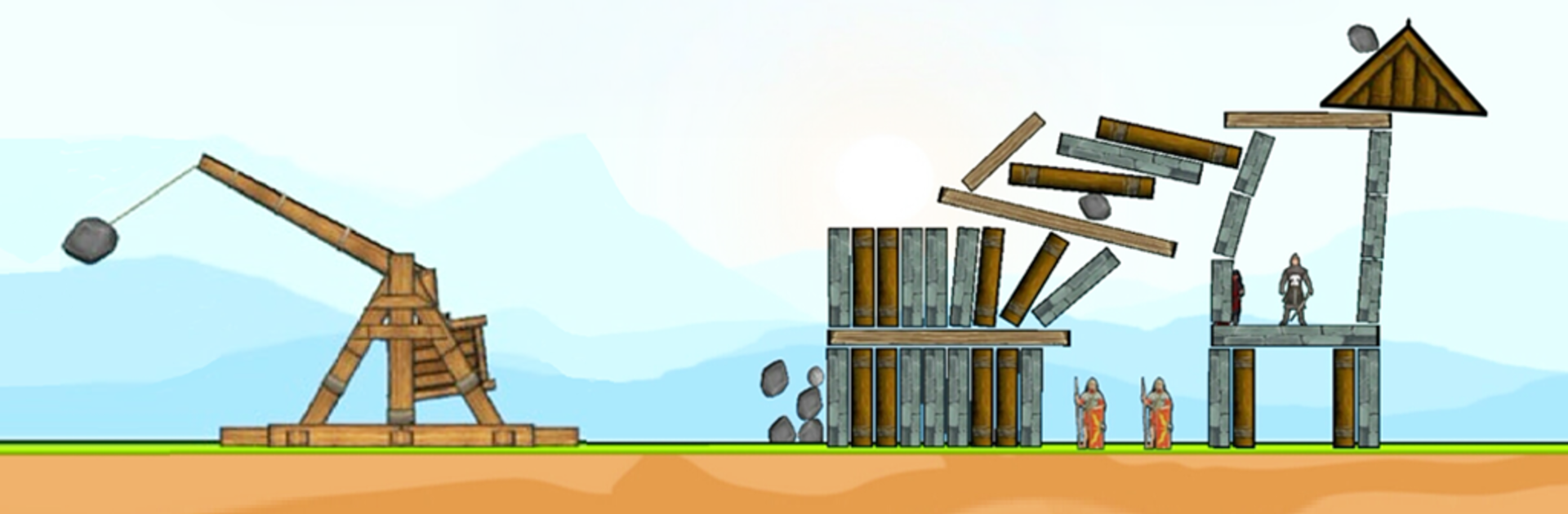
Castle Destruction feels like a physics sandbox dressed up as a medieval siege. The whole loop is about lining up shots with cannons, catapults, and a chunky trebuchet, then watching towers crack and tumble in satisfying little chain reactions. Controls are simple without being dull. Tap to set aim and the cannon does the rest, or do the two-tap dance with the trebuchet where one tap arms the swing and the next releases the payload. A low line drive smacks weak spots, a high arc sails over shields. There are different bomb types for faster wrecking, and archers if a player prefers picking off defenders from afar instead of pure brute force.

Between fights there is a light card system and chest drops that unlock new ammo and perks, including some rare or magic cards that change how a run plays. Progress comes as waves, trophies, and a ranking board, and smashing enemy forts feeds into building a small city of their own, which is funny since all the demolition bankrolls the town. Stages roll through different themes with their own colors and music, so the scenery does not get stale. It plays quick and punchy, and the crumble physics are the star of the show. On BlueStacks, mouse aiming feels precise and the bigger screen makes the stone-by-stone collapse easier to read, so shots land where they should. There are optional in app bombs if someone wants to speed things up, but steady play opens cards and features at a fair clip, with little gift drops popping up often enough to keep the grind from feeling grindy.

Slay your opponents with your epic moves. Play it your way on BlueStacks and dominate the battlefield.


Game Features

Enhancements

  • Macros
  • Multi Instance
  • Multi Instance Sync
  • Eco Mode
  • Enhancements
Macros

Macros

Skip the boring parts of a game. Play Castle Destruction with Macros and get the edge. Simply record a sequence of commands and execute them at any moment.
Multi Instance

Multi Instance

Why limit to one game on your phone when you can play many on your PC? Open multiple instances of Castle Destruction at once with Multi-Instance. Leverage the power of different accounts by doing more.
Multi Instance Sync

Multi Instance Sync

Get the best out of Castle Destruction with Multi-Instance Sync. Play the game from different accounts and build your own empire. Use Multi-instance sync to repeat the action in the main BlueStacks instance on all other instances.
Eco Mode

Eco Mode

Find the rarest heroes by making multiple summons in Castle Destruction. And while you are at it, reduce your PC’s resource consumption with the Eco Mode. Farm efficiently. Get the best results.
Read More

How to Download and Play Castle Destruction on PC or Mac

  • Download and install BlueStacks on your PC or Mac

  • Complete Google sign-in to access the Play Store, or do it later

  • Look for Castle Destruction in the search bar at the top right corner

  • Click to install Castle Destruction from the search results

  • Complete Google sign-in (if you skipped step 2) to install Castle Destruction

  • Click the Castle Destruction icon on the home screen to start playing

video
Watch Video

Minimum System Requirements

With BlueStacks 5, you can get started on a PC that fulfills the following requirements.

  • Operating System

    Microsoft Windows 7 or above, macOS 11 (Big Sur) or above

  • Processor

    Intel, AMD or Apple Silicon Processor

  • RAM

    at least 4GB

  • HDD

    10GB Free Disk Space

Note:

* You must be an Administrator on your PC. Up to date graphics drivers from Microsoft or the chipset vendor.

Castle Destruction - FAQs

  • How to play Castle Destruction on Windows PC & Mac?

    Play Castle Destruction on your PC or Mac by following these simple steps.

    • Click on 'Play Castle Destruction on PC’ to download BlueStacks
    • Install it and log-in to Google Play Store
    • Launch and play the game.
  • Why is BlueStacks the fastest and safest platform to play games on PC?

    BlueStacks respects your privacy and is always safe and secure to use. It does not carry any malware, spyware, or any sort of additional software that could harm your PC.

    It is engineered to optimize speed and performance for a seamless gaming experience.

  • What are Castle Destruction PC requirements?

    Minimum requirement to run Castle Destruction on your PC

    • OS: Microsoft Windows 7 or above MacOS 11 (Big Sur) or above
    • Processor: Intel, AMD or Apple Silicon Processor
    • RAM: Your PC must have at least 4GB of RAM. (Note that having 4GB or more disk space is not a substitute for RAM)
    • HDD: 10GB Free Disk Space.
    • You must be an Administrator on your PC.