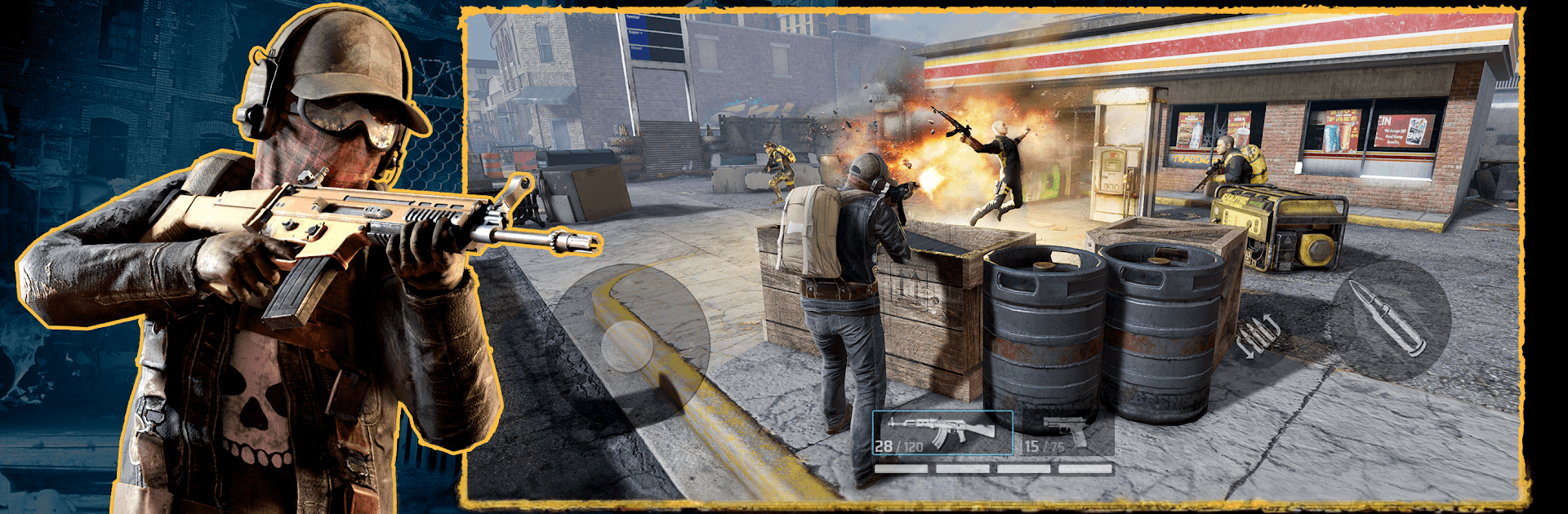
MadWorld: Warfront
MadWorld: Warfront

MadWorld: Warfront

Action

| Carbonated

Play on PC with BlueStacks or from our cloud

  • Overview
  • Game Features
  • How to Play

Page Modified On: April 21, 2026

Play MadWorld: Warfront on PC or Mac

Bring your A-game to MadWorld: Warfront, the Action game sensation from Carbonated. Give your gameplay the much-needed boost with precise game controls, high FPS graphics, and top-tier features on your PC or Mac with BlueStacks.

About the Game

MadWorld: Warfront is a gritty mashup of first-person firefights and big-picture strategy where the real world turns into the battlefield. Society’s cracked, power’s spotty, and your neighborhood isn’t safe unless you make it that way. From Carbonated, this Action hybrid throws you into a single, shared war where clans rise, turf changes hands, and every block you take actually matters. It’s in open beta, so expect fresh updates and the occasional rough edge.

Game Features

  • Hybrid FPS + Strategy
    Jump into tense raids with boots-on-the-ground gunplay, then pull back to plan your next moves on the world map. Kick doors in or call the shots from your safehouse—you pick the pace.

  • One World, Ongoing War
    Everyone fights on a single, persistent server. Clans clash over neighborhoods, cities, and entire regions, and the front line never really sleeps.

  • Clan Wars That Decide the Map
    When a War is declared, the clock starts. Rack up War Points across 24 hours, outplay rival crews, and the winning clan claims the land and its income.

  • Take, Hold, and Profit
    Lock down territory to grow your influence. Trade what you’ve earned at the Trading Post for elite squadmates, rare gear, and powerful blueprints.

  • Deployable Squads and Timed Ops
    Send your squadmates on missions to harass rivals, secure supplies, and fuel your upgrades while you prep for the next push.

  • Scavenge, Craft, Survive
    Hunt for blueprints, forge better weapons, and gear up for tougher jobs. Expect varied objectives, tough extractions, and enemies ranging from hit-and-run raiders to hulking heavies—plus bosses guarding the good stuff.

  • Play Your Way, With Friends
    Solo raids, coordinated pushes, scrappy last stands—clan coordination turns close calls into wins.

  • Smooth on PC with BlueStacks
    Prefer a mouse and keyboard? Running MadWorld: Warfront on BlueStacks makes aiming and command inputs feel tight without extra setup.

Make your gaming sessions memorable with precise controls that give you an edge in close combats and visuals that pop up, bringing every character to life.


Game Features

Enhancements

  • Macros
  • Multi Instance
  • Multi Instance Sync
  • Eco Mode
  • Enhancements
Macros

Macros

Skip the boring parts of a game. Play MadWorld: Warfront with Macros and get the edge. Simply record a sequence of commands and execute them at any moment.
Multi Instance

Multi Instance

Why limit to one game on your phone when you can play many on your PC? Open multiple instances of MadWorld: Warfront at once with Multi-Instance. Leverage the power of different accounts by doing more.
Multi Instance Sync

Multi Instance Sync

Get the best out of MadWorld: Warfront with Multi-Instance Sync. Play the game from different accounts and build your own empire. Use Multi-instance sync to repeat the action in the main BlueStacks instance on all other instances.
Eco Mode

Eco Mode

Find the rarest heroes by making multiple summons in MadWorld: Warfront. And while you are at it, reduce your PC’s resource consumption with the Eco Mode. Farm efficiently. Get the best results.
Read More

How to Download and Play MadWorld: Warfront on PC or Mac

  • Download and install BlueStacks on your PC or Mac

  • Complete Google sign-in to access the Play Store, or do it later

  • Look for MadWorld: Warfront in the search bar at the top right corner

  • Click to install MadWorld: Warfront from the search results

  • Complete Google sign-in (if you skipped step 2) to install MadWorld: Warfront

  • Click the MadWorld: Warfront icon on the home screen to start playing

video
Watch Video

Minimum System Requirements

With BlueStacks 5, you can get started on a PC that fulfills the following requirements.

  • Operating System

    Microsoft Windows 7 or above, macOS 11 (Big Sur) or above

  • Processor

    Intel, AMD or Apple Silicon Processor

  • RAM

    at least 4GB

  • HDD

    10GB Free Disk Space

Note:

* You must be an Administrator on your PC. Up to date graphics drivers from Microsoft or the chipset vendor.

MadWorld: Warfront - FAQs

  • How to play MadWorld: Warfront on Windows PC & Mac?

    Play MadWorld: Warfront on your PC or Mac by following these simple steps.

    • Click on 'Play MadWorld: Warfront on PC’ to download BlueStacks
    • Install it and log-in to Google Play Store
    • Launch and play the game.
  • Why is BlueStacks the fastest and safest platform to play games on PC?

    BlueStacks respects your privacy and is always safe and secure to use. It does not carry any malware, spyware, or any sort of additional software that could harm your PC.

    It is engineered to optimize speed and performance for a seamless gaming experience.

  • What are MadWorld: Warfront PC requirements?

    Minimum requirement to run MadWorld: Warfront on your PC

    • OS: Microsoft Windows 7 or above MacOS 11 (Big Sur) or above
    • Processor: Intel, AMD or Apple Silicon Processor
    • RAM: Your PC must have at least 4GB of RAM. (Note that having 4GB or more disk space is not a substitute for RAM)
    • HDD: 10GB Free Disk Space.
    • You must be an Administrator on your PC.