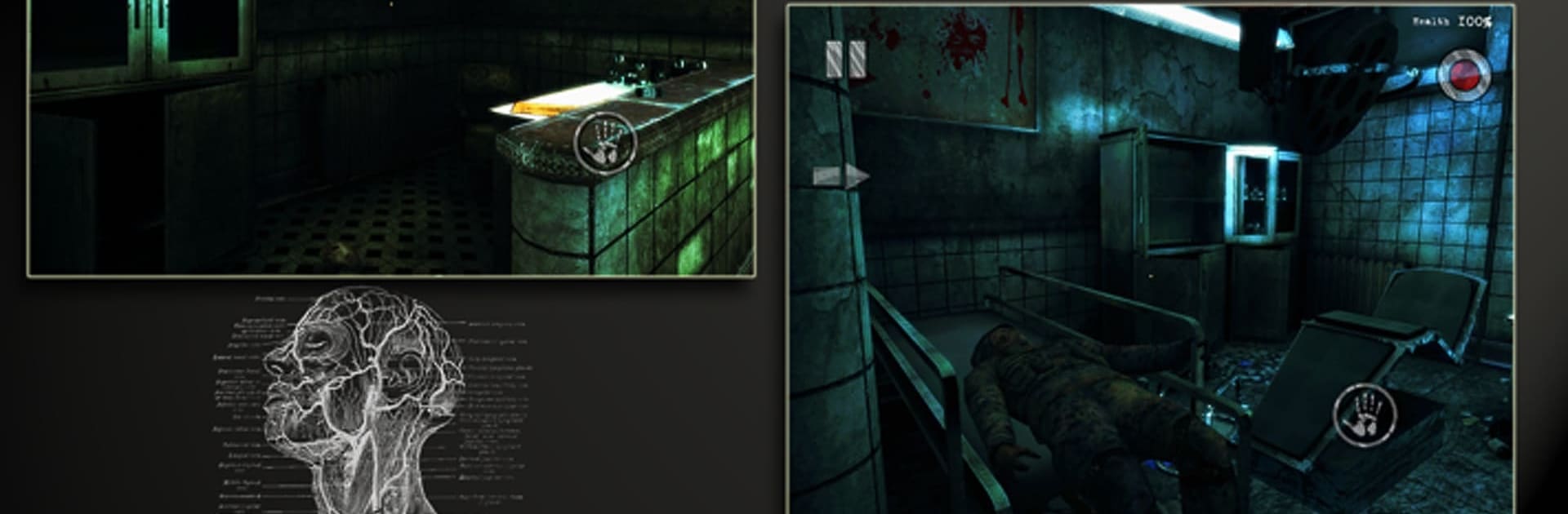
Mental Hospital III Remastered

Mental Hospital III Remastered

Action

| AGaming+

Play on PC with BlueStacks or from our cloud

  • Overview
  • Game Features
  • How to Play

Page Modified On: November 28, 2025

Play Mental Hospital III Remastered on PC or Mac

From the innovators and creators at AGaming+, Mental Hospital III Remastered is another fun addition to the World of Action games. Go beyond your mobile screen and play it bigger and better on your PC or Mac. An immersive experience awaits you.

About the Game

Mental Hospital III Remastered brings back a cult scare-fest with a fresh coat of paint and plenty of nerves to shred. You’re a cameraman hired to cover a special forces raid at a psychiatric hospital rumored to hide ugly secrets. You show up late, step inside anyway, and realize this “simple gig” has turned into a long, terrifying night you’ll never shake.

Game Features

  • Remastered visuals — Sharper textures, cleaner lighting, and a gloomier look that makes every corridor feel uneasy and alive.
  • First-person fear — See everything through your own eyes: tight spaces, flickering lights, and that awful feeling something’s just out of sight.
  • Story-driven nightmare — Track down Lieutenant Sidorov and piece together what those secret experiments were really about as the situation spirals.
  • Unsettling atmosphere — Thunder outside, bad news on the airwaves, broken-down car, and a hospital full of “inhabitants” who don’t feel quite human.
  • Camera-centric experience — You came to film, so you’ll rely on your gear to navigate, find evidence, and keep your hands from shaking—at least a little.
  • Exploration and survival — Sneak, listen, and read the room. Look for clues, open new paths, and try not to attract attention you can’t handle.
  • Classic horror, reimagined — A beloved 2013 fright returns, rebuilt to preserve the original tension while smoothing out the rough edges.
  • Play your way — Responsive touch controls on mobile, and if you prefer keyboard and mouse on PC, BlueStacks keeps things tight and comfortable.

From AGaming+, Mental Hospital III Remastered lands squarely in the Action space, but it’s the creeping tension and grounded, slow-burn scares that do the heavy lifting.

Slay your opponents with your epic moves. Play it your way on BlueStacks and dominate the battlefield.


Game Features

Enhancements

  • Macros
  • Multi Instance
  • Multi Instance Sync
  • Eco Mode
  • Enhancements
Macros

Macros

Skip the boring parts of a game. Play Mental Hospital III Remastered with Macros and get the edge. Simply record a sequence of commands and execute them at any moment.
Multi Instance

Multi Instance

Why limit to one game on your phone when you can play many on your PC? Open multiple instances of Mental Hospital III Remastered at once with Multi-Instance. Leverage the power of different accounts by doing more.
Multi Instance Sync

Multi Instance Sync

Get the best out of Mental Hospital III Remastered with Multi-Instance Sync. Play the game from different accounts and build your own empire. Use Multi-instance sync to repeat the action in the main BlueStacks instance on all other instances.
Eco Mode

Eco Mode

Find the rarest heroes by making multiple summons in Mental Hospital III Remastered. And while you are at it, reduce your PC’s resource consumption with the Eco Mode. Farm efficiently. Get the best results.
Read More

How to Download and Play Mental Hospital III Remastered on PC or Mac

  • Download and install BlueStacks on your PC or Mac

  • Complete Google sign-in to access the Play Store, or do it later

  • Look for Mental Hospital III Remastered in the search bar at the top right corner

  • Click to install Mental Hospital III Remastered from the search results

  • Complete Google sign-in (if you skipped step 2) to install Mental Hospital III Remastered

  • Click the Mental Hospital III Remastered icon on the home screen to start playing

video
Watch Video

Minimum System Requirements

With BlueStacks 5, you can get started on a PC that fulfills the following requirements.

  • Operating System

    Microsoft Windows 7 or above, macOS 11 (Big Sur) or above

  • Processor

    Intel, AMD or Apple Silicon Processor

  • RAM

    at least 4GB

  • HDD

    10GB Free Disk Space

Note:

* You must be an Administrator on your PC. Up to date graphics drivers from Microsoft or the chipset vendor.

Mental Hospital III Remastered - FAQs

  • How to play Mental Hospital III Remastered on Windows PC & Mac?

    Play Mental Hospital III Remastered on your PC or Mac by following these simple steps.

    • Click on 'Play Mental Hospital III Remastered on PC’ to download BlueStacks
    • Install it and log-in to Google Play Store
    • Launch and play the game.
  • Why is BlueStacks the fastest and safest platform to play games on PC?

    BlueStacks respects your privacy and is always safe and secure to use. It does not carry any malware, spyware, or any sort of additional software that could harm your PC.

    It is engineered to optimize speed and performance for a seamless gaming experience.

  • What are Mental Hospital III Remastered PC requirements?

    Minimum requirement to run Mental Hospital III Remastered on your PC

    • OS: Microsoft Windows 7 or above MacOS 11 (Big Sur) or above
    • Processor: Intel, AMD or Apple Silicon Processor
    • RAM: Your PC must have at least 4GB of RAM. (Note that having 4GB or more disk space is not a substitute for RAM)
    • HDD: 10GB Free Disk Space.
    • You must be an Administrator on your PC.