Samkok Heroes TD
Samkok Heroes TD

Samkok Heroes TD

Action

| Suga Studio

Play on PC with BlueStacks or from our cloud

  • Overview
  • Game Features
  • How to Play

Page Modified On: January 09, 2026

Play Samkok Heroes TD on PC or Mac

From the innovators and creators at Suga Studio, Samkok Heroes TD is another fun addition to the World of Action games. Go beyond your mobile screen and play it bigger and better on your PC or Mac. An immersive experience awaits you.

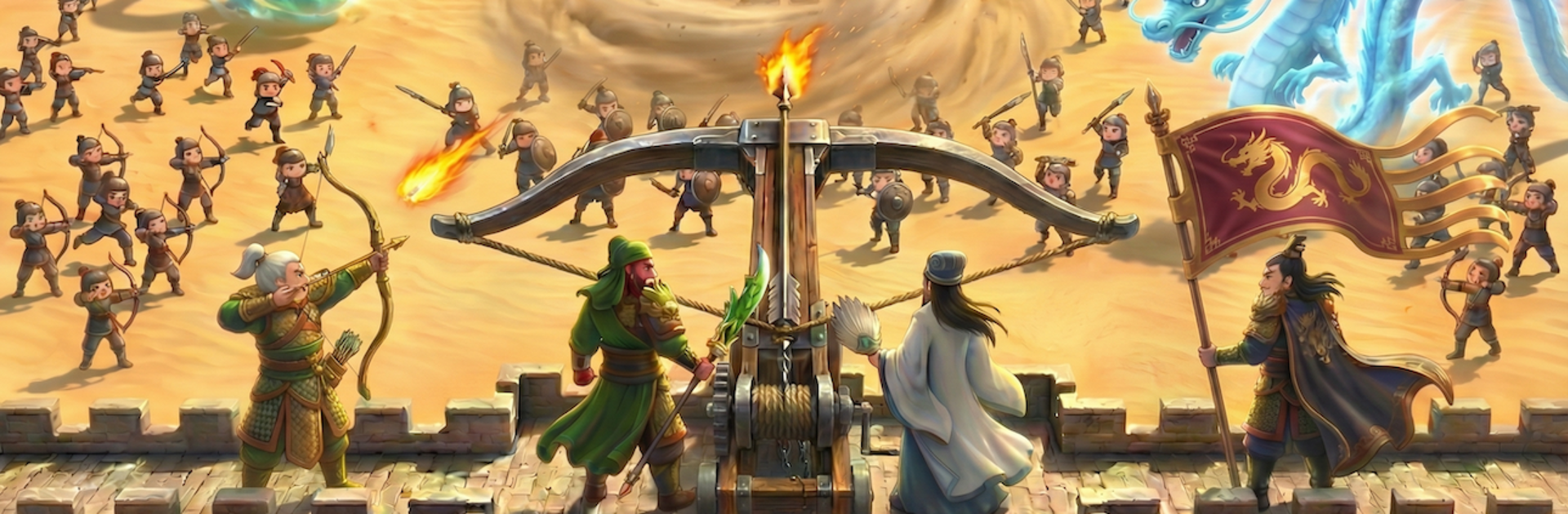
Samkok Heroes TD is a Three Kingdoms tower defense where lanes are held by named generals and their squads, not just basic towers. Guan Yu, Zhao Yun, Zhuge Liang and the rest all fight differently, and each one comes with a big skill that flips a wave when used at the right second. The rhythm ends up being set a formation, watch enemy lines push in, then trigger a blade sweep or a formation blast to save a leaking lane. It feels punchy, with a lot of small timing calls rather than just placing and forgetting.

The Soul Gem system is the tinkering part. Gems like Power, Wisdom, or Resistance slot into both towers and generals, shifting damage, range, survivability, even how a lane handles bosses. Swapping loadouts before a map actually matters, so someone can build sturdy choke points for later waves or go all in on early burst. Maps are based on big historical battles, so Red Cliffs, Guandu, and Yiling come with different terrain and enemy mixes that push new setups. There is a long campaign that walks through the era, plus an endless Trial Tower, dungeon runs for rarer gear, and timed Historical Incident events for extra rewards. It does expect some resource grinding between tougher chapters, nothing wild, just the usual steady climb.

On PC through BlueStacks, mouse placement feels clean and firing skills with keys is a lot less fumbly than touch. If someone wants a hero-forward TD that leans on timing, team comp, and little build tweaks rather than maze tricks, this hits that niche quite well.

Slay your opponents with your epic moves. Play it your way on BlueStacks and dominate the battlefield.


Game Features

Enhancements

  • Macros
  • Multi Instance
  • Multi Instance Sync
  • Eco Mode
  • Enhancements
Macros

Macros

Skip the boring parts of a game. Play Samkok Heroes TD with Macros and get the edge. Simply record a sequence of commands and execute them at any moment.
Multi Instance

Multi Instance

Why limit to one game on your phone when you can play many on your PC? Open multiple instances of Samkok Heroes TD at once with Multi-Instance. Leverage the power of different accounts by doing more.
Multi Instance Sync

Multi Instance Sync

Get the best out of Samkok Heroes TD with Multi-Instance Sync. Play the game from different accounts and build your own empire. Use Multi-instance sync to repeat the action in the main BlueStacks instance on all other instances.
Eco Mode

Eco Mode

Find the rarest heroes by making multiple summons in Samkok Heroes TD. And while you are at it, reduce your PC’s resource consumption with the Eco Mode. Farm efficiently. Get the best results.
Read More

How to Download and Play Samkok Heroes TD on PC or Mac

  • Download and install BlueStacks on your PC or Mac

  • Complete Google sign-in to access the Play Store, or do it later

  • Look for Samkok Heroes TD in the search bar at the top right corner

  • Click to install Samkok Heroes TD from the search results

  • Complete Google sign-in (if you skipped step 2) to install Samkok Heroes TD

  • Click the Samkok Heroes TD icon on the home screen to start playing

video
Watch Video

Minimum System Requirements

With BlueStacks 5, you can get started on a PC that fulfills the following requirements.

  • Operating System

    Microsoft Windows 7 or above, macOS 11 (Big Sur) or above

  • Processor

    Intel, AMD or Apple Silicon Processor

  • RAM

    at least 4GB

  • HDD

    10GB Free Disk Space

Note:

* You must be an Administrator on your PC. Up to date graphics drivers from Microsoft or the chipset vendor.

Samkok Heroes TD - FAQs

  • How to play Samkok Heroes TD on Windows PC & Mac?

    Play Samkok Heroes TD on your PC or Mac by following these simple steps.

    • Click on 'Play Samkok Heroes TD on PC’ to download BlueStacks
    • Install it and log-in to Google Play Store
    • Launch and play the game.
  • Why is BlueStacks the fastest and safest platform to play games on PC?

    BlueStacks respects your privacy and is always safe and secure to use. It does not carry any malware, spyware, or any sort of additional software that could harm your PC.

    It is engineered to optimize speed and performance for a seamless gaming experience.

  • What are Samkok Heroes TD PC requirements?

    Minimum requirement to run Samkok Heroes TD on your PC

    • OS: Microsoft Windows 7 or above MacOS 11 (Big Sur) or above
    • Processor: Intel, AMD or Apple Silicon Processor
    • RAM: Your PC must have at least 4GB of RAM. (Note that having 4GB or more disk space is not a substitute for RAM)
    • HDD: 10GB Free Disk Space.
    • You must be an Administrator on your PC.