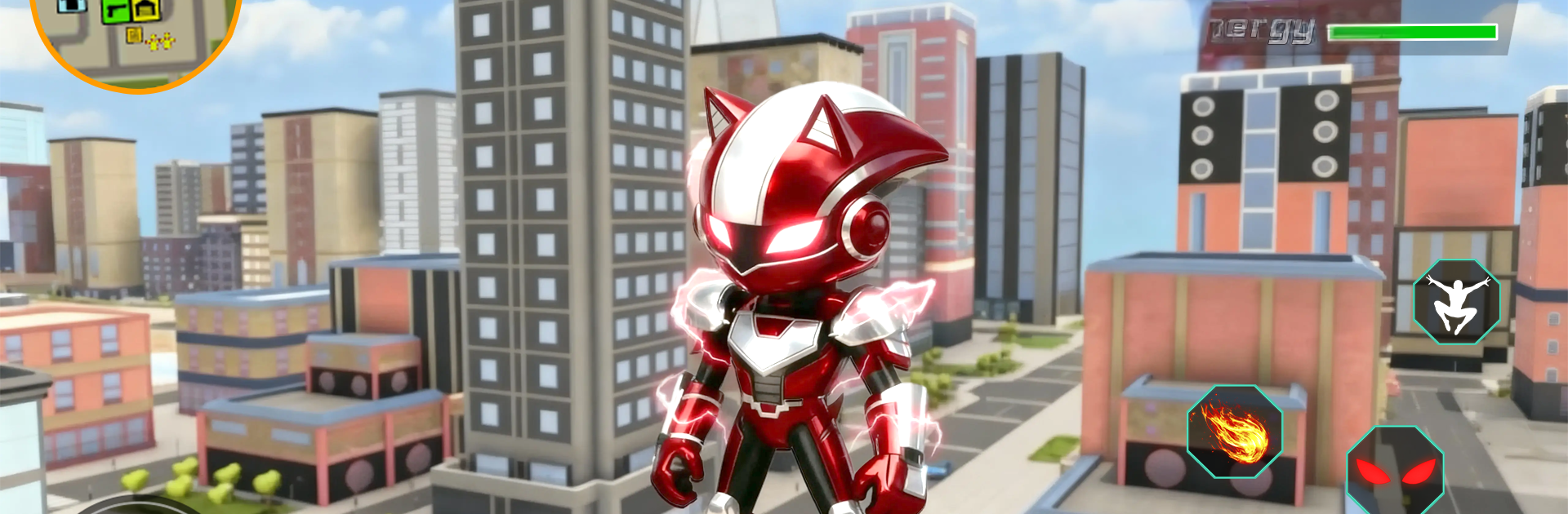
Speed Runner: Hyper Electric

Speed Runner: Hyper Electric

Action

| Tuan Anh Hoang

Play on PC with BlueStacks or from our cloud

  • Overview
  • Game Features
  • How to Play

Page Modified On: January 06, 2026

Play Speed Runner: Hyper Electric on PC or Mac

Speed Runner: Hyper Electric brings the Action genre to life, and throws up exciting challenges for gamers. Developed by Tuan Anh Hoang, this Android game is best experienced on BlueStacks, the World’s #1 app player for PC and Mac users.

Speed Runner: Hyper Electric feels like a citywide playground built for momentum. The player is an electric hero who strings boosts together to rocket across rooftops, thread gaps between skyscrapers, and sometimes ragdoll into a billboard when a landing goes sideways. It is fast, loud, and a little messy in a good way. The physics are not just window dressing either. Mistakes bounce, flips turn into accidental saves, and a clean run can turn chaotic, then somehow recover into a slick finish.

There is structure if someone wants it. Missions throw out quick objectives like rescuing citizens, chasing slippery targets, outrunning drones, or bulldozing obstacles before a timer bites. The open city keeps it loose, so a route can be improvised on the fly and every run ends up looking different. Upgrades give more energy to push longer bursts, plus new forms that change how the boost behaves, so speed junkies can tune thier flow rather than just grind numbers.

It plays nicely on PC with BlueStacks. Keyboard controls make sprint, jump, and boost feel snappy, and the mouse helps snap the camera when lining up a rooftop edge or a mid-air redirect. The whole loop is really about rhythm and recovery. Build speed, try a ridiculous jump, eat concrete, bounce, laugh, then go even faster on the next stretch. If a player enjoys games that reward audacity and does not mind the occasional goofy wipeout, this scratches that itch.

Make your gaming sessions memorable with precise controls that give you an edge in close combats and visuals that pop up, bringing every character to life.


Game Features

Enhancements

  • Macros
  • Multi Instance
  • Multi Instance Sync
  • Eco Mode
  • Enhancements
Macros

Macros

Skip the boring parts of a game. Play Speed Runner: Hyper Electric with Macros and get the edge. Simply record a sequence of commands and execute them at any moment.
Multi Instance

Multi Instance

Why limit to one game on your phone when you can play many on your PC? Open multiple instances of Speed Runner: Hyper Electric at once with Multi-Instance. Leverage the power of different accounts by doing more.
Multi Instance Sync

Multi Instance Sync

Get the best out of Speed Runner: Hyper Electric with Multi-Instance Sync. Play the game from different accounts and build your own empire. Use Multi-instance sync to repeat the action in the main BlueStacks instance on all other instances.
Eco Mode

Eco Mode

Find the rarest heroes by making multiple summons in Speed Runner: Hyper Electric. And while you are at it, reduce your PC’s resource consumption with the Eco Mode. Farm efficiently. Get the best results.
Read More

How to Download and Play Speed Runner: Hyper Electric on PC or Mac

  • Download and install BlueStacks on your PC or Mac

  • Complete Google sign-in to access the Play Store, or do it later

  • Look for Speed Runner: Hyper Electric in the search bar at the top right corner

  • Click to install Speed Runner: Hyper Electric from the search results

  • Complete Google sign-in (if you skipped step 2) to install Speed Runner: Hyper Electric

  • Click the Speed Runner: Hyper Electric icon on the home screen to start playing

video
Watch Video

Minimum System Requirements

With BlueStacks 5, you can get started on a PC that fulfills the following requirements.

  • Operating System

    Microsoft Windows 7 or above, macOS 11 (Big Sur) or above

  • Processor

    Intel, AMD or Apple Silicon Processor

  • RAM

    at least 4GB

  • HDD

    10GB Free Disk Space

Note:

* You must be an Administrator on your PC. Up to date graphics drivers from Microsoft or the chipset vendor.

Speed Runner: Hyper Electric - FAQs

  • How to play Speed Runner: Hyper Electric on Windows PC & Mac?

    Play Speed Runner: Hyper Electric on your PC or Mac by following these simple steps.

    • Click on 'Play Speed Runner: Hyper Electric on PC’ to download BlueStacks
    • Install it and log-in to Google Play Store
    • Launch and play the game.
  • Why is BlueStacks the fastest and safest platform to play games on PC?

    BlueStacks respects your privacy and is always safe and secure to use. It does not carry any malware, spyware, or any sort of additional software that could harm your PC.

    It is engineered to optimize speed and performance for a seamless gaming experience.

  • What are Speed Runner: Hyper Electric PC requirements?

    Minimum requirement to run Speed Runner: Hyper Electric on your PC

    • OS: Microsoft Windows 7 or above MacOS 11 (Big Sur) or above
    • Processor: Intel, AMD or Apple Silicon Processor
    • RAM: Your PC must have at least 4GB of RAM. (Note that having 4GB or more disk space is not a substitute for RAM)
    • HDD: 10GB Free Disk Space.
    • You must be an Administrator on your PC.