Trench Warfare WW2 Strategy

Trench Warfare WW2 Strategy

Action

| TrofyGames FZ LLC

Play on PC with BlueStacks or from our cloud

  • Overview
  • Game Features
  • How to Play

Page Modified On: December 15, 2025

Play Trench Warfare WW2 Strategy on PC or Mac

Step into the World of Trench Warfare WW2 Strategy, a thrilling Action game from the house of TrofyGames FZ LLC. Play this Android game on BlueStacks App Player and experience immersive gaming on PC or Mac.

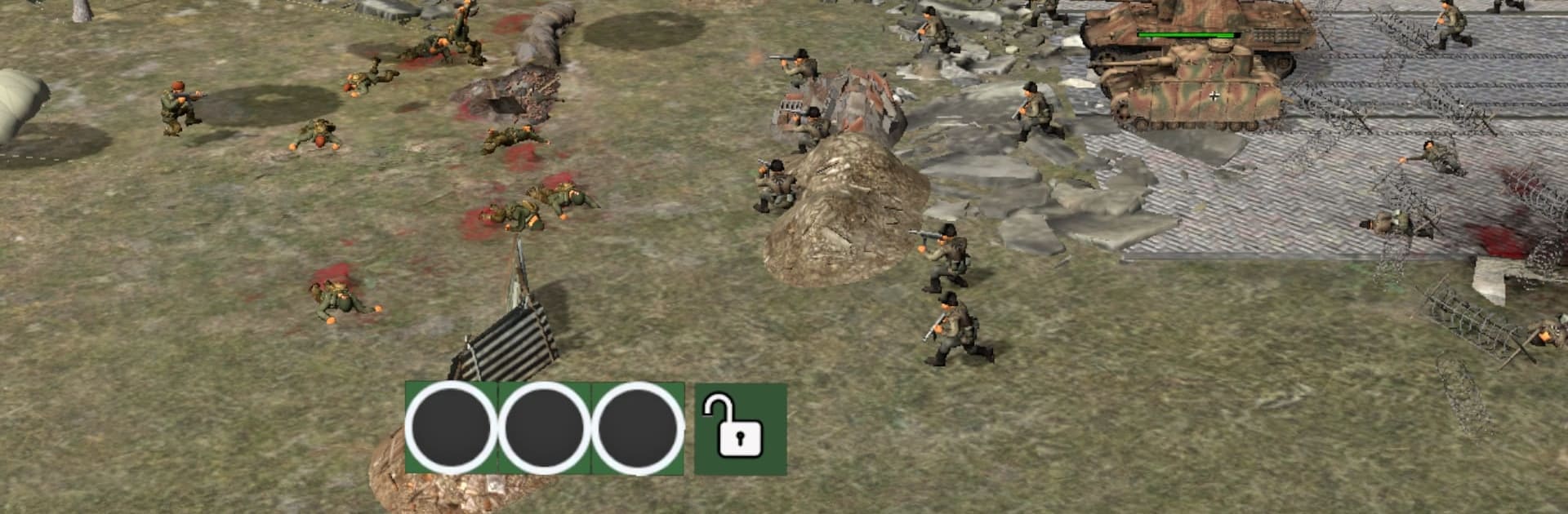
Think of a tug-of-war set in the Pacific front. Trench Warfare WW2 Strategy drops the player into U.S. Army command and turns every push across no-man’s land into a small puzzle. Infantry move fast but drop quick without support, machine gunners lock lanes and chew through charges, and tanks crawl forward like stubborn bulldozers that break a stalemate when they finally arrive. It is all about timing and spacing. Grab a trench, hold it long enough to regroup, then risk the next step while the enemy tries to swarm the gap. Maps feel like island outposts and beach lines, with that muddy, sandbag look that makes each trench feel earned. Sound design is punchy enough to stress the small choices, so a bad call is heard as much as it is seen.

The flow is snappy. Units deploy with clear roles, there is no clutter, and the goals are obvious: take positions, keep them, press on. It is strategy without a textbook, closer to battlefield chess than a huge sim, which makes it easy to binge a few battles back to back. On PC with BlueStacks, clicking to place squads and hopping trench to trench feels clean, and the wider screen helps track both flanks without panning like crazy. Players who enjoy planning a push, digging in under pressure, and winning by smart unit mixes will get hooked alittle fast.

Make your gaming sessions memorable with precise controls that give you an edge in close combats and visuals that pop up, bringing every character to life.


Game Features

Enhancements

  • Macros
  • Multi Instance
  • Multi Instance Sync
  • Eco Mode
  • Enhancements
Macros

Macros

Skip the boring parts of a game. Play Trench Warfare WW2 Strategy with Macros and get the edge. Simply record a sequence of commands and execute them at any moment.
Multi Instance

Multi Instance

Why limit to one game on your phone when you can play many on your PC? Open multiple instances of Trench Warfare WW2 Strategy at once with Multi-Instance. Leverage the power of different accounts by doing more.
Multi Instance Sync

Multi Instance Sync

Get the best out of Trench Warfare WW2 Strategy with Multi-Instance Sync. Play the game from different accounts and build your own empire. Use Multi-instance sync to repeat the action in the main BlueStacks instance on all other instances.
Eco Mode

Eco Mode

Find the rarest heroes by making multiple summons in Trench Warfare WW2 Strategy. And while you are at it, reduce your PC’s resource consumption with the Eco Mode. Farm efficiently. Get the best results.
Read More

How to Download and Play Trench Warfare WW2 Strategy on PC or Mac

  • Download and install BlueStacks on your PC or Mac

  • Complete Google sign-in to access the Play Store, or do it later

  • Look for Trench Warfare WW2 Strategy in the search bar at the top right corner

  • Click to install Trench Warfare WW2 Strategy from the search results

  • Complete Google sign-in (if you skipped step 2) to install Trench Warfare WW2 Strategy

  • Click the Trench Warfare WW2 Strategy icon on the home screen to start playing

video
Watch Video

Minimum System Requirements

With BlueStacks 5, you can get started on a PC that fulfills the following requirements.

  • Operating System

    Microsoft Windows 7 or above, macOS 11 (Big Sur) or above

  • Processor

    Intel, AMD or Apple Silicon Processor

  • RAM

    at least 4GB

  • HDD

    10GB Free Disk Space

Note:

* You must be an Administrator on your PC. Up to date graphics drivers from Microsoft or the chipset vendor.

Trench Warfare WW2 Strategy - FAQs

  • How to play Trench Warfare WW2 Strategy on Windows PC & Mac?

    Play Trench Warfare WW2 Strategy on your PC or Mac by following these simple steps.

    • Click on 'Play Trench Warfare WW2 Strategy on PC’ to download BlueStacks
    • Install it and log-in to Google Play Store
    • Launch and play the game.
  • Why is BlueStacks the fastest and safest platform to play games on PC?

    BlueStacks respects your privacy and is always safe and secure to use. It does not carry any malware, spyware, or any sort of additional software that could harm your PC.

    It is engineered to optimize speed and performance for a seamless gaming experience.

  • What are Trench Warfare WW2 Strategy PC requirements?

    Minimum requirement to run Trench Warfare WW2 Strategy on your PC

    • OS: Microsoft Windows 7 or above MacOS 11 (Big Sur) or above
    • Processor: Intel, AMD or Apple Silicon Processor
    • RAM: Your PC must have at least 4GB of RAM. (Note that having 4GB or more disk space is not a substitute for RAM)
    • HDD: 10GB Free Disk Space.
    • You must be an Administrator on your PC.