Zombie Age 4: Last Survivor

Zombie Age 4: Last Survivor

Action

| RedAntz

Play on PC with BlueStacks or from our cloud

  • Overview
  • Game Features
  • How to Play

Page Modified On: January 02, 2026

Play Zombie Age 4: Last Survivor on PC or Mac

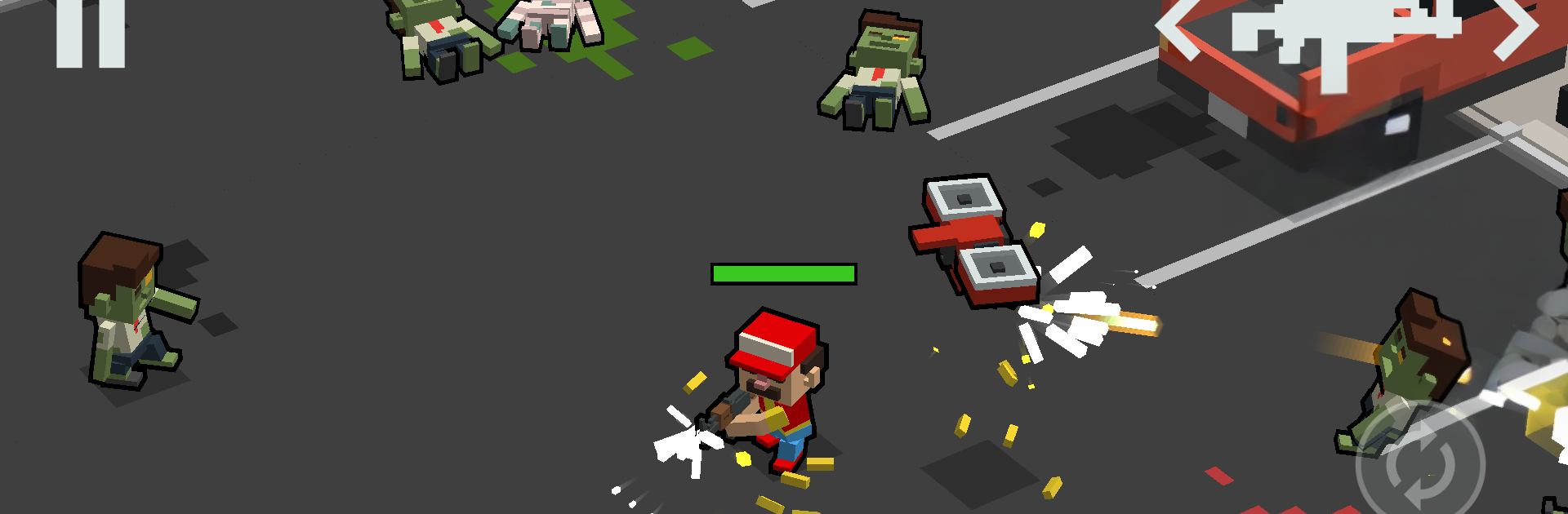
From the innovators and creators at RedAntz, Zombie Age 4: Last Survivor is another fun addition to the World of Action games. Go beyond your mobile screen and play it bigger and better on your PC or Mac. An immersive experience awaits you.

Zombie Age 4: Last Survivor is a fast, side-scrolling shooter where the screen fills with the loud kind of chaos that feels good to clear. It keeps things simple, move, aim, and unload on anything staggering toward the character. Missions are short and punchy, some ask for holding a spot, others have a timer, or a boss to hunt, so it never drags. The fun sits in swapping between a stack of weapons, shotguns that chunk crowds, a chainsaw for messy close work, rockets for big groups, plus throwables and gear that tweak damage or survivability. There are different zombie types to read and react to, sprinters that rush, spitters that force movement, exploders that punish clumping, and those big shielded brutes that need spacing. Bosses hit hard and turn it into a little dance of dodging and burst windows.

It is arcade at heart, more about feel than story, with plenty of unlocks to chase and gear to upgrade. The art is exaggerated and goofy, so even when it gets gory it stays light. Controls are tight, and on PC with BlueStacks the mouse aim and keyboard movement make kiting lines of enemies and landing headshots smoother than tapping on a screen. It plays well in short sessions, just a few minutes of mayhem, then another mission, then another, until the weapon list starts looking tempting again.

Get ready for a buttery smooth, high-performance gaming action only on BlueStacks.

Game Features

Enhancements

  • Macros
  • Multi Instance
  • Multi Instance Sync
  • Eco Mode
  • Enhancements
Macros

Macros

Skip the boring parts of a game. Play Zombie Age 4: Last Survivor with Macros and get the edge. Simply record a sequence of commands and execute them at any moment.
Multi Instance

Multi Instance

Why limit to one game on your phone when you can play many on your PC? Open multiple instances of Zombie Age 4: Last Survivor at once with Multi-Instance. Leverage the power of different accounts by doing more.
Multi Instance Sync

Multi Instance Sync

Get the best out of Zombie Age 4: Last Survivor with Multi-Instance Sync. Play the game from different accounts and build your own empire. Use Multi-instance sync to repeat the action in the main BlueStacks instance on all other instances.
Eco Mode

Eco Mode

Find the rarest heroes by making multiple summons in Zombie Age 4: Last Survivor. And while you are at it, reduce your PC’s resource consumption with the Eco Mode. Farm efficiently. Get the best results.
Read More

How to Download and Play Zombie Age 4: Last Survivor on PC or Mac

  • Download and install BlueStacks on your PC or Mac

  • Complete Google sign-in to access the Play Store, or do it later

  • Look for Zombie Age 4: Last Survivor in the search bar at the top right corner

  • Click to install Zombie Age 4: Last Survivor from the search results

  • Complete Google sign-in (if you skipped step 2) to install Zombie Age 4: Last Survivor

  • Click the Zombie Age 4: Last Survivor icon on the home screen to start playing

video
Watch Video

Minimum System Requirements

With BlueStacks 5, you can get started on a PC that fulfills the following requirements.

  • Operating System

    Microsoft Windows 7 or above, macOS 11 (Big Sur) or above

  • Processor

    Intel, AMD or Apple Silicon Processor

  • RAM

    at least 4GB

  • HDD

    10GB Free Disk Space

Note:

* You must be an Administrator on your PC. Up to date graphics drivers from Microsoft or the chipset vendor.

Zombie Age 4: Last Survivor - FAQs

  • How to play Zombie Age 4: Last Survivor on Windows PC & Mac?

    Play Zombie Age 4: Last Survivor on your PC or Mac by following these simple steps.

    • Click on 'Play Zombie Age 4: Last Survivor on PC’ to download BlueStacks
    • Install it and log-in to Google Play Store
    • Launch and play the game.
  • Why is BlueStacks the fastest and safest platform to play games on PC?

    BlueStacks respects your privacy and is always safe and secure to use. It does not carry any malware, spyware, or any sort of additional software that could harm your PC.

    It is engineered to optimize speed and performance for a seamless gaming experience.

  • What are Zombie Age 4: Last Survivor PC requirements?

    Minimum requirement to run Zombie Age 4: Last Survivor on your PC

    • OS: Microsoft Windows 7 or above MacOS 11 (Big Sur) or above
    • Processor: Intel, AMD or Apple Silicon Processor
    • RAM: Your PC must have at least 4GB of RAM. (Note that having 4GB or more disk space is not a substitute for RAM)
    • HDD: 10GB Free Disk Space.
    • You must be an Administrator on your PC.