Zombie Kill : 28 Days Later

Zombie Kill : 28 Days Later

Action

| Clegames Inc

Play on PC with BlueStacks or from our cloud

  • Overview
  • Game Features
  • How to Play

Page Modified On: December 15, 2025

Play Zombie Kill : 28 Days Later on PC or Mac

Step into the World of Zombie Kill : 28 Days Later, a thrilling Action game from the house of Clegames Inc. Play this Android game on BlueStacks App Player and experience immersive gaming on PC or Mac.

About the Game

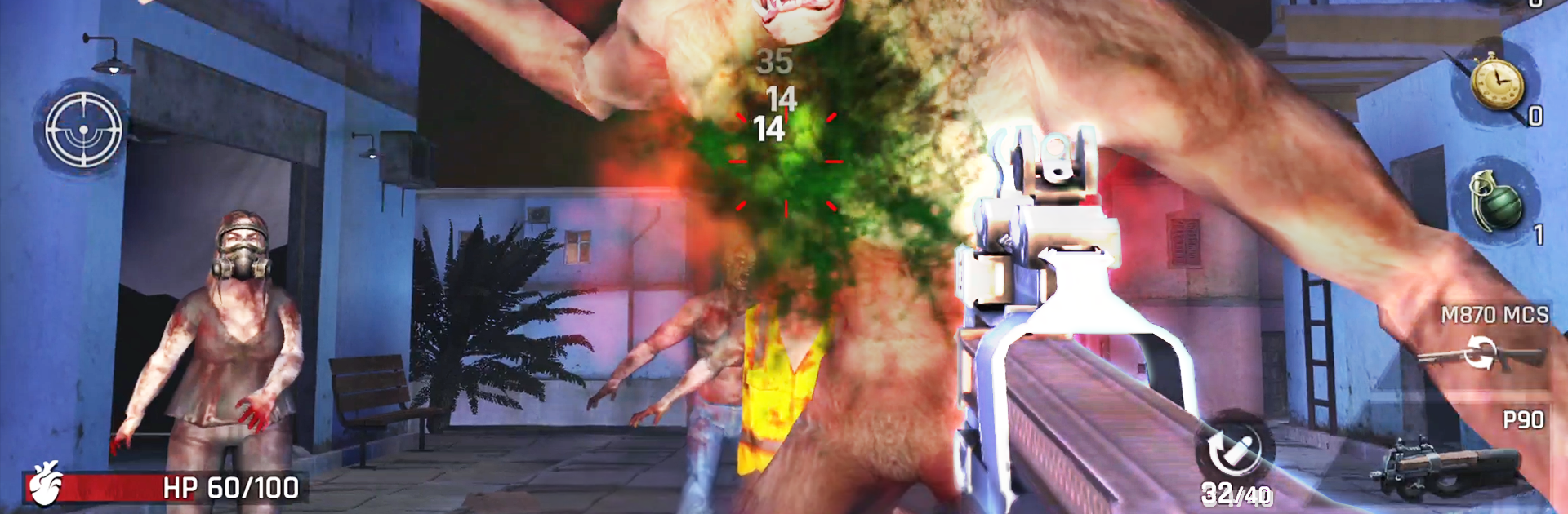
Zombie Kill : 28 Days Later throws you into a city that’s gone to hell and asks a simple question: how long can you last? It’s a gritty Action shooter where every shot matters, every upgrade counts, and every stage pushes you a little harder. Build the right loadout, protect the people you care about, and keep the undead at bay—one headshot at a time. Prefer playing on PC? It runs great with BlueStacks if you want crisp visuals and steady aim.

Game Features

  • Tactical Survival
  • Pick smart weapon combos and adapt to changing enemy types. Fast runners, armored brutes, huge boss monsters—each stage keeps you guessing.

  • Realistic Firearms

  • A deep armory of classic guns with punchy sound and feel. Go for clean sniper lines or mow through hordes with heavier firepower.

  • Collect, Merge, Upgrade

  • Unlock new weapons, merge duplicates to boost their power, and upgrade your favorites to squeeze out more damage and better handling.

  • Multiple Modes

  • Push through Stage missions, hold the line in Defense, and test your skills in PVP skirmishes for quick, high-pressure matchups.

  • Rescue Missions

  • It’s not just about kills. Break through swarms, secure zones, and get survivors out alive.

  • Endless Stages and Boss Fights

  • Keep climbing through increasingly brutal levels packed with different zombie behaviors and giant bosses.

  • Offline Friendly

  • Play anywhere without a connection, with smooth performance even on slower devices.

  • Broad Language Support

  • Jump in with support for many languages, so it’s easy to play wherever you are.

  • From Clegames Inc

  • A focused Action experience built for quick sessions or long runs when you’ve got time to spare.

Start your journey now. Download the game on BlueStacks, invite your friends, and march on a new adventure.


Game Features

Enhancements

  • Macros
  • Multi Instance
  • Multi Instance Sync
  • Eco Mode
  • Enhancements
Macros

Macros

Skip the boring parts of a game. Play Zombie Kill : 28 Days Later with Macros and get the edge. Simply record a sequence of commands and execute them at any moment.
Multi Instance

Multi Instance

Why limit to one game on your phone when you can play many on your PC? Open multiple instances of Zombie Kill : 28 Days Later at once with Multi-Instance. Leverage the power of different accounts by doing more.
Multi Instance Sync

Multi Instance Sync

Get the best out of Zombie Kill : 28 Days Later with Multi-Instance Sync. Play the game from different accounts and build your own empire. Use Multi-instance sync to repeat the action in the main BlueStacks instance on all other instances.
Eco Mode

Eco Mode

Find the rarest heroes by making multiple summons in Zombie Kill : 28 Days Later. And while you are at it, reduce your PC’s resource consumption with the Eco Mode. Farm efficiently. Get the best results.
Read More

How to Download and Play Zombie Kill : 28 Days Later on PC or Mac

  • Download and install BlueStacks on your PC or Mac

  • Complete Google sign-in to access the Play Store, or do it later

  • Look for Zombie Kill : 28 Days Later in the search bar at the top right corner

  • Click to install Zombie Kill : 28 Days Later from the search results

  • Complete Google sign-in (if you skipped step 2) to install Zombie Kill : 28 Days Later

  • Click the Zombie Kill : 28 Days Later icon on the home screen to start playing

video
Watch Video

Minimum System Requirements

With BlueStacks 5, you can get started on a PC that fulfills the following requirements.

  • Operating System

    Microsoft Windows 7 or above, macOS 11 (Big Sur) or above

  • Processor

    Intel, AMD or Apple Silicon Processor

  • RAM

    at least 4GB

  • HDD

    10GB Free Disk Space

Note:

* You must be an Administrator on your PC. Up to date graphics drivers from Microsoft or the chipset vendor.

Zombie Kill : 28 Days Later - FAQs

  • How to play Zombie Kill : 28 Days Later on Windows PC & Mac?

    Play Zombie Kill : 28 Days Later on your PC or Mac by following these simple steps.

    • Click on 'Play Zombie Kill : 28 Days Later on PC’ to download BlueStacks
    • Install it and log-in to Google Play Store
    • Launch and play the game.
  • Why is BlueStacks the fastest and safest platform to play games on PC?

    BlueStacks respects your privacy and is always safe and secure to use. It does not carry any malware, spyware, or any sort of additional software that could harm your PC.

    It is engineered to optimize speed and performance for a seamless gaming experience.

  • What are Zombie Kill : 28 Days Later PC requirements?

    Minimum requirement to run Zombie Kill : 28 Days Later on your PC

    • OS: Microsoft Windows 7 or above MacOS 11 (Big Sur) or above
    • Processor: Intel, AMD or Apple Silicon Processor
    • RAM: Your PC must have at least 4GB of RAM. (Note that having 4GB or more disk space is not a substitute for RAM)
    • HDD: 10GB Free Disk Space.
    • You must be an Administrator on your PC.