Hungry Battle: Multiplayer PVP

Hungry Battle: Multiplayer PVP

Arcade

| SIA BFA

Play on PC with BlueStacks or from our cloud

  • Overview
  • Game Features
  • How to Play

Page Modified On: November 10, 2025

Play Hungry Battle: Multiplayer PVP on PC or Mac

From the innovators and creators at SIA BFA, Hungry Battle: Multiplayer PVP is another fun addition to the World of Arcade games. Go beyond your mobile screen and play it bigger and better on your PC or Mac. An immersive experience awaits you.

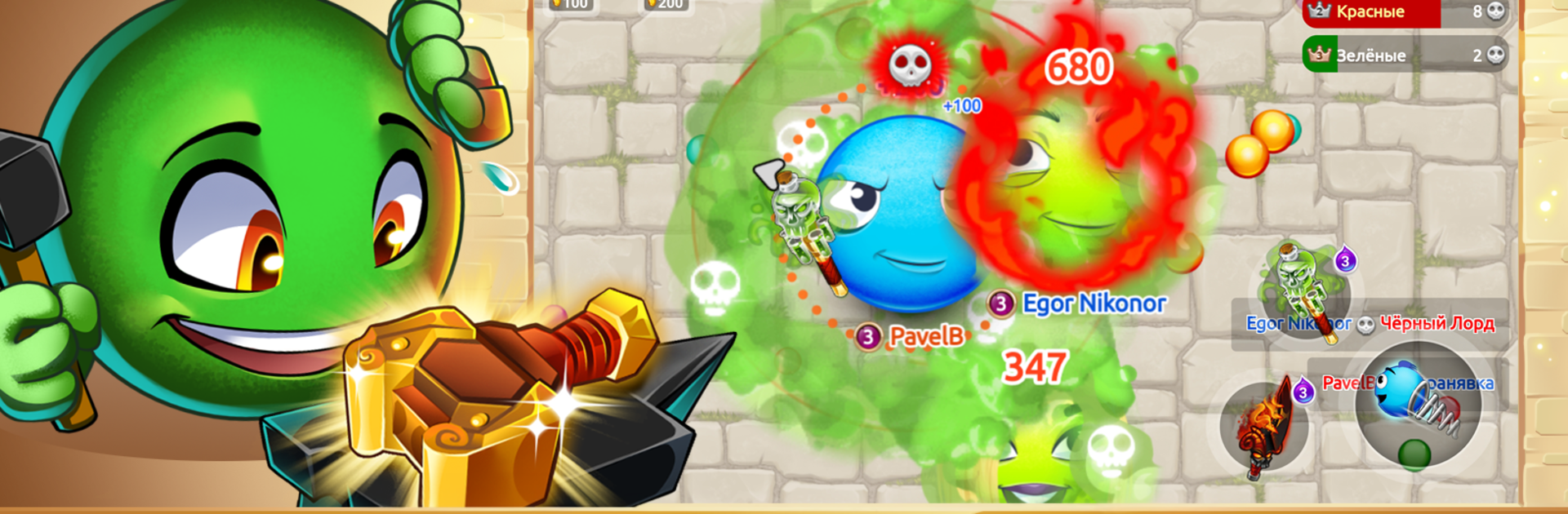
Hungry Battle is one of those blob arena games where everyone drops into a crowded map as a little dot, eats tiny pellets, then starts hunting other players once the size gets going. It feels quick and tense, because a single bad turn leaves the blob cornered and eaten. The neat trick is splitting into smaller pieces to trap opponents or escape, which adds a cat and mouse rhythm that keeps matches snappy. On PC with BlueStacks, the mouse movement feels precise, and setting a key for split or eject makes reactions faster. The bigger screen helps spot predators sneaking in from the edge, so fewer silly losses just because a thumb covered part of the view.

There is a league system that pushes players to climb through tiers for rewards, plus daily bonuses and a pile of achievements for the checklist crew. Customizing the blob is funny in a good way, with eyes, mouths, hair, even a beard, so it does not feel like a blank ball rolling around. The weapon system is the curveball here. More than 30 options, things like a fiery sword or a chunky bow, along with armor, and they actually change how fights feel, not just stats. Controls are responsive, rounds are short, and it suits both quick breaks and longer sessions if someone wants to grind a bit or team up in a clan. If the classic eat-and-grow PVP loop sounds fun, this keeps that spirit and adds some sharp toys to play with.

Slay your opponents with your epic moves. Play it your way on BlueStacks and dominate the battlefield.


Game Features

Enhancements

  • Macros
  • Multi Instance
  • Multi Instance Sync
  • Script
  • Enhancements
Macros

Macros

Automate the predictable in Hungry Battle: Multiplayer PVP and transform your gameplay with Macros. Get access to inventive Macros in the BlueStacks Macro Community
Multi Instance

Multi Instance

Play Hungry Battle: Multiplayer PVP on one window. And chat with your friend on the other. Press CTRL + Shift + 8 to open the Multi-Instance Manager. And start creating fresh instances or clone an existing one.
Multi Instance Sync

Multi Instance Sync

Play Hungry Battle: Multiplayer PVP with the power of Multi-Instance Sync. Replicate what you are doing on the main instance on all other instances. Level up faster, play more.
Script

Script

Script your way to gaming glory in Hungry Battle: Multiplayer PVP with BlueStacks Script. Write and run a set of commands to automate repeated tasks. Trigger the command by assigning it to any key.
Read More

How to Download and Play Hungry Battle: Multiplayer PVP on PC or Mac

  • Download and install BlueStacks on your PC or Mac

  • Complete Google sign-in to access the Play Store, or do it later

  • Look for Hungry Battle: Multiplayer PVP in the search bar at the top right corner

  • Click to install Hungry Battle: Multiplayer PVP from the search results

  • Complete Google sign-in (if you skipped step 2) to install Hungry Battle: Multiplayer PVP

  • Click the Hungry Battle: Multiplayer PVP icon on the home screen to start playing

video
Watch Video

Minimum System Requirements

With BlueStacks 5, you can get started on a PC that fulfills the following requirements.

  • Operating System

    Microsoft Windows 7 or above, macOS 11 (Big Sur) or above

  • Processor

    Intel, AMD or Apple Silicon Processor

  • RAM

    at least 4GB

  • HDD

    10GB Free Disk Space

Note:

* You must be an Administrator on your PC. Up to date graphics drivers from Microsoft or the chipset vendor.

Hungry Battle: Multiplayer PVP - FAQs

  • How to play Hungry Battle: Multiplayer PVP on Windows PC & Mac?

    Play Hungry Battle: Multiplayer PVP on your PC or Mac by following these simple steps.

    • Click on 'Play Hungry Battle: Multiplayer PVP on PC’ to download BlueStacks
    • Install it and log-in to Google Play Store
    • Launch and play the game.
  • Why is BlueStacks the fastest and safest platform to play games on PC?

    BlueStacks respects your privacy and is always safe and secure to use. It does not carry any malware, spyware, or any sort of additional software that could harm your PC.

    It is engineered to optimize speed and performance for a seamless gaming experience.

  • What are Hungry Battle: Multiplayer PVP PC requirements?

    Minimum requirement to run Hungry Battle: Multiplayer PVP on your PC

    • OS: Microsoft Windows 7 or above MacOS 11 (Big Sur) or above
    • Processor: Intel, AMD or Apple Silicon Processor
    • RAM: Your PC must have at least 4GB of RAM. (Note that having 4GB or more disk space is not a substitute for RAM)
    • HDD: 10GB Free Disk Space.
    • You must be an Administrator on your PC.