Redneck Mayhem
Redneck Mayhem

Redneck Mayhem

Casual

| Gamesoul Studio

Play on PC with BlueStacks or from our cloud

  • Overview
  • Game Features
  • How to Play

Page Modified On: August 04, 2026

Play Redneck Mayhem on PC or Mac

Redneck Mayhem by Gamesoul Studio has plenty to keep you busy. BlueStacks lets you play it on PC or Mac with more screen space, better control, and fewer mobile limits.

About the Game

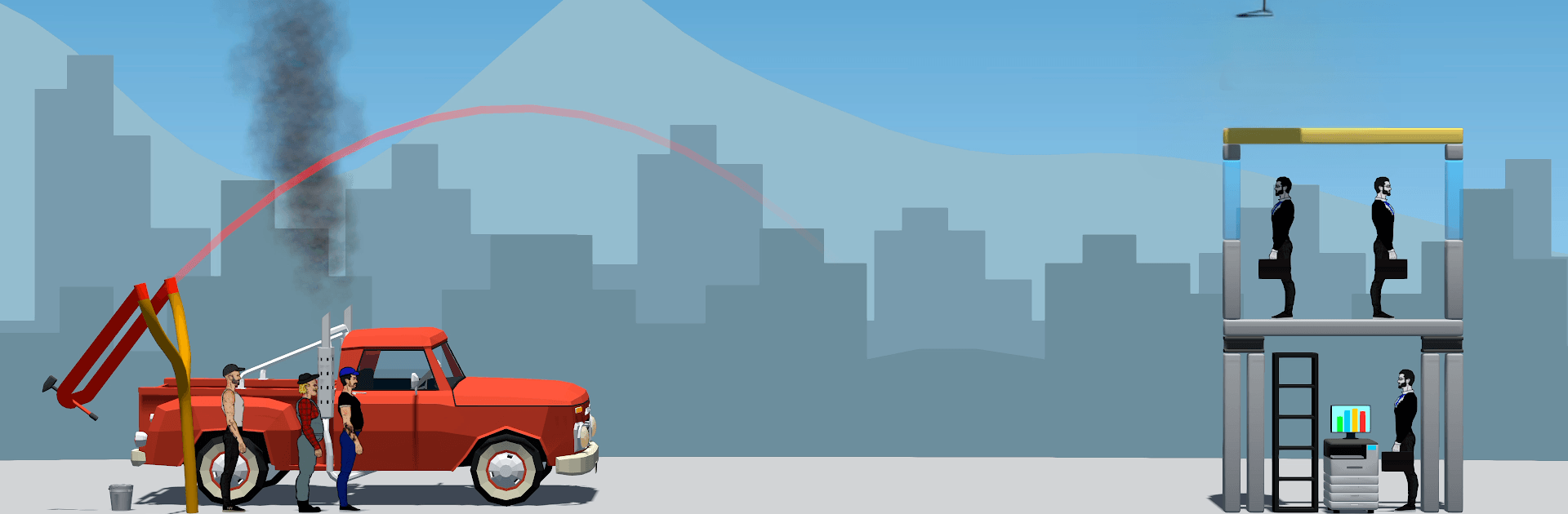
Redneck Mayhem is a Casual, physics-fling riot where small-town stubbornness meets modern-day nonsense. You’ll be lobbing scrap across rickety setups, cracking supports just right, and, when push comes to shove, turning the heroes into human projectiles. It’s goofy, messy, and surprisingly strategic—great on mobile or on PC with BlueStacks if you want the chaos on a bigger screen.

Game Features

  • Slingshot Physics: Pull back, set your angle, and send junk flying. Nail weak points to start glorious chain reactions and watch entire structures buckle.
  • Three Rowdy Leads: Hank the grease-stained mechanic, Earl the no-nonsense farmer, and Tucker, the wildcard who lives for a good crash. Different personalities, same mission: absolute mayhem.
  • Junkyard Arsenal: Hurl hammers, heavy wheels, wooden crates, and the occasional explosive barrel. Pick the right payload for the build you’re trying to bring down.
  • Human Cannonball Moments: Out of ammo? Launch the boys themselves for a last-ditch smash that turns a near-miss into a clean sweep.
  • Targets You Love to Topple: From shady bankers and slippery politicians to smug baristas, trend-chasing barbers, and “whoops-sorry” delivery folks—line ’em up and send ’em packing.
  • Destructible Setups: Each stage plays like a puzzle made of beams, braces, and pressure points. Hit the sweet spot, and the whole thing collapses in beautiful slow disaster.
  • Quick, Snackable Play: Short rounds, instant action, and that “one more shot” itch—perfect for quick breaks or a late-night fling-fest.

BlueStacks gives you more room to focus on the game and less time adjusting around mobile limitations.


Game Features

Enhancements

  • Macros
  • Multi Instance
  • Script
  • Repeated Tap
  • Enhancements
Macros

Macros

Automate the predictable in Redneck Mayhem and transform your gameplay with Macros. Get access to inventive Macros in the BlueStacks Macro Community
Multi Instance

Multi Instance

Play Redneck Mayhem on one window. And chat with your friend on the other. Press CTRL + Shift + 8 to open the Multi-Instance Manager. And start creating fresh instances or clone an existing one.
Script

Script

Script your way to gaming glory in Redneck Mayhem with BlueStacks Script. Write and run a set of commands to automate repeated tasks. Trigger the command by assigning it to any key.
Repeated Tap

Repeated Tap

BlueStacks lets you master Redneck Mayhem with useful features like the Repeated Tap. Now you do not have to press the same key repeatedly to initiate an action. Just assign it to one key and you are good to go.
Read More

How to Download and Play Redneck Mayhem on PC or Mac

  • Download and install BlueStacks on your PC or Mac

  • Complete Google sign-in to access the Play Store, or do it later

  • Look for Redneck Mayhem in the search bar at the top right corner

  • Click to install Redneck Mayhem from the search results

  • Complete Google sign-in (if you skipped step 2) to install Redneck Mayhem

  • Click the Redneck Mayhem icon on the home screen to start playing

video
Watch Video

Minimum System Requirements

With BlueStacks 5, you can get started on a PC that fulfills the following requirements.

  • Operating System

    Microsoft Windows 7 or above, macOS 11 (Big Sur) or above

  • Processor

    Intel, AMD or Apple Silicon Processor

  • RAM

    at least 4GB

  • HDD

    10GB Free Disk Space

Note:

* You must be an Administrator on your PC. Up to date graphics drivers from Microsoft or the chipset vendor.

Redneck Mayhem - FAQs

  • How to play Redneck Mayhem on Windows PC & Mac?

    Play Redneck Mayhem on your PC or Mac by following these simple steps.

    • Click on 'Play Redneck Mayhem on PC’ to download BlueStacks
    • Install it and log-in to Google Play Store
    • Launch and play the game.
  • Why is BlueStacks the fastest and safest platform to play games on PC?

    BlueStacks respects your privacy and is always safe and secure to use. It does not carry any malware, spyware, or any sort of additional software that could harm your PC.

    It is engineered to optimize speed and performance for a seamless gaming experience.

  • What are Redneck Mayhem PC requirements?

    Minimum requirement to run Redneck Mayhem on your PC

    • OS: Microsoft Windows 7 or above MacOS 11 (Big Sur) or above
    • Processor: Intel, AMD or Apple Silicon Processor
    • RAM: Your PC must have at least 4GB of RAM. (Note that having 4GB or more disk space is not a substitute for RAM)
    • HDD: 10GB Free Disk Space.
    • You must be an Administrator on your PC.