




Why limit yourself to your small screen on the phone? Run Astrolapp Live Planets and Sky Map, an app by Ecliptical Apps, best experienced on your PC or Mac with BlueStacks, the world’s #1 Android emulator.
About the App
Ever looked up and wondered exactly what you’re seeing in the night sky? Astrolapp Live Planets and Sky Map from Ecliptical Apps turns your phone into a handheld planetarium, letting you explore stars, planets, and constellations with just a slight tilt or tap. Whether you’re spotting Saturn on a clear night or curious about how the Moon’s phase is changing, this app brings the cosmos to your fingertips with a setup that’s both accurate and easy to use.
App Features
-
Live Sky Tracking
Point your device up and watch as Astrolapp Live Planets and Sky Map responds in real time, highlighting what’s above you—planets, stars, and even full constellations. If your phone’s got a built-in compass, live mode feels almost like a window into the universe. -
Instant Star and Planet Finder
Want to know where Mars is? Just use the search function—an arrow guides you right to it in the sky, so you’ll never get lost among the stars. -
Celestial Path Visualization
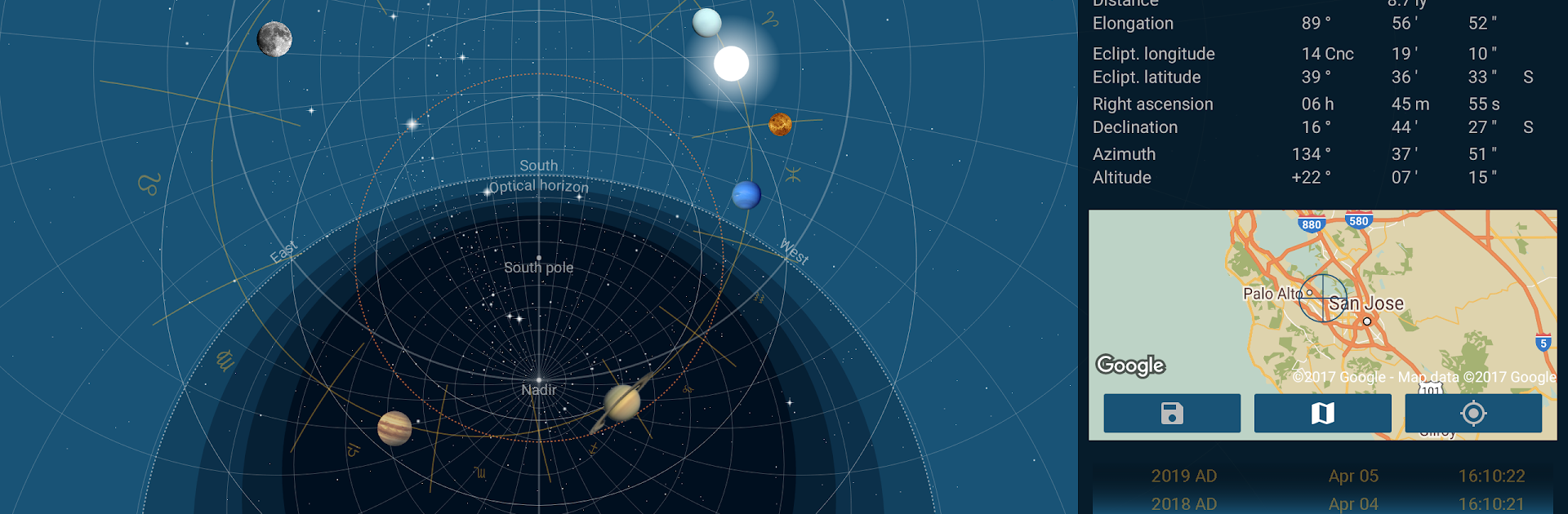
Tap on any star or planet to trace its journey across the sky. You’ll see rise and set times right down to the minute, plus a neat side panel with detailed coordinates if you’re craving more data. -
Time Travel for Stargazers
Jump forward or back in time to see how the sky changes—check out planetary positions from centuries past or glimpse what’s up there months from now, all in a few swipes. -
Global Sky Views
Automatically finds where you are and shows you the sky as you see it. Or pick any spot on Earth with the map feature and see how the sky looks from a different hemisphere. -
Two Interactive Modes
Switch between Live Mode for real-world views and Star-Map Mode for an old-school, astronomical clock style. No compass? No problem—Star-Map Mode gives you the same great info, mapping the sky with visuals inspired by medieval star charts. -
Loads of Astronomical Data
Displays over 9000 of the brightest stars, plus all 88 constellations recognized by the IAU. You’ll get info on planetary phases, when objects rise or transit, and even specialized things like sidereal time. -
True Color Star Display and Night Mode
Stars appear with colors that match their real-life look. And if you’re out under dark skies, flip on night mode for an eye-friendly red-and-black view. -
No Distractions
No ads, no annoying sounds—just you and the sky. Works seamlessly alongside tools like BlueStacks if you prefer exploring from your desktop.
Interested in astronomy or just love a good skywatching session? Astrolapp Live Planets and Sky Map mixes reliable data with an interface that feels refreshingly straightforward—giving both beginners and seasoned sky fans plenty to see.
Big screen. Bigger performance. Use BlueStacks on your PC or Mac to run your favorite apps.





