
English Verb Conjugator

English Verb Conjugator

Education

| Ian Tipton

Play on PC with BlueStacks or from our cloud

  • Overview
  • How to Download

Page Modified On: December 15, 2025

Run English Verb Conjugator on PC or Mac

Upgrade your experience. Try English Verb Conjugator, the fantastic Education app from Ian Tipton, from the comfort of your laptop, PC, or Mac, only on BlueStacks.

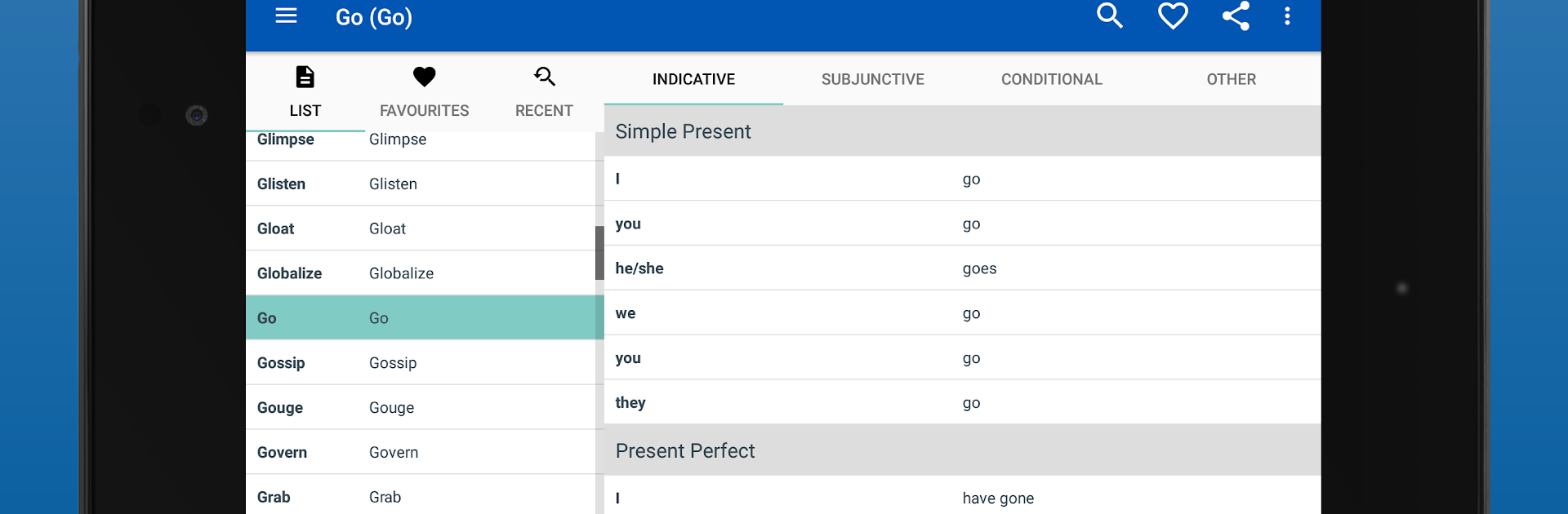
English Verb Conjugator is basically a super fast reference for verbs, not a course, and that is what makes it useful. There are almost two thousand verbs in here, each laid out across a bunch of tenses, so a person can jump from present to past perfect without hunting around. The layout is plain and clear. Type a few letters in the search and the verb shows up right away. On a PC with BlueStacks, the bigger screen makes those tables easier to read, and typing to search feels quick. It is the kind of tool someone keeps open while writing an email or doing homework.

The neat extra is audio. There is a little speaker next to the conjugations, and tapping it reads the word out loud, which helps when a verb looks simple but the pronunciation is sneaky. Audio needs an internet connection, so if the Wi Fi drops, the sound will not play, but the tables still load fine. Favorites are there for verbs that keep coming up, and a recent list quietly remembers what was checked last. Copying a full set of forms takes a second, and sending it into notes, an email, or a text message is painless. It does not try to be flashy or teach rules. It just gets a person to the right form, quickly, and gets out of the way.

Ready to experience English Verb Conjugator on a bigger screen, in all its glory? Download BlueStacks now.


How to Download and Run English Verb Conjugator on PC or Mac

  • Download and install BlueStacks on your PC or Mac

  • Complete Google sign-in to access the Play Store, or do it later

  • Look for English Verb Conjugator in the search bar at the top right corner

  • Click to install English Verb Conjugator from the search results

  • Complete Google sign-in (if you skipped step 2) to install English Verb Conjugator

  • Click the English Verb Conjugator icon on the home screen to start playing

video
Watch Video

Minimum System Requirements

With BlueStacks 5, you can get started on a PC that fulfills the following requirements.

  • Operating System

    Microsoft Windows 7 or above, macOS 11 (Big Sur) or above

  • Processor

    Intel, AMD or Apple Silicon Processor

  • RAM

    at least 4GB

  • HDD

    10GB Free Disk Space

Note:

* You must be an Administrator on your PC. Up to date graphics drivers from Microsoft or the chipset vendor.

English Verb Conjugator - FAQs

  • How to Run English Verb Conjugator on Windows PC & Mac?

    Run English Verb Conjugator on your PC or Mac by following these simple steps.

    • Click on ‘Download English Verb Conjugator on PC’ to download BlueStacks
    • Install it and log-in to Google Play Store
    • Launch and run the app.
  • Why is BlueStacks the fastest and safest platform to play games on PC?

    BlueStacks respects your privacy and is always safe and secure to use. It does not carry any malware, spyware, or any sort of additional software that could harm your PC.

    It is engineered to optimize speed and performance for a seamless gaming experience.

  • What are English Verb Conjugator PC requirements?

    Minimum requirement to run English Verb Conjugator on your PC

    • OS: Microsoft Windows 7 and above:
    • Processor: Intel or AMD Processor:
    • RAM: Your PC must have at least 2GB of RAM. (Note that having 2GB or more disk space is not a substitute for RAM):
    • HDD: 5GB Free Disk Space.
    • You must be an Administrator on your PC.



