
Heavens-Above Pro
Heavens-Above Pro

Heavens-Above Pro

Education

| Heavens-Above

Play on PC with BlueStacks or from our cloud

  • Overview
  • How to Download

Page Modified On: August 29, 2025

Run Heavens-Above Pro on PC or Mac

Upgrade your experience. Try Heavens-Above Pro, the fantastic Education app from Heavens-Above, from the comfort of your laptop, PC, or Mac, only on BlueStacks.

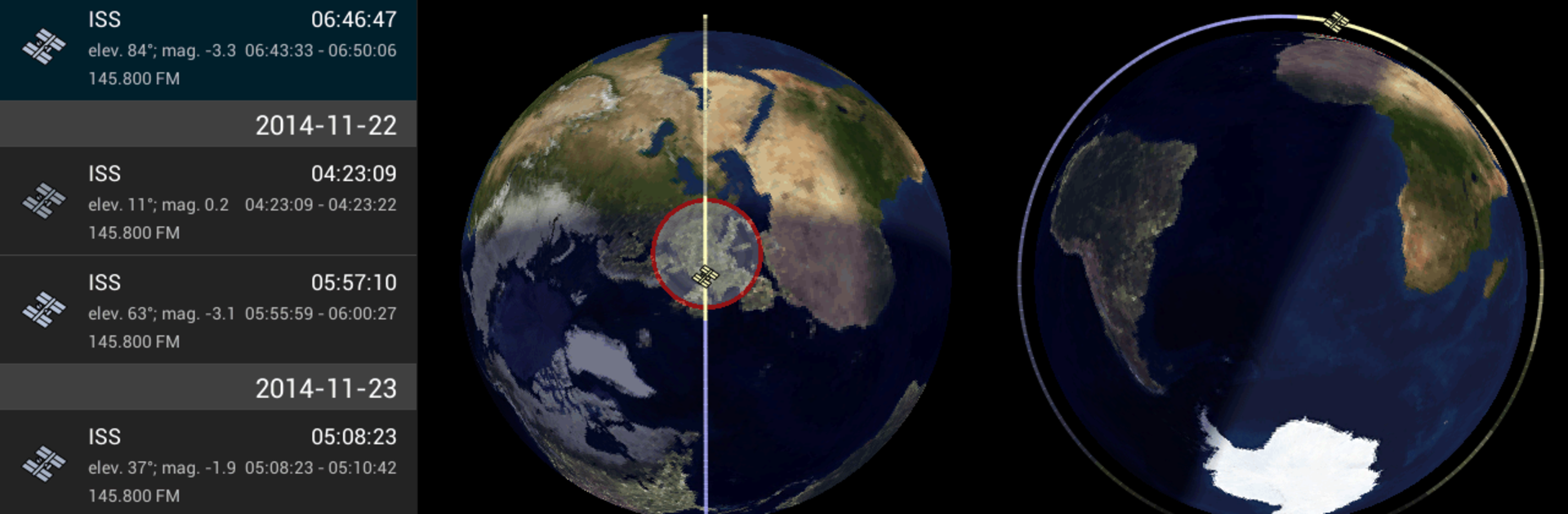
Heavens-Above Pro feels like a calm, nerdy friend who knows exactly what is flying over the backyard and when. It opens to a live sky map that shows what is overhead right now or at any time someone picks, and the chart is clear without being loud. The app calls out upcoming passes for the ISS and other bright satellites, tells which way to face, how high to look, and how long the pass will last. There is a section for amateur radio satellites too, with uplink and downlink info that is actually useful and not just fluff. Running it on a PC with BlueStacks is nice, the bigger screen makes the star labels and tracks easier to read, and the night mode with red on black does not kill night vision.

Everything is calculated on the device, so once the data is refreshed every few days it works fine even without a steady connection. There is a detailed orbit and ground track view for any satellite, plus a timeline that lets someone scrub forward and watch the path move across the sky and over the map. The tracker helps point the device at the right spot, and on a desktop it still makes sense, just pan the map instead of waving a phone around. Calendar integration is there, so those great passes end up with reminders instead of being missed. No ads, no clutter, more like a clean tool than a showy app. If catching the ISS or other satellites is the goal, this makes it simple without getting in the way.

Ready to experience Heavens-Above Pro on a bigger screen, in all its glory? Download BlueStacks now.


How to Download and Run Heavens-Above Pro on PC or Mac

  • Download and install BlueStacks on your PC or Mac

  • Complete Google sign-in to access the Play Store, or do it later

  • Look for Heavens-Above Pro in the search bar at the top right corner

  • Click to install Heavens-Above Pro from the search results

  • Complete Google sign-in (if you skipped step 2) to install Heavens-Above Pro

  • Click the Heavens-Above Pro icon on the home screen to start playing

video
Watch Video

Minimum System Requirements

With BlueStacks 5, you can get started on a PC that fulfills the following requirements.

  • Operating System

    Microsoft Windows 7 or above, macOS 11 (Big Sur) or above

  • Processor

    Intel, AMD or Apple Silicon Processor

  • RAM

    at least 4GB

  • HDD

    10GB Free Disk Space

Note:

* You must be an Administrator on your PC. Up to date graphics drivers from Microsoft or the chipset vendor.

Heavens-Above Pro - FAQs

  • How to Run Heavens-Above Pro on Windows PC & Mac?

    Run Heavens-Above Pro on your PC or Mac by following these simple steps.

    • Click on ‘Download Heavens-Above Pro on PC’ to download BlueStacks
    • Install it and log-in to Google Play Store
    • Launch and run the app.
  • Why is BlueStacks the fastest and safest platform to play games on PC?

    BlueStacks respects your privacy and is always safe and secure to use. It does not carry any malware, spyware, or any sort of additional software that could harm your PC.

    It is engineered to optimize speed and performance for a seamless gaming experience.

  • What are Heavens-Above Pro PC requirements?

    Minimum requirement to run Heavens-Above Pro on your PC

    • OS: Microsoft Windows 7 and above:
    • Processor: Intel or AMD Processor:
    • RAM: Your PC must have at least 2GB of RAM. (Note that having 2GB or more disk space is not a substitute for RAM):
    • HDD: 5GB Free Disk Space.
    • You must be an Administrator on your PC.



