
Tafseer al Jalalain - Urdu Translation and Tafseer

Tafseer al Jalalain - Urdu Translation and Tafseer

Education

| UsmanPervez

Play on PC with BlueStacks or from our cloud

  • Overview
  • How to Download

Page Modified On: August 25, 2025

Run Tafseer al Jalalain - Urdu Translation and Tafseer on PC or Mac

Multitask effortlessly on your PC or Mac as you try out Tafseer al Jalalain – Urdu Translation and Tafseer, a Education app by UsmanPervez on BlueStacks.

About the App

Tafseer al Jalalain – Urdu Translation and Tafseer is your handy companion for exploring one of the most respected classical interpretations of the Qur’an—with everything available right at your fingertips. Whether you’re deepening your understanding, looking for guidance, or just curious about what a certain verse means, this app makes it all a lot easier. Plus, if you like reading on a bigger screen every now and then, it works great with BlueStacks too.

App Features

  • Full Tafseer in Urdu
    Get the complete Tafseer al Jalalain text alongside a clear Urdu translation, so you can really grasp the meaning of every verse.

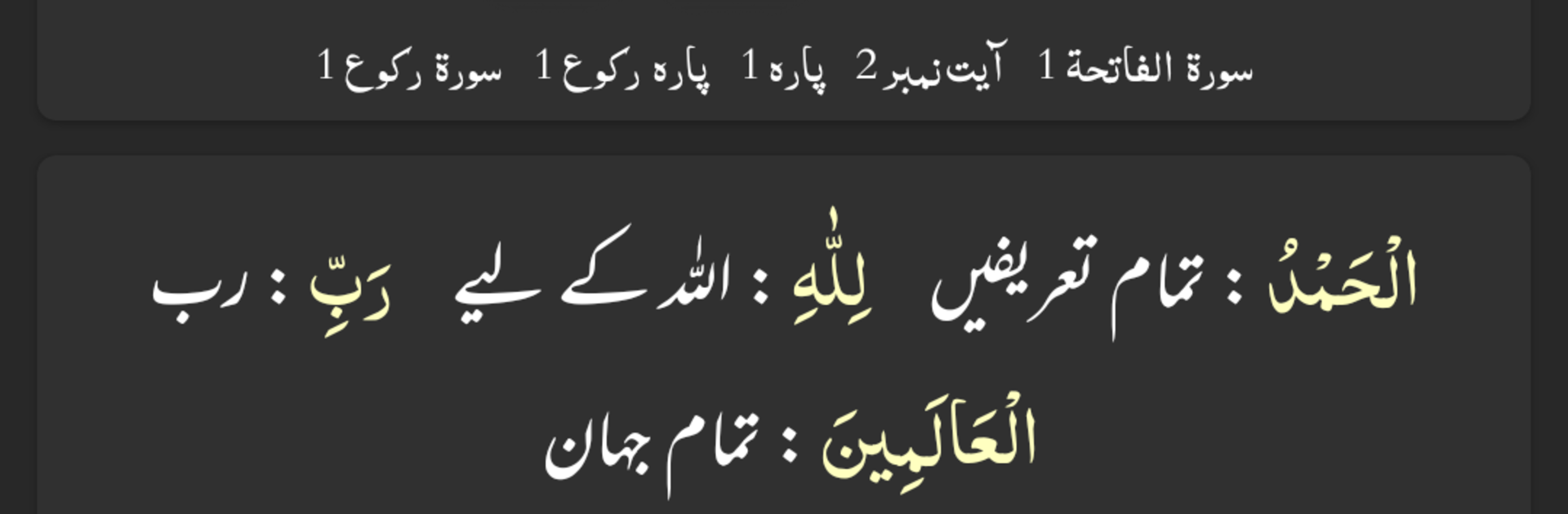
  • Word-by-Word Translation with Color Coding
    Not only can you read the translation, but you’ll also find each word clearly distinguished by color, making verse-by-verse study simpler.

  • Flexible Search Tools
    Looking for a specific passage or topic? The advanced search lets you jump right to the content you’re after—across the Qur’an, translation, and tafseer sections.

  • Modern, Customizable Look
    With options from Arabic and Urdu font choices to color themes, it’s easy to get everything just the way you like it, whether you prefer classic or dark modes for late-night reading.

  • Bookmark and Pick Up Where You Left Off
    Mark an unlimited number of ayat, so you can always return to your spot, and never lose your place no matter how many sessions you take.

  • Share with Family and Friends
    Send an ayah—or several—directly from the app, with translation and tafseer if you want, making it simple to share insights or questions.

  • Versatile Reading Modes
    Switch easily between Mushaf Mode (to recite with translation or tafseer), Translation Only Mode, or tweak your layout between list view and slider to fit your reading habits.

  • Quick Navigation
    Jump instantly to any ayah, ruku, ruku info, or para you need, without endless scrolling.

  • Personalize Your Experience
    From font size and color to visibility of word-by-word translation and tafseer, you control what’s on your screen.

  • Beautiful on Any Device
    Looks and works great, even if you’re reading on BlueStacks on your laptop or PC.

With Tafseer al Jalalain – Urdu Translation and Tafseer by UsmanPervez, studying and understanding the Qur’an in depth—right in Urdu—becomes simple and straightforward.

BlueStacks brings your apps to life on a bigger screen—seamless and straightforward.

How to Download and Run Tafseer al Jalalain - Urdu Translation and Tafseer on PC or Mac

  • Download and install BlueStacks on your PC or Mac

  • Complete Google sign-in to access the Play Store, or do it later

  • Look for Tafseer al Jalalain - Urdu Translation and Tafseer in the search bar at the top right corner

  • Click to install Tafseer al Jalalain - Urdu Translation and Tafseer from the search results

  • Complete Google sign-in (if you skipped step 2) to install Tafseer al Jalalain - Urdu Translation and Tafseer

  • Click the Tafseer al Jalalain - Urdu Translation and Tafseer icon on the home screen to start playing

video
Watch Video

Minimum System Requirements

With BlueStacks 5, you can get started on a PC that fulfills the following requirements.

  • Operating System

    Microsoft Windows 7 or above, macOS 11 (Big Sur) or above

  • Processor

    Intel, AMD or Apple Silicon Processor

  • RAM

    at least 4GB

  • HDD

    10GB Free Disk Space

Note:

* You must be an Administrator on your PC. Up to date graphics drivers from Microsoft or the chipset vendor.

Tafseer al Jalalain - Urdu Translation and Tafseer - FAQs

  • How to Run Tafseer al Jalalain - Urdu Translation and Tafseer on Windows PC & Mac?

    Run Tafseer al Jalalain - Urdu Translation and Tafseer on your PC or Mac by following these simple steps.

    • Click on ‘Download Tafseer al Jalalain - Urdu Translation and Tafseer on PC’ to download BlueStacks
    • Install it and log-in to Google Play Store
    • Launch and run the app.
  • Why is BlueStacks the fastest and safest platform to play games on PC?

    BlueStacks respects your privacy and is always safe and secure to use. It does not carry any malware, spyware, or any sort of additional software that could harm your PC.

    It is engineered to optimize speed and performance for a seamless gaming experience.

  • What are Tafseer al Jalalain - Urdu Translation and Tafseer PC requirements?

    Minimum requirement to run Tafseer al Jalalain - Urdu Translation and Tafseer on your PC

    • OS: Microsoft Windows 7 and above:
    • Processor: Intel or AMD Processor:
    • RAM: Your PC must have at least 2GB of RAM. (Note that having 2GB or more disk space is not a substitute for RAM):
    • HDD: 5GB Free Disk Space.
    • You must be an Administrator on your PC.




