Baby ABC in box! Kids alphabet games for toddlers!

Baby ABC in box! Kids alphabet games for toddlers!

Educational

| Bini Bambini

Play on PC with BlueStacks or from our cloud

  • Overview
  • Game Features
  • How to Play

Page Modified On: September 02, 2025

Play Baby ABC in box! Kids alphabet games for toddlers! on PC or Mac

Baby ABC in box! Kids alphabet games for toddlers! brings the Educational genre to life, and throws up exciting challenges for gamers. Developed by Bini Bambini, this Android game is best experienced on BlueStacks, the World’s #1 app player for PC and Mac users.

About the Game

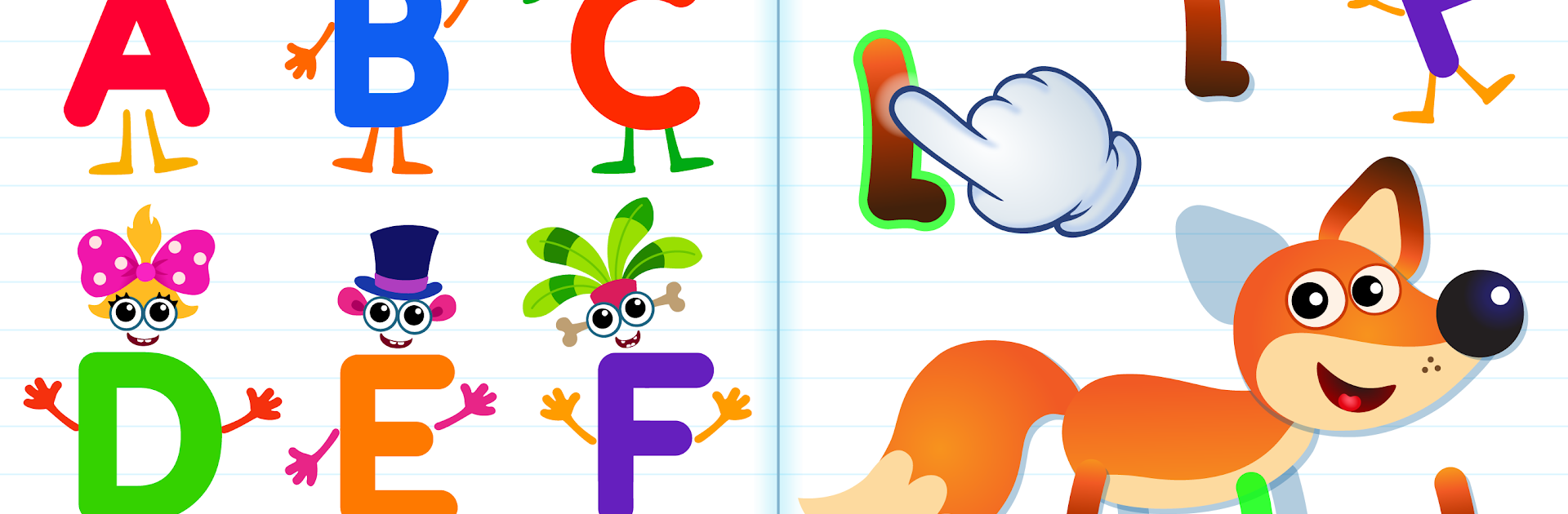
Baby ABC in box! Kids alphabet games for toddlers! turns early reading into a playful little adventure. Kids tap, catch, and sort lively letters, then build simple words that pop into charming mini-animations. It’s a warm, hands-on way to explore the alphabet, phonics, and first words—great for ages 2–5. This Educational title from Bini Bambini feels intuitive for little learners and relaxed for parents.

Game Features

  • Animated Letter Friends: Meet 26 cheerful letter characters that model letter names and sounds in a friendly, memorable way.
  • Build Words, Watch Them Move: Snap together puzzle pieces to form a word, then see the picture come alive with animation.
  • Two Ways to Learn: Switch between reading by letters or by syllables/sounds so your child can learn at a pace that fits.
  • 100+ Words and Puzzles: Explore more than 100 kid-ready words with matching puzzles to keep practice fresh and fun.
  • Phonics Made Playful: Clear letter–sound pairing and gentle prompts help kids blend sounds and read their first words.
  • Kid-Friendly Controls: Big buttons, simple gestures, and short interactions suit tiny hands and build fine motor skills.
  • Lively Audio Cues: Friendly voiceovers and silly effects hold attention and reinforce each step of the activity.
  • Preschool Skill Boost: Encourages focus, memory, imagination, and early literacy while keeping the mood light and playful.
  • Parent Controls: Ad-free experience with built-in parental settings; start with free content, unlock more via in-app purchase.
  • Big-Screen Option: Prefer co-playing on a computer? It runs smoothly on BlueStacks for an easy couch-learning setup.

Ready to top the leaderboard? We bet you do. Let precise controls and sharp visuals optimized on BlueStacks lead you to victory.


Game Features

Enhancements

  • Macros
  • Multi Instance
  • Multi Instance Sync
  • Script
  • Enhancements
Macros

Macros

Automate the predictable in Baby ABC in box! Kids alphabet games for toddlers! and transform your gameplay with Macros. Get access to inventive Macros in the BlueStacks Macro Community
Multi Instance

Multi Instance

Play Baby ABC in box! Kids alphabet games for toddlers! on one window. And chat with your friend on the other. Press CTRL + Shift + 8 to open the Multi-Instance Manager. And start creating fresh instances or clone an existing one.
Multi Instance Sync

Multi Instance Sync

Play Baby ABC in box! Kids alphabet games for toddlers! with the power of Multi-Instance Sync. Replicate what you are doing on the main instance on all other instances. Level up faster, play more.
Script

Script

Script your way to gaming glory in Baby ABC in box! Kids alphabet games for toddlers! with BlueStacks Script. Write and run a set of commands to automate repeated tasks. Trigger the command by assigning it to any key.
Read More

How to Download and Play Baby ABC in box! Kids alphabet games for toddlers! on PC or Mac

  • Download and install BlueStacks on your PC or Mac

  • Complete Google sign-in to access the Play Store, or do it later

  • Look for Baby ABC in box! Kids alphabet games for toddlers! in the search bar at the top right corner

  • Click to install Baby ABC in box! Kids alphabet games for toddlers! from the search results

  • Complete Google sign-in (if you skipped step 2) to install Baby ABC in box! Kids alphabet games for toddlers!

  • Click the Baby ABC in box! Kids alphabet games for toddlers! icon on the home screen to start playing

video
Watch Video

Minimum System Requirements

With BlueStacks 5, you can get started on a PC that fulfills the following requirements.

  • Operating System

    Microsoft Windows 7 or above, macOS 11 (Big Sur) or above

  • Processor

    Intel, AMD or Apple Silicon Processor

  • RAM

    at least 4GB

  • HDD

    10GB Free Disk Space

Note:

* You must be an Administrator on your PC. Up to date graphics drivers from Microsoft or the chipset vendor.

Baby ABC in box! Kids alphabet games for toddlers! - FAQs

  • How to play Baby ABC in box! Kids alphabet games for toddlers! on Windows PC & Mac?

    Play Baby ABC in box! Kids alphabet games for toddlers! on your PC or Mac by following these simple steps.

    • Click on 'Play Baby ABC in box! Kids alphabet games for toddlers! on PC’ to download BlueStacks
    • Install it and log-in to Google Play Store
    • Launch and play the game.
  • Why is BlueStacks the fastest and safest platform to play games on PC?

    BlueStacks respects your privacy and is always safe and secure to use. It does not carry any malware, spyware, or any sort of additional software that could harm your PC.

    It is engineered to optimize speed and performance for a seamless gaming experience.

  • What are Baby ABC in box! Kids alphabet games for toddlers! PC requirements?

    Minimum requirement to run Baby ABC in box! Kids alphabet games for toddlers! on your PC

    • OS: Microsoft Windows 7 or above MacOS 11 (Big Sur) or above
    • Processor: Intel, AMD or Apple Silicon Processor
    • RAM: Your PC must have at least 4GB of RAM. (Note that having 4GB or more disk space is not a substitute for RAM)
    • HDD: 10GB Free Disk Space.
    • You must be an Administrator on your PC.