
EIS-AR
EIS-AR

EIS-AR

Entertainment

| McDonald's Deutschland LLC

Play on PC with BlueStacks or from our cloud

  • Overview
  • How to Download

Page Modified On: October 13, 2025

Run EIS-AR on PC or Mac

Why limit yourself to your small screen on the phone? Run EIS-AR, an app by McDonald’s Deutschland LLC, best experienced on your PC or Mac with BlueStacks, the world’s #1 Android emulator.

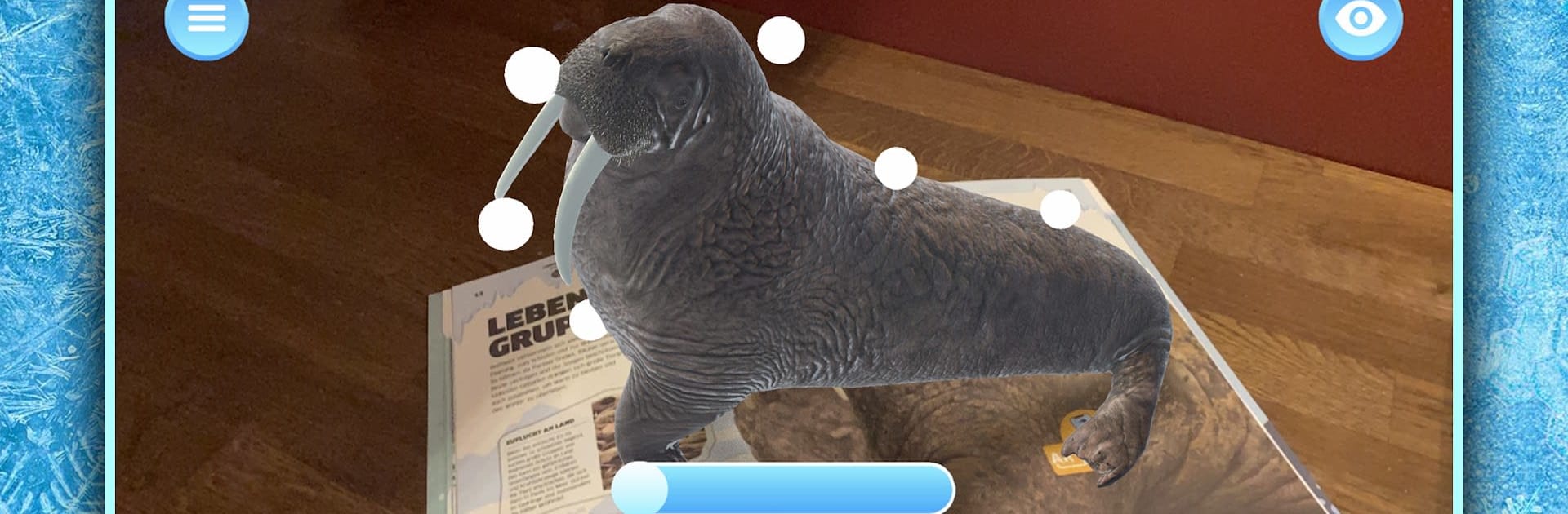
EIS-AR is basically a little AR companion for the book Ice – Survival in Extreme Worlds. It is not a standalone game, more like a way to make the pages come alive. Someone points a camera at the pages that have the orange AR+ icon with the penguin and suddenly there are 3D scenes on top of the paper. On PC with BlueStacks it works fine with a webcam, and the bigger screen makes the models easier to look at. Mouse clicks act like taps, and scrolling or trackpad gestures handle zoom and rotation well enough. The app expects sound to be on because some scenes use audio cues, so speakers up. There is a simple left menu to hop back to the main screen, restart an activity, or read quick tips about the mini games.

What stands out is how approachable it feels. There are buttons floating in the AR view you can tap, a slider on some models that flips between different states, like showing a scene before and after a change. It shows off cold regions of the world, animals, ice formations, that sort of thing, and it keeps things playful rather than textbook dry. Just note that it really needs the physical book, since those pages are the triggers. Good lighting helps the camera recognize the markers faster, and once it locks in, the models sit stable on the page. It is light on the device, loads quick, and feels like a neat way to explore a science book without fiddly controls getting in the way.

BlueStacks gives you the much-needed freedom to experience your favorite apps on a bigger screen. Get it now.


How to Download and Run EIS-AR on PC or Mac

  • Download and install BlueStacks on your PC or Mac

  • Complete Google sign-in to access the Play Store, or do it later

  • Look for EIS-AR in the search bar at the top right corner

  • Click to install EIS-AR from the search results

  • Complete Google sign-in (if you skipped step 2) to install EIS-AR

  • Click the EIS-AR icon on the home screen to start playing

video
Watch Video

Minimum System Requirements

With BlueStacks 5, you can get started on a PC that fulfills the following requirements.

  • Operating System

    Microsoft Windows 7 or above, macOS 11 (Big Sur) or above

  • Processor

    Intel, AMD or Apple Silicon Processor

  • RAM

    at least 4GB

  • HDD

    10GB Free Disk Space

Note:

* You must be an Administrator on your PC. Up to date graphics drivers from Microsoft or the chipset vendor.

EIS-AR - FAQs

  • How to Run EIS-AR on Windows PC & Mac?

    Run EIS-AR on your PC or Mac by following these simple steps.

    • Click on ‘Download EIS-AR on PC’ to download BlueStacks
    • Install it and log-in to Google Play Store
    • Launch and run the app.
  • Why is BlueStacks the fastest and safest platform to play games on PC?

    BlueStacks respects your privacy and is always safe and secure to use. It does not carry any malware, spyware, or any sort of additional software that could harm your PC.

    It is engineered to optimize speed and performance for a seamless gaming experience.

  • What are EIS-AR PC requirements?

    Minimum requirement to run EIS-AR on your PC

    • OS: Microsoft Windows 7 and above:
    • Processor: Intel or AMD Processor:
    • RAM: Your PC must have at least 2GB of RAM. (Note that having 2GB or more disk space is not a substitute for RAM):
    • HDD: 5GB Free Disk Space.
    • You must be an Administrator on your PC.



