
1970s Cassette Pack
1970s Cassette Pack

1970s Cassette Pack

Music & Audio

| Valentyn Vieshchunov

Play on PC with BlueStacks or from our cloud

  • Overview
  • How to Download

Page Modified On: November 03, 2025

Run 1970s Cassette Pack on PC or Mac

What’s better than using 1970s Cassette Pack by Valentyn Vieshchunov? Well, try it on a big screen, on your PC or Mac, with BlueStacks to see the difference.

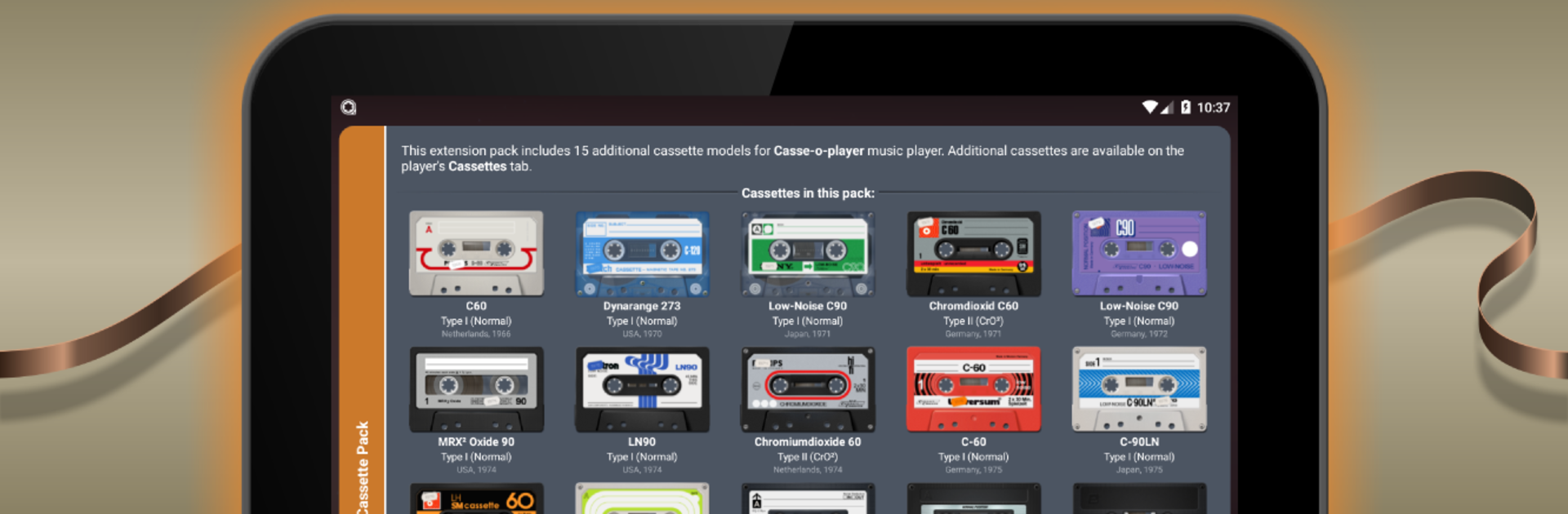
1970s Cassette Pack feels like a set of collectible skins for Casse-o-player, but done with real care. It adds 15 extra cassette designs that look straight out of a dusty record shop shelf, with bold colors, scuffs, chrome bits, and little print details that make each tape feel like a real object. The reels spin, the stickers and screws show, and the whole thing has this warm, old stereo vibe. On a PC screen through BlueStacks, the textures and tiny detials pop more than on a phone, so flipping between tapes and watching the animation has a nice, lazy afternoon feel. It is not trying to be flashy, just faithful to that 70s look that gives the player some personality.

It is an add-on, so Casse-o-player needs to be installed and updated to at least version 3.0.9, then these tapes show up inside the app on the Cassettes page under Extension packs. Swapping tapes changes the look of the player while the music keeps going, which is weirdly satisfying if someone likes tactile interfaces. The pack suits anyone who enjoys album art and retro tech as much as the tunes themselves. On desktop, clicking through the designs is smooth, and the big display makes it easier to pick a favorite and just leave it running like a little desk toy while music plays.

BlueStacks brings your apps to life on a bigger screen—seamless and straightforward.

How to Download and Run 1970s Cassette Pack on PC or Mac

  • Download and install BlueStacks on your PC or Mac

  • Complete Google sign-in to access the Play Store, or do it later

  • Look for 1970s Cassette Pack in the search bar at the top right corner

  • Click to install 1970s Cassette Pack from the search results

  • Complete Google sign-in (if you skipped step 2) to install 1970s Cassette Pack

  • Click the 1970s Cassette Pack icon on the home screen to start playing

video
Watch Video

Minimum System Requirements

With BlueStacks 5, you can get started on a PC that fulfills the following requirements.

  • Operating System

    Microsoft Windows 7 or above, macOS 11 (Big Sur) or above

  • Processor

    Intel, AMD or Apple Silicon Processor

  • RAM

    at least 4GB

  • HDD

    10GB Free Disk Space

Note:

* You must be an Administrator on your PC. Up to date graphics drivers from Microsoft or the chipset vendor.

1970s Cassette Pack - FAQs

  • How to Run 1970s Cassette Pack on Windows PC & Mac?

    Run 1970s Cassette Pack on your PC or Mac by following these simple steps.

    • Click on ‘Download 1970s Cassette Pack on PC’ to download BlueStacks
    • Install it and log-in to Google Play Store
    • Launch and run the app.
  • Why is BlueStacks the fastest and safest platform to play games on PC?

    BlueStacks respects your privacy and is always safe and secure to use. It does not carry any malware, spyware, or any sort of additional software that could harm your PC.

    It is engineered to optimize speed and performance for a seamless gaming experience.

  • What are 1970s Cassette Pack PC requirements?

    Minimum requirement to run 1970s Cassette Pack on your PC

    • OS: Microsoft Windows 7 and above:
    • Processor: Intel or AMD Processor:
    • RAM: Your PC must have at least 2GB of RAM. (Note that having 2GB or more disk space is not a substitute for RAM):
    • HDD: 5GB Free Disk Space.
    • You must be an Administrator on your PC.




