CarlTune - Chromatic Tuner

CarlTune - Chromatic Tuner

Music & Audio

| Brainting

Play on PC with BlueStacks or from our cloud

  • Overview
  • How to Download

Page Modified On: January 02, 2026

Run CarlTune - Chromatic Tuner on PC or Mac

Upgrade your experience. Try CarlTune – Chromatic Tuner, the fantastic Music & Audio app from Brainting, from the comfort of your laptop, PC, or Mac, only on BlueStacks.

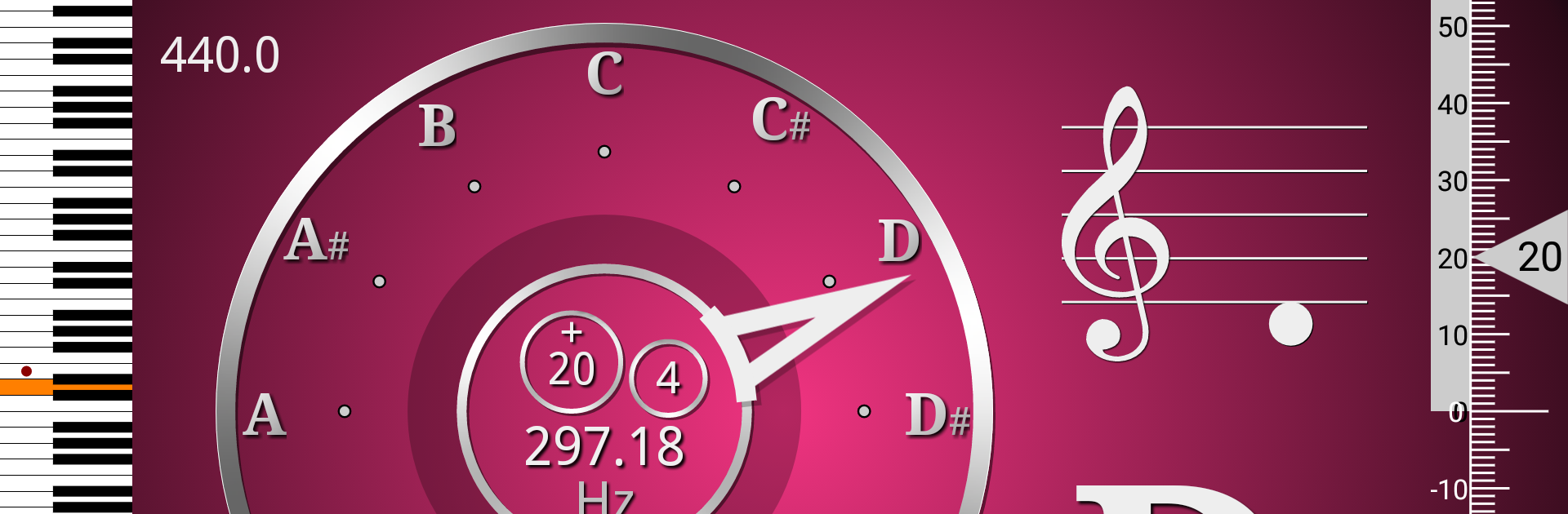
CarlTune feels like a clean, no‑nonsense tuner that shows exactly what is happening with a note the moment it hits the mic. The main screen pops up a clear pitch readout with frequency, octave, and how many cents sharp or flat, and the little clock style needle makes it obvious when the note lands. On a bigger screen through BlueStacks, the dial and numbers are easy to read from a stand or across a bedroom, which makes quick touch ups less fussy than squinting at a phone.

What stands out is how flexible it is without getting confusing. Colors can be changed to taste, notation works for US or Europe plus Korea, Thailand, Japan, and India, and it rotates between portrait and landscape. The aspect ratio can be tweaked so it fits weird screens nicely. There is a fine adjustment for the target range if someone tunes a little tight or loose. The app ships with tons of presets for real world use, like standard guitar, Drop D, Double Drop D, DADGAD, Open G, Open D, EAEGBE, and other open or alt setups. It covers 4 and 6 string bass, ukulele, violin, viola, cello, double bass, mandolin, mandola, and guitarelle, and the chromatic view works for things like flute, kalimba, traditional instruments, and simple vocal warmups. A pitch pipe generates accurate reference tones, and there is a tiny piano keyboard with frequency values for quick ear checks. Concert pitch can be changed off 440 Hz, and transposition is there for Bb and Eb instruments like clarinet, trumpet, and sax. There is a metronome tucked in, ads are present but removable with a small purchase, and the whole thing feels stable and quick.

Big screen. Bigger performance. Use BlueStacks on your PC or Mac to run your favorite apps.

How to Download and Run CarlTune - Chromatic Tuner on PC or Mac

  • Download and install BlueStacks on your PC or Mac

  • Complete Google sign-in to access the Play Store, or do it later

  • Look for CarlTune - Chromatic Tuner in the search bar at the top right corner

  • Click to install CarlTune - Chromatic Tuner from the search results

  • Complete Google sign-in (if you skipped step 2) to install CarlTune - Chromatic Tuner

  • Click the CarlTune - Chromatic Tuner icon on the home screen to start playing

video
Watch Video

Minimum System Requirements

With BlueStacks 5, you can get started on a PC that fulfills the following requirements.

  • Operating System

    Microsoft Windows 7 or above, macOS 11 (Big Sur) or above

  • Processor

    Intel, AMD or Apple Silicon Processor

  • RAM

    at least 4GB

  • HDD

    10GB Free Disk Space

Note:

* You must be an Administrator on your PC. Up to date graphics drivers from Microsoft or the chipset vendor.

CarlTune - Chromatic Tuner - FAQs

  • How to Run CarlTune - Chromatic Tuner on Windows PC & Mac?

    Run CarlTune - Chromatic Tuner on your PC or Mac by following these simple steps.

    • Click on ‘Download CarlTune - Chromatic Tuner on PC’ to download BlueStacks
    • Install it and log-in to Google Play Store
    • Launch and run the app.
  • Why is BlueStacks the fastest and safest platform to play games on PC?

    BlueStacks respects your privacy and is always safe and secure to use. It does not carry any malware, spyware, or any sort of additional software that could harm your PC.

    It is engineered to optimize speed and performance for a seamless gaming experience.

  • What are CarlTune - Chromatic Tuner PC requirements?

    Minimum requirement to run CarlTune - Chromatic Tuner on your PC

    • OS: Microsoft Windows 7 and above:
    • Processor: Intel or AMD Processor:
    • RAM: Your PC must have at least 2GB of RAM. (Note that having 2GB or more disk space is not a substitute for RAM):
    • HDD: 5GB Free Disk Space.
    • You must be an Administrator on your PC.