
Chrome Cassette Pack

Chrome Cassette Pack

Music & Audio

| Valentyn Vieshchunov

Play on PC with BlueStacks or from our cloud

  • Overview
  • How to Download

Page Modified On: October 24, 2025

Run Chrome Cassette Pack on PC or Mac

Upgrade your experience. Try Chrome Cassette Pack, the fantastic Music & Audio app from Valentyn Vieshchunov, from the comfort of your laptop, PC, or Mac, only on BlueStacks.

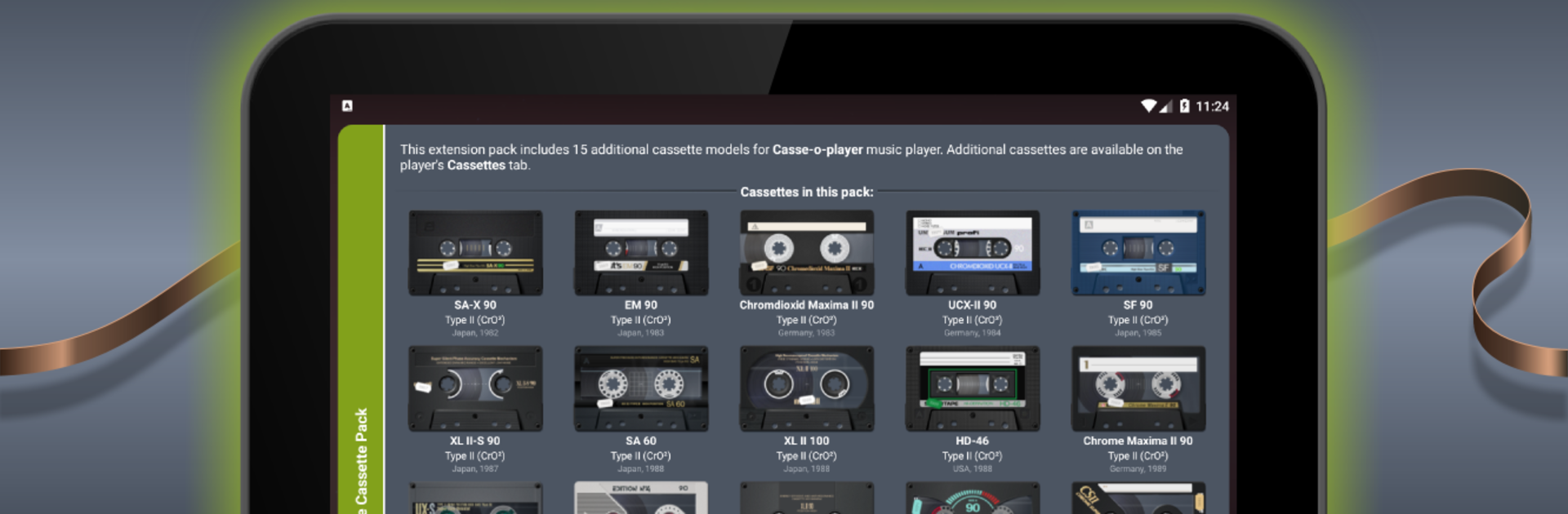
Chrome Cassette Pack is an add-on for Casse-o-player that drops 15 extra cassette designs into the app. They are modeled after those classic Type II chrome tapes, the clear ones that looked fancy back in the day. Each cassette is fully animated, so the reels spin, the tape moves, labels and screws are all there. It is mostly about the look and the feel, like swapping a different shell onto your mixtape. If the tape models matter to someone, this pack scratches that itch, and it gives that satisfying clicky, mechanical look people expect from an old deck.

On a PC with BlueStacks, the tiny details are easier to notice on a bigger screen, the transparency, the little reflections, the print on the hubs. It does not turn the app into a different player, it just gives more style choices that match the chrome sound idea Casse-o-player already plays with. Setup is simple. Casse-o-player needs to be on version 3.0.14 or newer, then the new tapes show up on the Cassettes page under Extension packs. For anyone who likes the ritual of hitting play and watching the reels turn, this makes the whole fake cassette deck feel more real, almost like a small museum shelf that actually moves.

Switch to BlueStacks and make the most of your apps on your PC or Mac.

How to Download and Run Chrome Cassette Pack on PC or Mac

  • Download and install BlueStacks on your PC or Mac

  • Complete Google sign-in to access the Play Store, or do it later

  • Look for Chrome Cassette Pack in the search bar at the top right corner

  • Click to install Chrome Cassette Pack from the search results

  • Complete Google sign-in (if you skipped step 2) to install Chrome Cassette Pack

  • Click the Chrome Cassette Pack icon on the home screen to start playing

video
Watch Video

Minimum System Requirements

With BlueStacks 5, you can get started on a PC that fulfills the following requirements.

  • Operating System

    Microsoft Windows 7 or above, macOS 11 (Big Sur) or above

  • Processor

    Intel, AMD or Apple Silicon Processor

  • RAM

    at least 4GB

  • HDD

    10GB Free Disk Space

Note:

* You must be an Administrator on your PC. Up to date graphics drivers from Microsoft or the chipset vendor.

Chrome Cassette Pack - FAQs

  • How to Run Chrome Cassette Pack on Windows PC & Mac?

    Run Chrome Cassette Pack on your PC or Mac by following these simple steps.

    • Click on ‘Download Chrome Cassette Pack on PC’ to download BlueStacks
    • Install it and log-in to Google Play Store
    • Launch and run the app.
  • Why is BlueStacks the fastest and safest platform to play games on PC?

    BlueStacks respects your privacy and is always safe and secure to use. It does not carry any malware, spyware, or any sort of additional software that could harm your PC.

    It is engineered to optimize speed and performance for a seamless gaming experience.

  • What are Chrome Cassette Pack PC requirements?

    Minimum requirement to run Chrome Cassette Pack on your PC

    • OS: Microsoft Windows 7 and above:
    • Processor: Intel or AMD Processor:
    • RAM: Your PC must have at least 2GB of RAM. (Note that having 2GB or more disk space is not a substitute for RAM):
    • HDD: 5GB Free Disk Space.
    • You must be an Administrator on your PC.




