
Feed Calculator for livestock

Feed Calculator for livestock

Productivity

| Single Spark The Netherlands

Play on PC with BlueStacks or from our cloud

  • Overview
  • How to Download

Page Modified On: December 15, 2025

Run Feed Calculator for livestock on PC or Mac

Get freedom from your phone’s obvious limitations. Use Feed Calculator for livestock, made by Single Spark The Netherlands, a Productivity app on your PC or Mac with BlueStacks, and level up your experience.

About the App

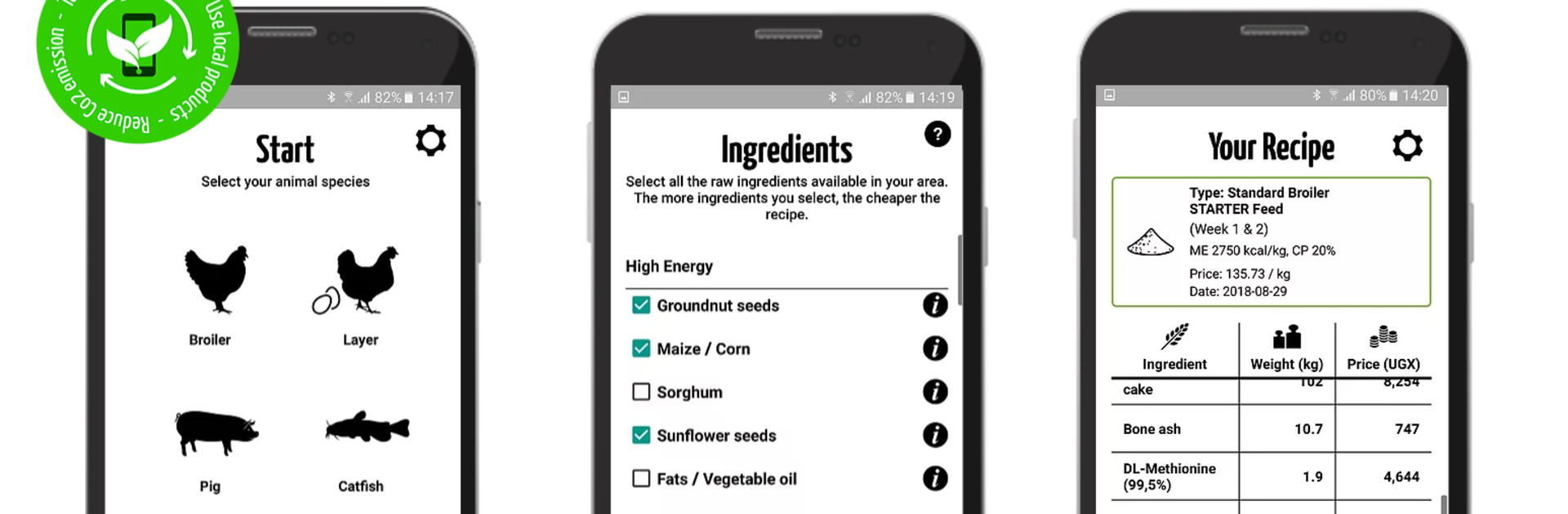
Feed Calculator for livestock makes feed formulation simple, fast, and affordable. This Productivity tool from Single Spark The Netherlands helps farmers and feed mills create balanced rations using ingredients they can actually buy nearby. Tell the app what you have and what it costs, and it builds a high‑quality recipe that keeps your animals on track and your costs in check. Dairy feed isn’t available yet, but it’s on the way.

Prefer working on a computer? You can also run it on BlueStacks for an easier view while entering prices and ingredients.

App Features

  • Least-cost recipes: The app’s smart algorithm finds the most economical mix based on your local ingredient list and the prices you enter.
  • Nutrition you can trust: Formulas meet species-specific requirements and follow international feed standards, so you get cost savings without cutting corners on quality.
  • Simple workflow: Choose your animal type (broilers, layers, pigs, catfish, or tilapia), pick available ingredients, add local prices, and tap calculate—done.
  • Local ingredient library: Start with 30+ commonly used ingredients, then adjust availability and costs to match your market.
  • Feed intake guidance: Get practical intake advice for pigs, broilers, layers, catfish, and tilapia to match diets with real-world consumption.
  • For farms and mills: Whether you’re mixing on-farm or running a feed mill, keep control of formulations and margins with your own data.
  • Multilanguage support: Use the app in the language that works best for your team, designed for on-the-ground use.
  • Training resources: Access learning options through FeedCalculator Academy, helpful for NGOs and groups that support local producers.
  • Built for your reality: Works with fluctuating prices and changing availability, so you can update numbers anytime and recalculate fresh, reliable rations.

Switch to BlueStacks and make the most of your apps on your PC or Mac.

How to Download and Run Feed Calculator for livestock on PC or Mac

  • Download and install BlueStacks on your PC or Mac

  • Complete Google sign-in to access the Play Store, or do it later

  • Look for Feed Calculator for livestock in the search bar at the top right corner

  • Click to install Feed Calculator for livestock from the search results

  • Complete Google sign-in (if you skipped step 2) to install Feed Calculator for livestock

  • Click the Feed Calculator for livestock icon on the home screen to start playing

video
Watch Video

Minimum System Requirements

With BlueStacks 5, you can get started on a PC that fulfills the following requirements.

  • Operating System

    Microsoft Windows 7 or above, macOS 11 (Big Sur) or above

  • Processor

    Intel, AMD or Apple Silicon Processor

  • RAM

    at least 4GB

  • HDD

    10GB Free Disk Space

Note:

* You must be an Administrator on your PC. Up to date graphics drivers from Microsoft or the chipset vendor.

Feed Calculator for livestock - FAQs

  • How to Run Feed Calculator for livestock on Windows PC & Mac?

    Run Feed Calculator for livestock on your PC or Mac by following these simple steps.

    • Click on ‘Download Feed Calculator for livestock on PC’ to download BlueStacks
    • Install it and log-in to Google Play Store
    • Launch and run the app.
  • Why is BlueStacks the fastest and safest platform to play games on PC?

    BlueStacks respects your privacy and is always safe and secure to use. It does not carry any malware, spyware, or any sort of additional software that could harm your PC.

    It is engineered to optimize speed and performance for a seamless gaming experience.

  • What are Feed Calculator for livestock PC requirements?

    Minimum requirement to run Feed Calculator for livestock on your PC

    • OS: Microsoft Windows 7 and above:
    • Processor: Intel or AMD Processor:
    • RAM: Your PC must have at least 2GB of RAM. (Note that having 2GB or more disk space is not a substitute for RAM):
    • HDD: 5GB Free Disk Space.
    • You must be an Administrator on your PC.




