
Flowdia Diagrams
Flowdia Diagrams

Flowdia Diagrams

Productivity

| BEZAPPS

Play on PC with BlueStacks or from our cloud

  • Overview
  • How to Download

Page Modified On: November 10, 2025

Run Flowdia Diagrams on PC or Mac

Upgrade your experience. Try Flowdia Diagrams, the fantastic Productivity app from BEZAPPS, from the comfort of your laptop, PC, or Mac, only on BlueStacks.

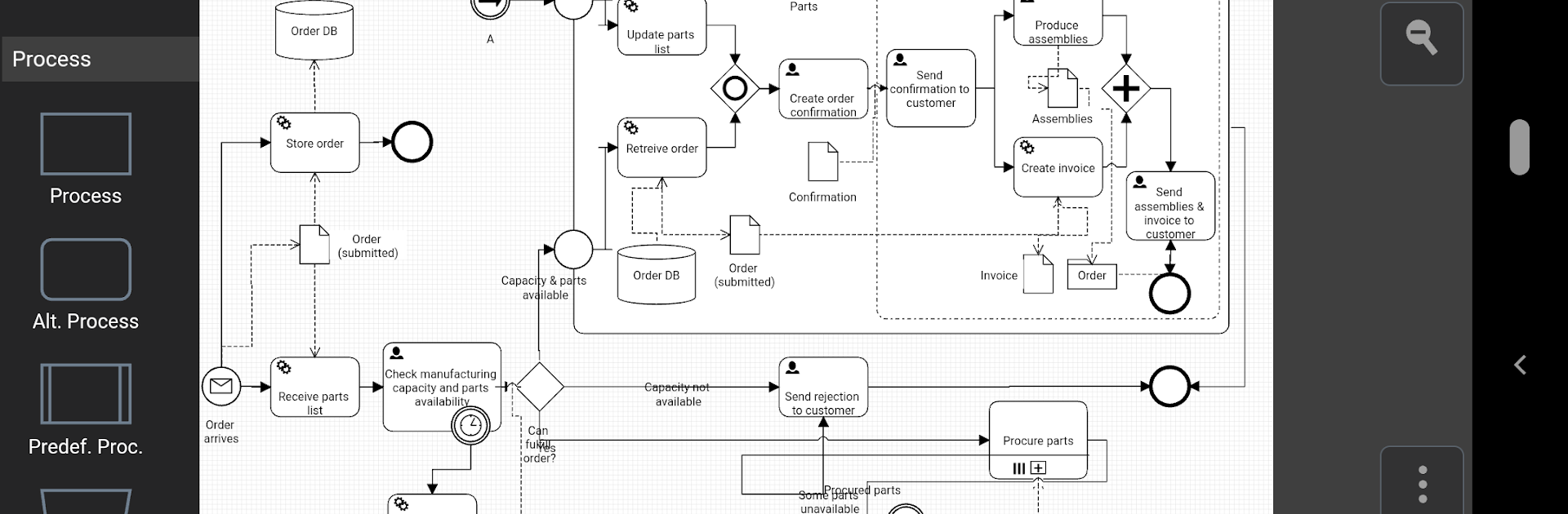
Flowdia Diagrams feels like a straightforward sketchpad for ideas that happen to be structured. Someone drops a few shapes, clicks the little plus to add a new swimlane or a mind map branch, and the app spaces things out so it does not look messy. Lines snap between connection points without fuss, which is a relief when there are lots of boxes. The shapes scale cleanly since they are not flat images, so resizing a workflow or a rack layout does not turn text into fuzz. Colors and fonts are easy to tweak, so a network map or BPMN chart can look clear without spending twenty minutes on styling. There is a handy picker on BPMN elements for switching event, task, or gateway types, which saves hunting through menus.

It handles a bunch of diagram types, from flowcharts and swimlanes to mind maps, Cisco and general network diagrams, server and rack layouts, UML activity, business process, and even chevron timelines. Exporting to PNG, JPG, PDF, or SVG is built in, and the SVGs open in Microsoft Visio if someone needs to hand things off. Importing PNG or JPG logos or icons works, and a single file can have up to 10 pages that can be copied, renamed, or deleted when plans change. On PC with BlueStacks, the mouse makes lining up connectors and nudging labels feel natural, especially on a big monitor where a whole process fits on screen. It comes off as focused and light, more get stuff done than tool overload, which suits quick planning and clean handoffs.

BlueStacks brings your apps to life on a bigger screen—seamless and straightforward.

How to Download and Run Flowdia Diagrams on PC or Mac

  • Download and install BlueStacks on your PC or Mac

  • Complete Google sign-in to access the Play Store, or do it later

  • Look for Flowdia Diagrams in the search bar at the top right corner

  • Click to install Flowdia Diagrams from the search results

  • Complete Google sign-in (if you skipped step 2) to install Flowdia Diagrams

  • Click the Flowdia Diagrams icon on the home screen to start playing

video
Watch Video

Minimum System Requirements

With BlueStacks 5, you can get started on a PC that fulfills the following requirements.

  • Operating System

    Microsoft Windows 7 or above, macOS 11 (Big Sur) or above

  • Processor

    Intel, AMD or Apple Silicon Processor

  • RAM

    at least 4GB

  • HDD

    10GB Free Disk Space

Note:

* You must be an Administrator on your PC. Up to date graphics drivers from Microsoft or the chipset vendor.

Flowdia Diagrams - FAQs

  • How to Run Flowdia Diagrams on Windows PC & Mac?

    Run Flowdia Diagrams on your PC or Mac by following these simple steps.

    • Click on ‘Download Flowdia Diagrams on PC’ to download BlueStacks
    • Install it and log-in to Google Play Store
    • Launch and run the app.
  • Why is BlueStacks the fastest and safest platform to play games on PC?

    BlueStacks respects your privacy and is always safe and secure to use. It does not carry any malware, spyware, or any sort of additional software that could harm your PC.

    It is engineered to optimize speed and performance for a seamless gaming experience.

  • What are Flowdia Diagrams PC requirements?

    Minimum requirement to run Flowdia Diagrams on your PC

    • OS: Microsoft Windows 7 and above:
    • Processor: Intel or AMD Processor:
    • RAM: Your PC must have at least 2GB of RAM. (Note that having 2GB or more disk space is not a substitute for RAM):
    • HDD: 5GB Free Disk Space.
    • You must be an Administrator on your PC.




