


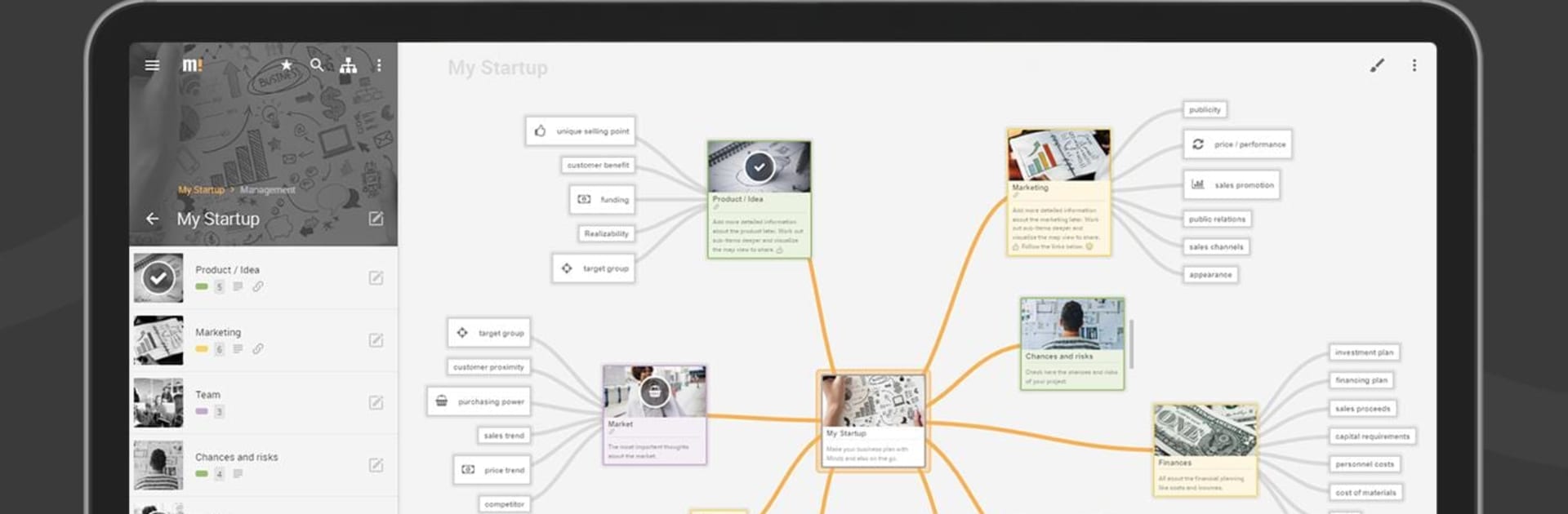


Get freedom from your phone’s obvious limitations. Use Mindz – Mind Map & Lists Pro, made by Creative Robots Labs, a Productivity app on your PC or Mac with BlueStacks, and level up your experience.
About the App
Mindz – Mind Map & Lists Pro is your flexible workspace for catching ideas, planning projects, and keeping everything organized without the chaos. Flip between clean lists and colorful visual maps to see your thoughts from every angle. Prefer a bigger canvas? It runs smoothly on BlueStacks when you’re working from your computer.
App Features
- List + Map in One: Start with a simple list and switch to a visual map view that lays out your thoughts in seconds.
- Personalize Every Node: Add colors, icons, images, and links so your maps look and work the way you think.
- Fast Search: Jump to any topic instantly, even in massive maps with tons of branches.
- Easy Navigation: Breadcrumbs, favorites, and an at-a-glance overview make hopping between sections painless.
- Arrange with Control: Drag and place nodes exactly where you want or let auto-layout tidy things up for you.
- Backup and Restore: Export or import Mindz and OPML files to keep your work safe and portable.
- Share Your Work: Send maps as images or PDFs, or hand off outlines using OPML.
- Pro: Unlimited Space: Create as many maps and nodes as you need—no cap, no worries.
- Pro: Map Designer: Apply themes and tweak the look of entire maps in a few taps.
- Pro: Node Designer: Style one node or many at once to keep everything consistent.
- Pro: More Export Choices: Save content as HTML, Markdown, or plain text for easy reuse.
- Pro: File Attachments: Pin documents, photos, or audio directly to any node.
- Pro: Cloud Backup: Keep maps backed up with Dropbox support.
- Dark Mode + Accents: Pick a dark theme and custom accent colors that match your vibe.
- No Ads, No Sign-Up: Open the app from Creative Robots Labs and get straight to work in the Productivity zone.
Eager to take your app experience to the next level? Start right away by downloading BlueStacks on your PC or Mac.





