
SLD | Electrical diagrams

SLD | Electrical diagrams

Productivity

| Ángel Martínez

Play on PC with BlueStacks or from our cloud

  • Overview
  • How to Download

Page Modified On: October 13, 2025

Run SLD | Electrical diagrams on PC or Mac

Multitask effortlessly on your PC or Mac as you try out SLD | Electrical diagrams, a Productivity app by Ángel Martínez on BlueStacks.

About the App

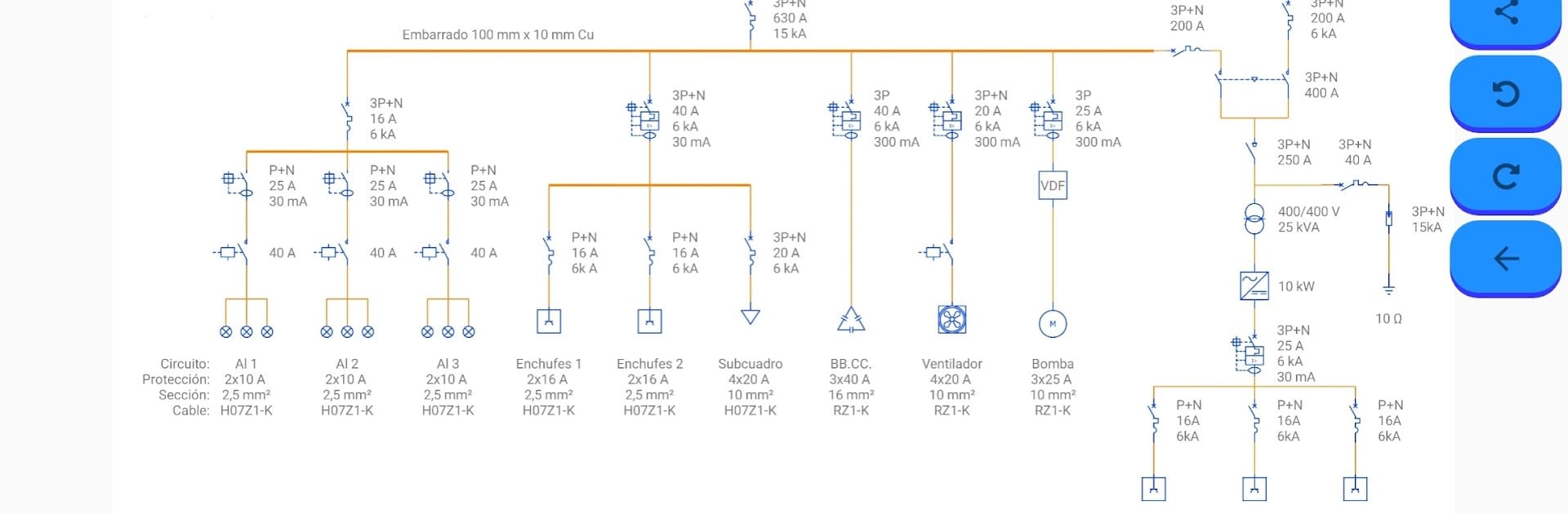
SLD | Electrical diagrams makes building single-line electrical diagrams feel straightforward and fast. Pick a symbol, drop it on the canvas, connect your runs, and add the labels you need—no fuss, no clutter. It’s built by Ángel Martínez for anyone who sketches, checks, or explains circuits in their day-to-day, and fits nicely in the Productivity genre. Want a bigger workspace? You can also use it on your desktop through BlueStacks.

App Features

  • Drag-and-drop editor: Place components exactly where you want them and rearrange with a quick swipe or tap.
  • IEC and ANSI symbols: Work confidently with a library that follows international standards—ideal for professional drawings and training.
  • Core power elements: Add breakers, switches, fuses, disconnectors, RCDs, contactors, transformers (including star–delta), and grounding with just a couple of taps.
  • Motors and drives: Sketch starters, soft starters, coils, thermal/magnetic protection, and interlocks for clear motor control layouts.
  • Measurement and metering: Drop in voltmeters, ammeters, ohmmeters, frequency meters, kWh meters, and reactive power meters to document how you’ll measure and monitor.
  • Conversion and control: Show rectifiers, inverters, AC/DC and DC/DC converters, variable resistances/reactances, diodes, varistors, and more.
  • Sources and loads: Represent motors, generators, batteries, photovoltaic panels, fans, heaters, and general loads to complete your SLD.
  • Contacts and logic: Use NO/NC contacts, push buttons, mushrooms, limit switches, handles, and interlocks to map control circuits.
  • Clear labeling: Add text for volts, amps, watts, energy, phases, neutral, and ground so your diagram reads the way you think.
  • Clean exports: Share your work as an image, PDF, or the app’s file format—perfect for quick reviews or sending to a teammate.
  • BASIC vs PRO: In BASIC, create one single-line diagram and share it (ads included). Upgrade to PRO to open, edit, and save multiple schemes, remove ads, and work with example projects.

Switch to BlueStacks and make the most of your apps on your PC or Mac.

How to Download and Run SLD | Electrical diagrams on PC or Mac

  • Download and install BlueStacks on your PC or Mac

  • Complete Google sign-in to access the Play Store, or do it later

  • Look for SLD | Electrical diagrams in the search bar at the top right corner

  • Click to install SLD | Electrical diagrams from the search results

  • Complete Google sign-in (if you skipped step 2) to install SLD | Electrical diagrams

  • Click the SLD | Electrical diagrams icon on the home screen to start playing

video
Watch Video

Minimum System Requirements

With BlueStacks 5, you can get started on a PC that fulfills the following requirements.

  • Operating System

    Microsoft Windows 7 or above, macOS 11 (Big Sur) or above

  • Processor

    Intel, AMD or Apple Silicon Processor

  • RAM

    at least 4GB

  • HDD

    10GB Free Disk Space

Note:

* You must be an Administrator on your PC. Up to date graphics drivers from Microsoft or the chipset vendor.

SLD | Electrical diagrams - FAQs

  • How to Run SLD | Electrical diagrams on Windows PC & Mac?

    Run SLD | Electrical diagrams on your PC or Mac by following these simple steps.

    • Click on ‘Download SLD | Electrical diagrams on PC’ to download BlueStacks
    • Install it and log-in to Google Play Store
    • Launch and run the app.
  • Why is BlueStacks the fastest and safest platform to play games on PC?

    BlueStacks respects your privacy and is always safe and secure to use. It does not carry any malware, spyware, or any sort of additional software that could harm your PC.

    It is engineered to optimize speed and performance for a seamless gaming experience.

  • What are SLD | Electrical diagrams PC requirements?

    Minimum requirement to run SLD | Electrical diagrams on your PC

    • OS: Microsoft Windows 7 and above:
    • Processor: Intel or AMD Processor:
    • RAM: Your PC must have at least 2GB of RAM. (Note that having 2GB or more disk space is not a substitute for RAM):
    • HDD: 5GB Free Disk Space.
    • You must be an Administrator on your PC.




