Ferry Port Trucker Parking Sim

Ferry Port Trucker Parking Sim

Racing

| Play With Games

Play on PC with BlueStacks or from our cloud

  • Overview
  • Game Features
  • How to Play

Page Modified On: January 02, 2026

Play Ferry Port Trucker Parking Sim on PC or Mac

Ferry Port Trucker Parking Sim brings the Racing genre to life, and throws up exciting challenges for gamers. Developed by Play With Games, this Android game is best experienced on BlueStacks, the World’s #1 app player for PC and Mac users.

Ferry Port Trucker Parking Sim is all about threading big vehicles through a busy harbor without scraping anything. It leans hard into precision driving. Tight ramps, painted lines on the ferry deck, awkward corners between containers, that kind of stuff. Every job scores clean turns and time, so smooth driving actually matters and better grades push progress faster. The whole map feels like a real port, with little detours and spots that tempt a shortcut if the driver is confident. There is no street racing here, it is slow, careful, oddly tense in a good way.

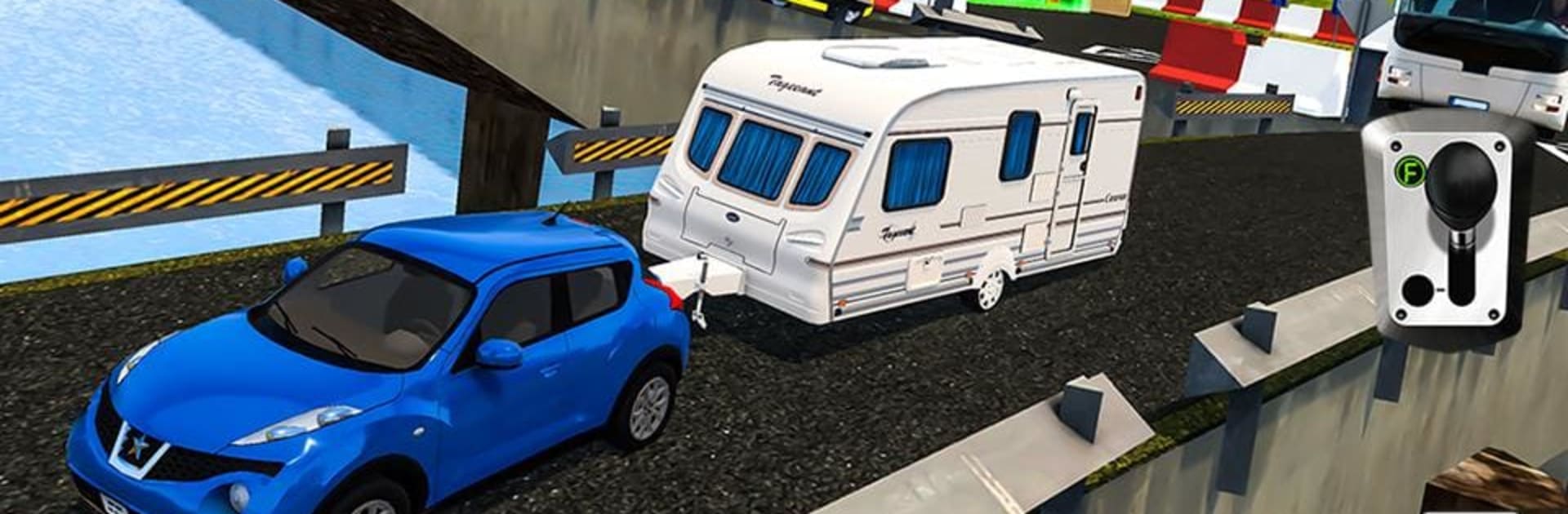
What makes it fun is how each ride feels different. A pickup is nimble and easy to correct. The tourist coach needs wide turns and patience. The freight truck has real weight when it starts rolling, and stopping it in the box neatly is a small win. The SUV with a caravan swings if the driver turns late, so watching the trailer angle becomes the mini game. The physics sell the idea that these are heavy machines, and swapping between camera views helps, especially the driver seat view when lining up a ramp. There are lots of short missions that teach little habits, like squaring up before reversing or feathering throttle on slopes. On BlueStacks, keyboard steering or a plugged controller makes fine inputs feel steadier, so threading the ferry ramps is less guesswork and more rhythm.

Make your gaming sessions memorable with precise controls that give you an edge in close combats and visuals that pop up, bringing every character to life.


Game Features

Enhancements

  • Macros
  • Multi Instance
  • Multi Instance Sync
  • Script
  • Enhancements
Macros

Macros

Automate the predictable in Ferry Port Trucker Parking Sim and transform your gameplay with Macros. Get access to inventive Macros in the BlueStacks Macro Community
Multi Instance

Multi Instance

Play Ferry Port Trucker Parking Sim on one window. And chat with your friend on the other. Press CTRL + Shift + 8 to open the Multi-Instance Manager. And start creating fresh instances or clone an existing one.
Multi Instance Sync

Multi Instance Sync

Play Ferry Port Trucker Parking Sim with the power of Multi-Instance Sync. Replicate what you are doing on the main instance on all other instances. Level up faster, play more.
Script

Script

Script your way to gaming glory in Ferry Port Trucker Parking Sim with BlueStacks Script. Write and run a set of commands to automate repeated tasks. Trigger the command by assigning it to any key.
Read More

How to Download and Play Ferry Port Trucker Parking Sim on PC or Mac

  • Download and install BlueStacks on your PC or Mac

  • Complete Google sign-in to access the Play Store, or do it later

  • Look for Ferry Port Trucker Parking Sim in the search bar at the top right corner

  • Click to install Ferry Port Trucker Parking Sim from the search results

  • Complete Google sign-in (if you skipped step 2) to install Ferry Port Trucker Parking Sim

  • Click the Ferry Port Trucker Parking Sim icon on the home screen to start playing

video
Watch Video

Minimum System Requirements

With BlueStacks 5, you can get started on a PC that fulfills the following requirements.

  • Operating System

    Microsoft Windows 7 or above, macOS 11 (Big Sur) or above

  • Processor

    Intel, AMD or Apple Silicon Processor

  • RAM

    at least 4GB

  • HDD

    10GB Free Disk Space

Note:

* You must be an Administrator on your PC. Up to date graphics drivers from Microsoft or the chipset vendor.

Ferry Port Trucker Parking Sim - FAQs

  • How to play Ferry Port Trucker Parking Sim on Windows PC & Mac?

    Play Ferry Port Trucker Parking Sim on your PC or Mac by following these simple steps.

    • Click on 'Play Ferry Port Trucker Parking Sim on PC’ to download BlueStacks
    • Install it and log-in to Google Play Store
    • Launch and play the game.
  • Why is BlueStacks the fastest and safest platform to play games on PC?

    BlueStacks respects your privacy and is always safe and secure to use. It does not carry any malware, spyware, or any sort of additional software that could harm your PC.

    It is engineered to optimize speed and performance for a seamless gaming experience.

  • What are Ferry Port Trucker Parking Sim PC requirements?

    Minimum requirement to run Ferry Port Trucker Parking Sim on your PC

    • OS: Microsoft Windows 7 or above MacOS 11 (Big Sur) or above
    • Processor: Intel, AMD or Apple Silicon Processor
    • RAM: Your PC must have at least 4GB of RAM. (Note that having 4GB or more disk space is not a substitute for RAM)
    • HDD: 10GB Free Disk Space.
    • You must be an Administrator on your PC.