Hajwala Darb
Hajwala Darb

Hajwala Darb

Racing

| AMBRATOR GAMES

Play on PC with BlueStacks or from our cloud

  • Overview
  • Game Features
  • How to Play

Page Modified On: April 07, 2026

Play Hajwala Darb on PC or Mac

Join millions to experience Hajwala Darb, an exciting Racing game from AMBRATOR GAMES. With BlueStacks App Player, you are always a step ahead of your opponent, ready to outplay them with faster gameplay and better control with the mouse and keyboard on your PC or Mac.

About the Game

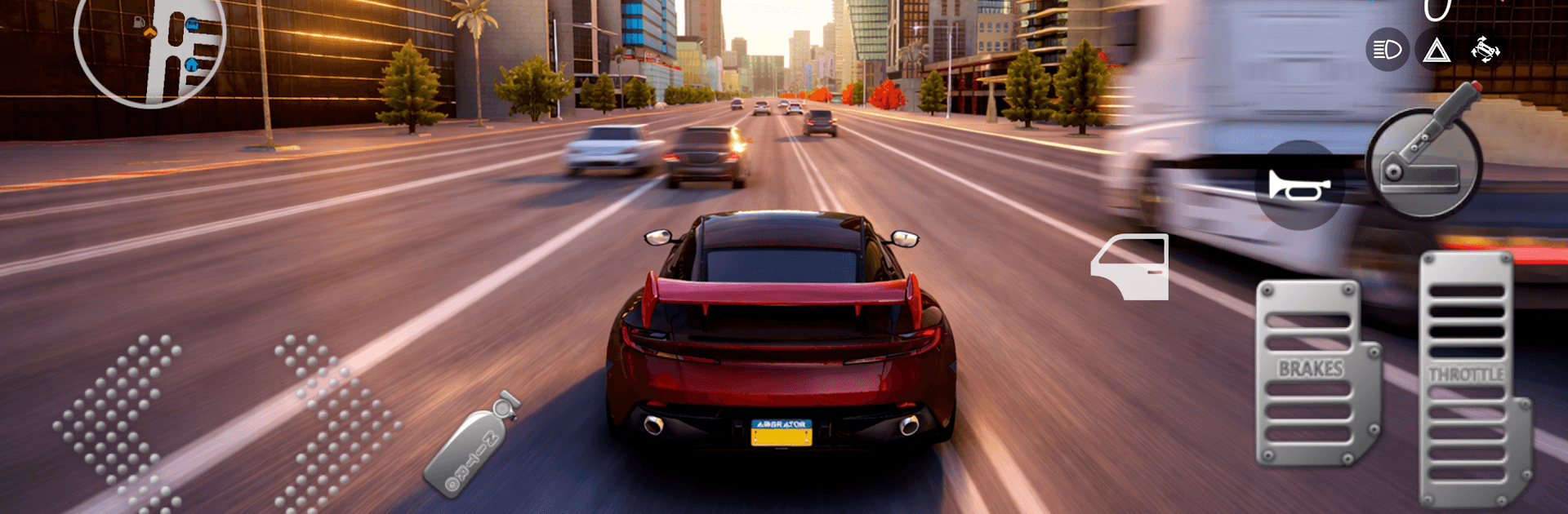
Hajwala Darb is a street-and-sand playground built for people who love the feel of a tail-happy car and the rush of clean racing lines. It blends believable handling with an easygoing, jump-in-and-drive vibe, so you can cruise, drift, or chase records without a ton of fuss. It’s a Racing title from AMBRATOR GAMES, and if you like a bigger screen, it also runs smoothly on BlueStacks.

Game Features

  • Huge garage, no paywall: Roll out with 100+ cars available from the start. Pick what fits your mood and start burning rubber.
  • Maps for every mood: Drive across 10+ locations, including vast deserts, city highways, pro circuits, and purpose-built drift zones—each with its own flow.
  • Tuning that actually matters: Dial in the engine, gearing, and handling feel. You can nudge the physics toward grippy or wild until the car behaves exactly how you want.
  • Style it your way: Paint, plates, spoilers, decals, lighting colors, wheels, and rims—tweak the details until your build looks unmistakably yours.
  • Modes that test skill: Hit circuit races for clean laps, go for straight-line speed in drag runs, or chase angle and control in drift challenges.
  • Online action: Jump into competitive lobbies to race others, or cruise around in open rooms to show off your setup and your technique.
  • Solo freedom: Practice across any map with zero timers and no pressure. Just you, your car, and the road—perfect for testing new tunes or learning lines.
  • Realism meets arcade fun: Get a convincing sense of weight and traction without losing that laid-back, pick-up-and-shred feel that keeps sessions fresh.

Make your gaming sessions memorable with precise controls that give you an edge in close combats and visuals that pop up, bringing every character to life.


Game Features

Enhancements

  • Macros
  • Multi Instance
  • Multi Instance Sync
  • Script
  • Enhancements
Macros

Macros

Automate the predictable in Hajwala Darb and transform your gameplay with Macros. Get access to inventive Macros in the BlueStacks Macro Community
Multi Instance

Multi Instance

Play Hajwala Darb on one window. And chat with your friend on the other. Press CTRL + Shift + 8 to open the Multi-Instance Manager. And start creating fresh instances or clone an existing one.
Multi Instance Sync

Multi Instance Sync

Play Hajwala Darb with the power of Multi-Instance Sync. Replicate what you are doing on the main instance on all other instances. Level up faster, play more.
Script

Script

Script your way to gaming glory in Hajwala Darb with BlueStacks Script. Write and run a set of commands to automate repeated tasks. Trigger the command by assigning it to any key.
Read More

How to Download and Play Hajwala Darb on PC or Mac

  • Download and install BlueStacks on your PC or Mac

  • Complete Google sign-in to access the Play Store, or do it later

  • Look for Hajwala Darb in the search bar at the top right corner

  • Click to install Hajwala Darb from the search results

  • Complete Google sign-in (if you skipped step 2) to install Hajwala Darb

  • Click the Hajwala Darb icon on the home screen to start playing

video
Watch Video

Minimum System Requirements

With BlueStacks 5, you can get started on a PC that fulfills the following requirements.

  • Operating System

    Microsoft Windows 7 or above, macOS 11 (Big Sur) or above

  • Processor

    Intel, AMD or Apple Silicon Processor

  • RAM

    at least 4GB

  • HDD

    10GB Free Disk Space

Note:

* You must be an Administrator on your PC. Up to date graphics drivers from Microsoft or the chipset vendor.

Hajwala Darb - FAQs

  • How to play Hajwala Darb on Windows PC & Mac?

    Play Hajwala Darb on your PC or Mac by following these simple steps.

    • Click on 'Play Hajwala Darb on PC’ to download BlueStacks
    • Install it and log-in to Google Play Store
    • Launch and play the game.
  • Why is BlueStacks the fastest and safest platform to play games on PC?

    BlueStacks respects your privacy and is always safe and secure to use. It does not carry any malware, spyware, or any sort of additional software that could harm your PC.

    It is engineered to optimize speed and performance for a seamless gaming experience.

  • What are Hajwala Darb PC requirements?

    Minimum requirement to run Hajwala Darb on your PC

    • OS: Microsoft Windows 7 or above MacOS 11 (Big Sur) or above
    • Processor: Intel, AMD or Apple Silicon Processor
    • RAM: Your PC must have at least 4GB of RAM. (Note that having 4GB or more disk space is not a substitute for RAM)
    • HDD: 10GB Free Disk Space.
    • You must be an Administrator on your PC.