Rally Race Pro 3.0 Car Racing

Rally Race Pro 3.0 Car Racing

Racing

| Terafort IEG

Play on PC with BlueStacks or from our cloud

  • Overview
  • Game Features
  • How to Play

Page Modified On: January 09, 2026

Play Rally Race Pro 3.0 Car Racing on PC or Mac

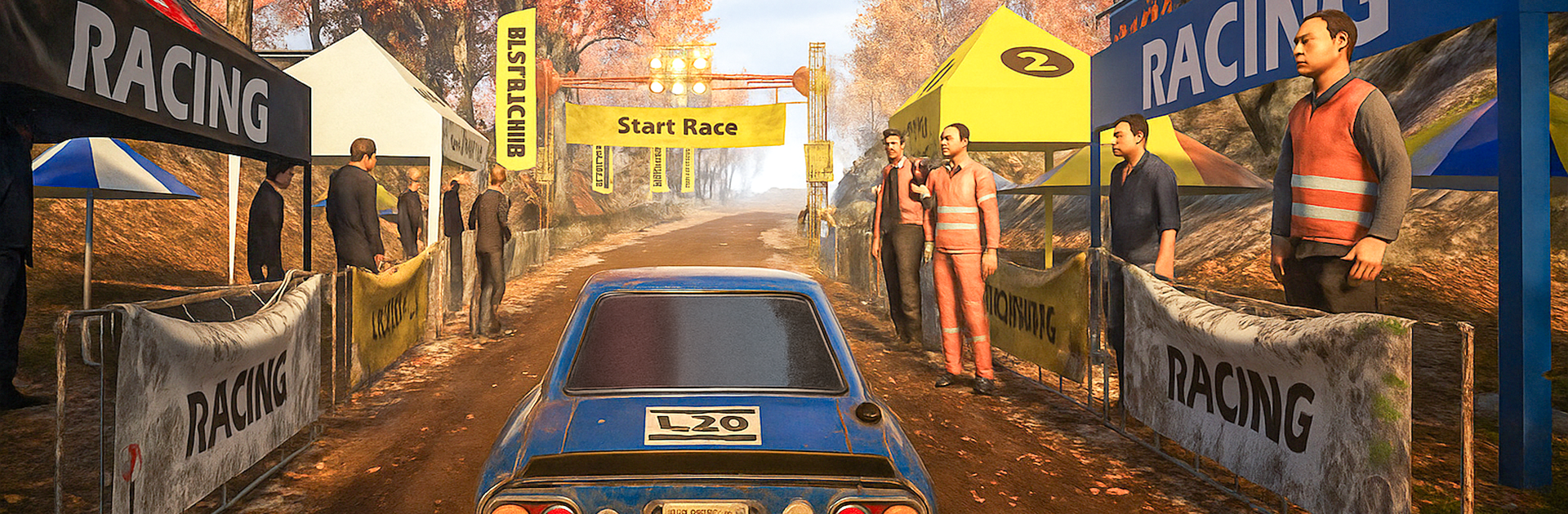
Rally Race Pro 3.0 Car Racing brings the Racing genre to life, and throws up exciting challenges for gamers. Developed by Terafort IEG, this Android game is best experienced on BlueStacks, the World’s #1 app player for PC and Mac users.

Rally Race Pro 3.0 Car Racing leans hard into simulation, not arcade. The cars feel heavy and alive, so braking, throttle, and steering all matter. Tracks are rough hill roads and older tarmac with mixed grip, so one corner bites and the next feels slick. Nail a hairpin and the rear slides just enough to make it clean, brake a touch late and the front pushes wide. It is tough at first but fair, and once the handling clicks it becomes that satisfying loop of shaving tenths off a lap.

There is a small but useful tuning setup where suspension adjustments actually change how the car behaves. Softer helps soak up bumps, stiffer tightens the turn in, and that choice shows up on the next stage. Races run under sun, sunset, cloudy skies, or full night, and the little touches help a lot. Dust kicks up, paint reflects, engines snarl, tires screech, and it all blends into a clean, focused sound and look without looking flashy for no reason. Multiple camera views help too, so cockpit for focus or chase cam for more awareness. Leaderboards push time attacks, and it works offline, so there is no need to be always connected. On PC with BlueStacks, the keyboard and mouse give steadier inputs than a phone screen, which makes holding a slide and hitting splits feel smoother. It suits anyone who likes learning lines, tuning a setup, and winning with technique rather than power ups or rubberbanding.

Make your gaming sessions memorable with precise controls that give you an edge in close combats and visuals that pop up, bringing every character to life.


Game Features

Enhancements

  • Macros
  • Multi Instance
  • Multi Instance Sync
  • Script
  • Enhancements
Macros

Macros

Automate the predictable in Rally Race Pro 3.0 Car Racing and transform your gameplay with Macros. Get access to inventive Macros in the BlueStacks Macro Community
Multi Instance

Multi Instance

Play Rally Race Pro 3.0 Car Racing on one window. And chat with your friend on the other. Press CTRL + Shift + 8 to open the Multi-Instance Manager. And start creating fresh instances or clone an existing one.
Multi Instance Sync

Multi Instance Sync

Play Rally Race Pro 3.0 Car Racing with the power of Multi-Instance Sync. Replicate what you are doing on the main instance on all other instances. Level up faster, play more.
Script

Script

Script your way to gaming glory in Rally Race Pro 3.0 Car Racing with BlueStacks Script. Write and run a set of commands to automate repeated tasks. Trigger the command by assigning it to any key.
Read More

How to Download and Play Rally Race Pro 3.0 Car Racing on PC or Mac

  • Download and install BlueStacks on your PC or Mac

  • Complete Google sign-in to access the Play Store, or do it later

  • Look for Rally Race Pro 3.0 Car Racing in the search bar at the top right corner

  • Click to install Rally Race Pro 3.0 Car Racing from the search results

  • Complete Google sign-in (if you skipped step 2) to install Rally Race Pro 3.0 Car Racing

  • Click the Rally Race Pro 3.0 Car Racing icon on the home screen to start playing

video
Watch Video

Minimum System Requirements

With BlueStacks 5, you can get started on a PC that fulfills the following requirements.

  • Operating System

    Microsoft Windows 7 or above, macOS 11 (Big Sur) or above

  • Processor

    Intel, AMD or Apple Silicon Processor

  • RAM

    at least 4GB

  • HDD

    10GB Free Disk Space

Note:

* You must be an Administrator on your PC. Up to date graphics drivers from Microsoft or the chipset vendor.

Rally Race Pro 3.0 Car Racing - FAQs

  • How to play Rally Race Pro 3.0 Car Racing on Windows PC & Mac?

    Play Rally Race Pro 3.0 Car Racing on your PC or Mac by following these simple steps.

    • Click on 'Play Rally Race Pro 3.0 Car Racing on PC’ to download BlueStacks
    • Install it and log-in to Google Play Store
    • Launch and play the game.
  • Why is BlueStacks the fastest and safest platform to play games on PC?

    BlueStacks respects your privacy and is always safe and secure to use. It does not carry any malware, spyware, or any sort of additional software that could harm your PC.

    It is engineered to optimize speed and performance for a seamless gaming experience.

  • What are Rally Race Pro 3.0 Car Racing PC requirements?

    Minimum requirement to run Rally Race Pro 3.0 Car Racing on your PC

    • OS: Microsoft Windows 7 or above MacOS 11 (Big Sur) or above
    • Processor: Intel, AMD or Apple Silicon Processor
    • RAM: Your PC must have at least 4GB of RAM. (Note that having 4GB or more disk space is not a substitute for RAM)
    • HDD: 10GB Free Disk Space.
    • You must be an Administrator on your PC.