
Alertes Spéciales
Alertes Spéciales

Alertes Spéciales

Simulation

| NexSimu

Play on PC with BlueStacks or from our cloud

  • Overview
  • Game Features
  • How to Play

Page Modified On: January 14, 2025

Play Alertes Spéciales on PC or Mac

Alertes Spéciales brings the Simulation genre to life, and throws up exciting challenges for gamers. Developed by NexSimu, this Android game is best experienced on BlueStacks, the World’s #1 app player for PC and Mac users.

About the Game

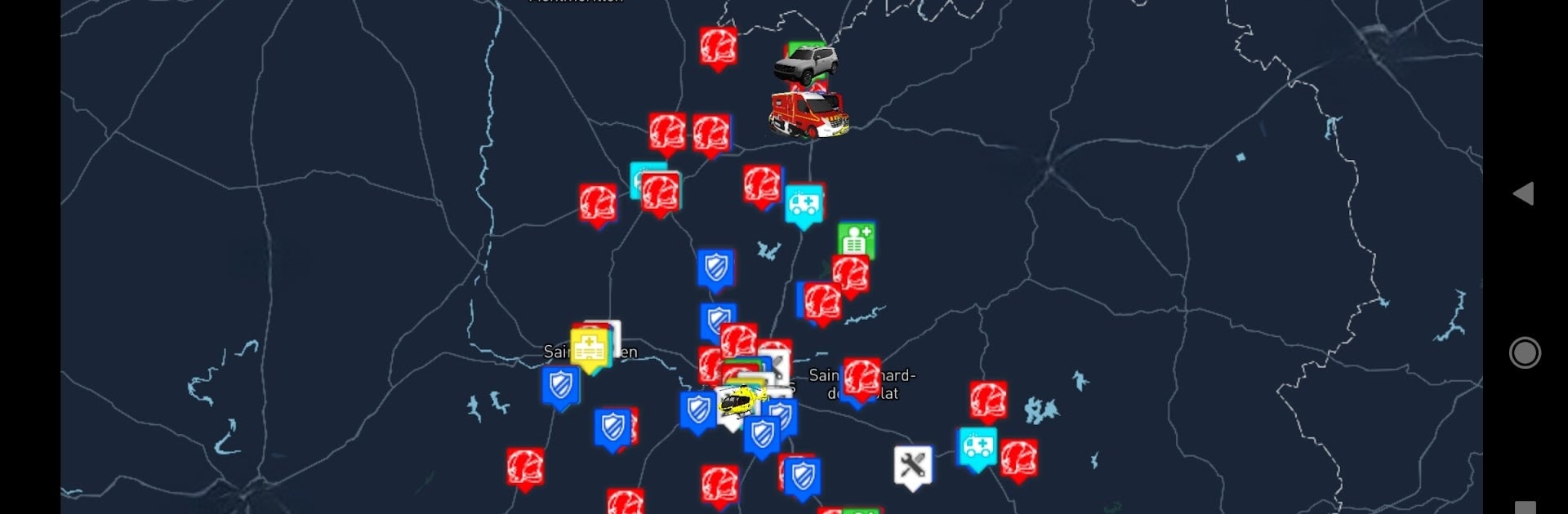
Your decisions really matter in “Alertes Spéciales” by NexSimu. This simulation game puts you in charge of various French rescue and emergency services like firefighters, SAMU, and law enforcement. Buy and upgrade buildings to expand your operational reach, unlock new vehicles, and recruit and train your team for dynamic missions. Expect interactive gameplay, as you join others online, tackling several missions in real time.

Game Features

  • Diverse Emergency Services: Manage a variety of services including police, gendarmerie, and civil security to handle any crisis efficiently.

  • Strategic Resource Management: Expand your sectors by buying new buildings and unlocking advanced vehicles, ensuring you’re always ready to respond.

  • Team Recruitment and Training: Hire qualified staff and equip them with necessary skills for tackling challenging missions.

  • Real-Time Online Missions: Collaborate with other players in a constantly active world, making teamwork essential.

  • BlueStacks Integration: Enjoy smoother gameplay and enhanced controls on PC, courtesy of subtle yet optimized support with BlueStacks.

Get ready for a buttery smooth, high-performance gaming action only on BlueStacks.

Game Features

Enhancements

  • Macros
  • Multi Instance
  • Multi Instance Sync
  • Script
  • Enhancements
Macros

Macros

Automate the predictable in Alertes Spéciales and transform your gameplay with Macros. Get access to inventive Macros in the BlueStacks Macro Community
Multi Instance

Multi Instance

Play Alertes Spéciales on one window. And chat with your friend on the other. Press CTRL + Shift + 8 to open the Multi-Instance Manager. And start creating fresh instances or clone an existing one.
Multi Instance Sync

Multi Instance Sync

Play Alertes Spéciales with the power of Multi-Instance Sync. Replicate what you are doing on the main instance on all other instances. Level up faster, play more.
Script

Script

Script your way to gaming glory in Alertes Spéciales with BlueStacks Script. Write and run a set of commands to automate repeated tasks. Trigger the command by assigning it to any key.
Read More

How to Download and Play Alertes Spéciales on PC or Mac

  • Download and install BlueStacks on your PC or Mac

  • Complete Google sign-in to access the Play Store, or do it later

  • Look for Alertes Spéciales in the search bar at the top right corner

  • Click to install Alertes Spéciales from the search results

  • Complete Google sign-in (if you skipped step 2) to install Alertes Spéciales

  • Click the Alertes Spéciales icon on the home screen to start playing

video
Watch Video

Minimum System Requirements

With BlueStacks 5, you can get started on a PC that fulfills the following requirements.

  • Operating System

    Microsoft Windows 7 or above, macOS 11 (Big Sur) or above

  • Processor

    Intel, AMD or Apple Silicon Processor

  • RAM

    at least 4GB

  • HDD

    10GB Free Disk Space

Note:

* You must be an Administrator on your PC. Up to date graphics drivers from Microsoft or the chipset vendor.

Alertes Spéciales - FAQs

  • How to play Alertes Spéciales on Windows PC & Mac?

    Play Alertes Spéciales on your PC or Mac by following these simple steps.

    • Click on 'Play Alertes Spéciales on PC’ to download BlueStacks
    • Install it and log-in to Google Play Store
    • Launch and play the game.
  • Why is BlueStacks the fastest and safest platform to play games on PC?

    BlueStacks respects your privacy and is always safe and secure to use. It does not carry any malware, spyware, or any sort of additional software that could harm your PC.

    It is engineered to optimize speed and performance for a seamless gaming experience.

  • What are Alertes Spéciales PC requirements?

    Minimum requirement to run Alertes Spéciales on your PC

    • OS: Microsoft Windows 7 or above MacOS 11 (Big Sur) or above
    • Processor: Intel, AMD or Apple Silicon Processor
    • RAM: Your PC must have at least 4GB of RAM. (Note that having 4GB or more disk space is not a substitute for RAM)
    • HDD: 10GB Free Disk Space.
    • You must be an Administrator on your PC.








