
Cargo Van Simulator
Cargo Van Simulator

Cargo Van Simulator

Simulation

| Arnogy Games

Play on PC with BlueStacks or from our cloud

  • Overview
  • Game Features
  • How to Play

Page Modified On: December 15, 2025

Play Cargo Van Simulator on PC or Mac

Explore a whole new adventure with Cargo Van Simulator, a Simulation game created by Arnogy Games. Experience great gameplay with BlueStacks, the most popular gaming platform to play Android games on your PC or Mac.

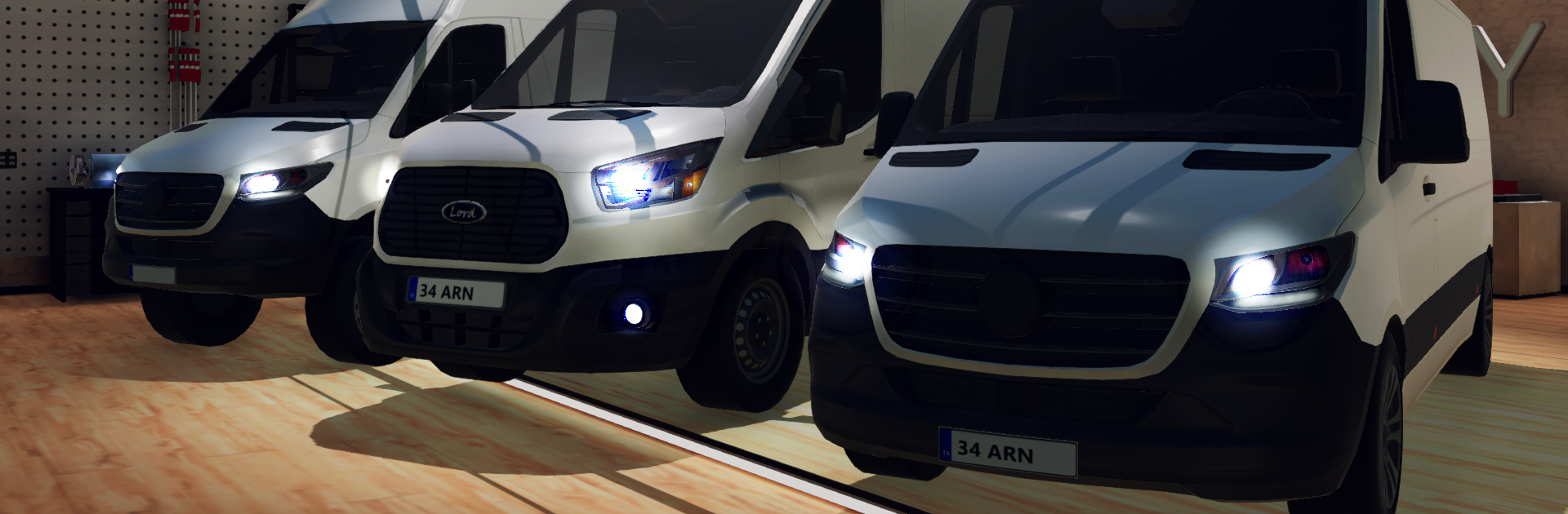
Cargo Van Simulator is all about hauling packages through a busy city and trying not to clip a curb while the light turns yellow. It puts the player in a fleet of boxy vans that actually feel heavy, so every turn matters and every bump is noticeable. Traffic can get pushy, routes twist through tight side streets and wider roads, and the game keeps things moving with a full day and night cycle plus weather that rolls in and messes with visibility. Engines growl, collisions thud, and headlights at night make the city feel alive without being flashy. Jobs pay out, the reputation meter climbs, and there is always another delivery a few blocks further than planned.

There are different vans to pick from, each with its own handling, and there is some decent customization to make the ride feel personal. The interiors are surprisingly detailed, with proper dashboards and gauges that are actually useful. Controls are straightforward. On PC with BlueStacks, steering on a keyboard or using a controller feels tight, and the bigger screen helps with reading the cabin and spotting shortcuts. The interface is clean, autosave quietly protects progress if a run gets cut short, and performance holds up without fuss. The game supports multiple languages and even nudges players toward community stuff for little in-game rewards. It is the kind of sim where the fun comes from threading a tall van through traffic, timing the brakes just right, and learning which alley shaves off that last minute when a storm rolls in.

Ready to top the leaderboard? We bet you do. Let precise controls and sharp visuals optimized on BlueStacks lead you to victory.


Game Features

Enhancements

  • Macros
  • Multi Instance
  • Multi Instance Sync
  • Script
  • Enhancements
Macros

Macros

Automate the predictable in Cargo Van Simulator and transform your gameplay with Macros. Get access to inventive Macros in the BlueStacks Macro Community
Multi Instance

Multi Instance

Play Cargo Van Simulator on one window. And chat with your friend on the other. Press CTRL + Shift + 8 to open the Multi-Instance Manager. And start creating fresh instances or clone an existing one.
Multi Instance Sync

Multi Instance Sync

Play Cargo Van Simulator with the power of Multi-Instance Sync. Replicate what you are doing on the main instance on all other instances. Level up faster, play more.
Script

Script

Script your way to gaming glory in Cargo Van Simulator with BlueStacks Script. Write and run a set of commands to automate repeated tasks. Trigger the command by assigning it to any key.
Read More

How to Download and Play Cargo Van Simulator on PC or Mac

  • Download and install BlueStacks on your PC or Mac

  • Complete Google sign-in to access the Play Store, or do it later

  • Look for Cargo Van Simulator in the search bar at the top right corner

  • Click to install Cargo Van Simulator from the search results

  • Complete Google sign-in (if you skipped step 2) to install Cargo Van Simulator

  • Click the Cargo Van Simulator icon on the home screen to start playing

video
Watch Video

Minimum System Requirements

With BlueStacks 5, you can get started on a PC that fulfills the following requirements.

  • Operating System

    Microsoft Windows 7 or above, macOS 11 (Big Sur) or above

  • Processor

    Intel, AMD or Apple Silicon Processor

  • RAM

    at least 4GB

  • HDD

    10GB Free Disk Space

Note:

* You must be an Administrator on your PC. Up to date graphics drivers from Microsoft or the chipset vendor.

Cargo Van Simulator - FAQs

  • How to play Cargo Van Simulator on Windows PC & Mac?

    Play Cargo Van Simulator on your PC or Mac by following these simple steps.

    • Click on 'Play Cargo Van Simulator on PC’ to download BlueStacks
    • Install it and log-in to Google Play Store
    • Launch and play the game.
  • Why is BlueStacks the fastest and safest platform to play games on PC?

    BlueStacks respects your privacy and is always safe and secure to use. It does not carry any malware, spyware, or any sort of additional software that could harm your PC.

    It is engineered to optimize speed and performance for a seamless gaming experience.

  • What are Cargo Van Simulator PC requirements?

    Minimum requirement to run Cargo Van Simulator on your PC

    • OS: Microsoft Windows 7 or above MacOS 11 (Big Sur) or above
    • Processor: Intel, AMD or Apple Silicon Processor
    • RAM: Your PC must have at least 4GB of RAM. (Note that having 4GB or more disk space is not a substitute for RAM)
    • HDD: 10GB Free Disk Space.
    • You must be an Administrator on your PC.







