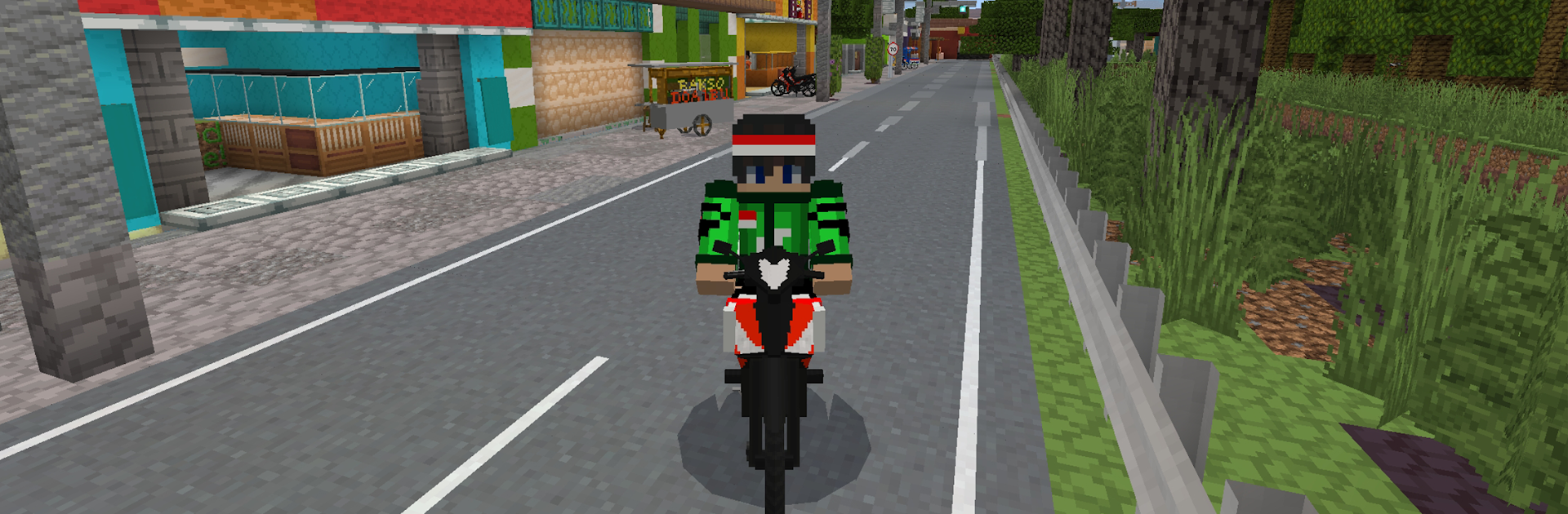
INDOCRAFT : Nuansa Indonesia

INDOCRAFT : Nuansa Indonesia

Simulation

| Angindev

Play on PC with BlueStacks or from our cloud

  • Overview
  • Game Features
  • How to Play

Page Modified On: October 24, 2025

Play INDOCRAFT : Nuansa Indonesia on PC or Mac

Explore a whole new adventure with INDOCRAFT : Nuansa Indonesia, a Simulation game created by Angindev. Experience great gameplay with BlueStacks, the most popular gaming platform to play Android games on your PC or Mac.

INDOCRAFT feels like a laid back block-builder that leans hard into Indonesian style. Players drop into a chunky, pixel world, start chopping and mining, and then turn all that stuff into tools, planks, stone blocks, and little decorations. The fun part is how the builds look. Instead of the usual generic houses, the game nudges players toward things like traditional homes and temple-style shapes, with roofs and details that give off real local flavor. It ends up looking warm and a bit nostalgic, not flashy, and that suits the pace. No rush, just gather, place blocks, try a new design, fix what looks odd, then keep going.

There is exploration, but it stays focused on finding materials for the next idea rather than constant combat. Crafting recipes are straightforward enough that someone can figure them out without a wiki, and the world is open enough that a player can wander for an hour and come back with a bag of ideas. The community angle is there too, with people sharing builds and trading tips, which helps when someone wants a temple entrance to look right or a courtyard to feel balanced. On PC with BlueStacks, mouse aiming and keybinds make building faster and less fussy, and the game looks clean at higher resolution. It is the sort of sandbox where a small hut can slowly turn into a village square, then a full complex, and no one tells the player to hurry.

Make your gaming sessions memorable with precise controls that give you an edge in close combats and visuals that pop up, bringing every character to life.


Game Features

Enhancements

  • Macros
  • Multi Instance
  • Multi Instance Sync
  • Script
  • Enhancements
Macros

Macros

Automate the predictable in INDOCRAFT : Nuansa Indonesia and transform your gameplay with Macros. Get access to inventive Macros in the BlueStacks Macro Community
Multi Instance

Multi Instance

Play INDOCRAFT : Nuansa Indonesia on one window. And chat with your friend on the other. Press CTRL + Shift + 8 to open the Multi-Instance Manager. And start creating fresh instances or clone an existing one.
Multi Instance Sync

Multi Instance Sync

Play INDOCRAFT : Nuansa Indonesia with the power of Multi-Instance Sync. Replicate what you are doing on the main instance on all other instances. Level up faster, play more.
Script

Script

Script your way to gaming glory in INDOCRAFT : Nuansa Indonesia with BlueStacks Script. Write and run a set of commands to automate repeated tasks. Trigger the command by assigning it to any key.
Read More

How to Download and Play INDOCRAFT : Nuansa Indonesia on PC or Mac

  • Download and install BlueStacks on your PC or Mac

  • Complete Google sign-in to access the Play Store, or do it later

  • Look for INDOCRAFT : Nuansa Indonesia in the search bar at the top right corner

  • Click to install INDOCRAFT : Nuansa Indonesia from the search results

  • Complete Google sign-in (if you skipped step 2) to install INDOCRAFT : Nuansa Indonesia

  • Click the INDOCRAFT : Nuansa Indonesia icon on the home screen to start playing

video
Watch Video

Minimum System Requirements

With BlueStacks 5, you can get started on a PC that fulfills the following requirements.

  • Operating System

    Microsoft Windows 7 or above, macOS 11 (Big Sur) or above

  • Processor

    Intel, AMD or Apple Silicon Processor

  • RAM

    at least 4GB

  • HDD

    10GB Free Disk Space

Note:

* You must be an Administrator on your PC. Up to date graphics drivers from Microsoft or the chipset vendor.

INDOCRAFT : Nuansa Indonesia - FAQs

  • How to play INDOCRAFT : Nuansa Indonesia on Windows PC & Mac?

    Play INDOCRAFT : Nuansa Indonesia on your PC or Mac by following these simple steps.

    • Click on 'Play INDOCRAFT : Nuansa Indonesia on PC’ to download BlueStacks
    • Install it and log-in to Google Play Store
    • Launch and play the game.
  • Why is BlueStacks the fastest and safest platform to play games on PC?

    BlueStacks respects your privacy and is always safe and secure to use. It does not carry any malware, spyware, or any sort of additional software that could harm your PC.

    It is engineered to optimize speed and performance for a seamless gaming experience.

  • What are INDOCRAFT : Nuansa Indonesia PC requirements?

    Minimum requirement to run INDOCRAFT : Nuansa Indonesia on your PC

    • OS: Microsoft Windows 7 or above MacOS 11 (Big Sur) or above
    • Processor: Intel, AMD or Apple Silicon Processor
    • RAM: Your PC must have at least 4GB of RAM. (Note that having 4GB or more disk space is not a substitute for RAM)
    • HDD: 10GB Free Disk Space.
    • You must be an Administrator on your PC.