
Exclusive Gaming Content. And More.
Get the latest updates on the BlueStacks Blog.
See MorePlay on PC with BlueStacks or from our cloud
Page Modified On: December 02, 2025
Join millions to experience Kamaeru: A Frog Refuge, an exciting Simulation game from Humble Reeds. With BlueStacks App Player, you are always a step ahead of your opponent, ready to outplay them with faster gameplay and better control with the mouse and keyboard on your PC or Mac.
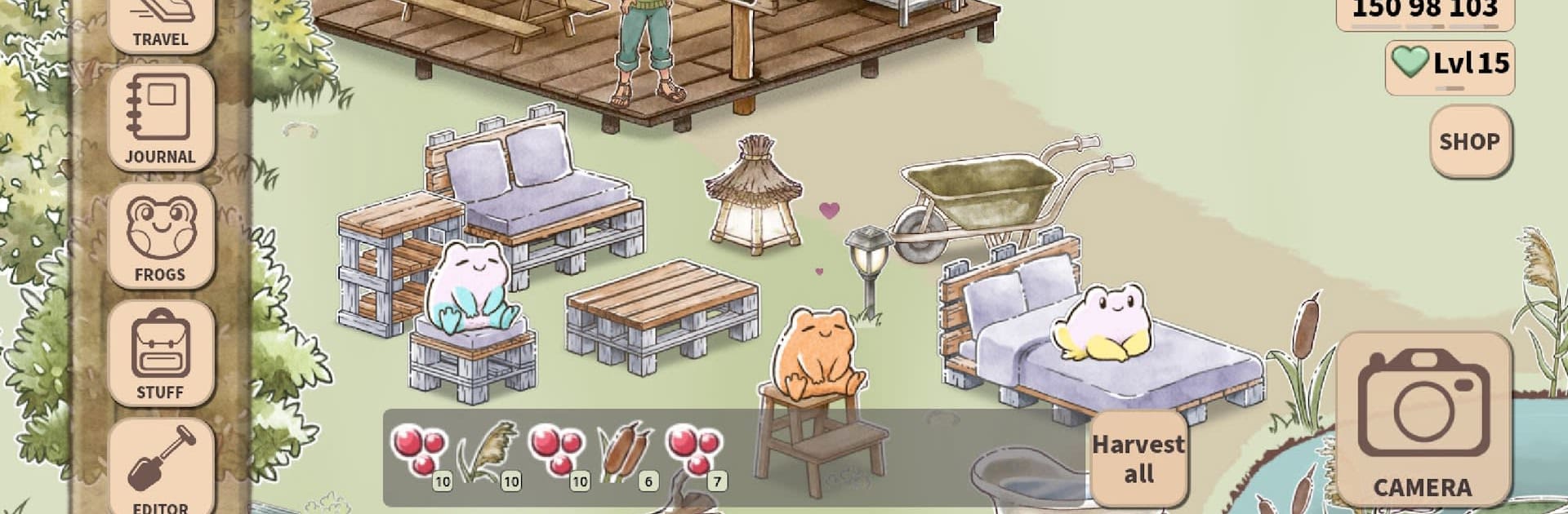
Kamaeru: A Frog Refuge feels like a slow, cozy builder where the goal is not to rush, it is to make a little swamp come back to life and fill it with frogs. The tone is calm and friendly, more nature journal than grind. On PC with BlueStacks it runs smooth and clicking around to place plants or nudge furniture is easy, so the whole thing feels like a relaxing afternoon project rather than a checklist.
The loop is simple but satisfying. Find frogs, breed them through short mini games to unlock rare colors and patterns, then snap photos to fill out a Frogedex that turns into a cute scrapbook. There are a lot of frogs, way more than expected, and they act as both collectibles and little residents to design around. The refuge itself grows as they restore wetlands through paludiculture, planting native species, harvesting sustainable crops, and crafting small goods that help the place expand. Decorating is not just for looks either. Moving and repainting furniture can trigger special frog poses, which nudges players to experiment with layouts and colors. Friendly NPCs wander in, new visitors show up, and the space starts to feel lived in without any loud pressure. No ads getting in the way, it starts free with a one time unlock if someone wants the whole package, which fits the mellow pace and the whole care-about-nature theme.
Start your journey now. Download the game on BlueStacks, invite your friends, and march on a new adventure.
Automate the predictable in Kamaeru: A Frog Refuge and transform your gameplay with Macros. Get access to inventive Macros in the BlueStacks Macro Community
Play Kamaeru: A Frog Refuge on one window. And chat with your friend on the other. Press CTRL + Shift + 8 to open the Multi-Instance Manager. And start creating fresh instances or clone an existing one.
Play Kamaeru: A Frog Refuge with the power of Multi-Instance Sync. Replicate what you are doing on the main instance on all other instances. Level up faster, play more.
Script your way to gaming glory in Kamaeru: A Frog Refuge with BlueStacks Script. Write and run a set of commands to automate repeated tasks. Trigger the command by assigning it to any key.
Download and install BlueStacks on your PC or Mac
Complete Google sign-in to access the Play Store, or do it later
Look for Kamaeru: A Frog Refuge in the search bar at the top right corner
Click to install Kamaeru: A Frog Refuge from the search results
Complete Google sign-in (if you skipped step 2) to install Kamaeru: A Frog Refuge
Click the Kamaeru: A Frog Refuge icon on the home screen to start playing
With BlueStacks 5, you can get started on a PC that fulfills the following requirements.
Microsoft Windows 7 or above, macOS 11 (Big Sur) or above
Intel, AMD or Apple Silicon Processor
at least 4GB
10GB Free Disk Space
* You must be an Administrator on your PC. Up to date graphics drivers from Microsoft or the chipset vendor.

Leave your email and we will notify
you when the game launches
Play Kamaeru: A Frog Refuge on your PC or Mac by following these simple steps.
BlueStacks respects your privacy and is always safe and secure to use. It does not carry any malware, spyware, or any sort of additional software that could harm your PC.
It is engineered to optimize speed and performance for a seamless gaming experience.
Minimum requirement to run Kamaeru: A Frog Refuge on your PC

Since you are on your phone, we are going to send you to the Google Play page.
In some cases BlueStacks uses affiliate links when linking to Google Play
BlueStacks 4 is not available on Windows XP. You must have Windows 7 or higher. Windows 10 is recommended.