Offroad Patriot
Offroad Patriot

Offroad Patriot

Simulation

| Oppana Games

Play on PC with BlueStacks or from our cloud

  • Overview
  • Game Features
  • How to Play

Page Modified On: June 17, 2025

Play Offroad Patriot on PC or Mac

Offroad Patriot brings the Simulation genre to life, and throws up exciting challenges for gamers. Developed by Oppana Games, this Android game is best experienced on BlueStacks, the World’s #1 app player for PC and Mac users.

About the Game

Ready to kick up some dirt and hit the road? Offroad Patriot from Oppana Games drops you straight into a Simulation ride where tough Russian trucks, bumpy trails, and your driving skills have a standoff. You’re not just going from A to B—you’re making your own rules, whether you’re navigating city traffic or tearing across the desert with friends. Expect banged-up bumpers, tight drifts, and plenty of moments that’ll make you grin (or maybe scream at your screen).

Game Features

  • Realistic Physics & Car Damage
    Crash into a tree or speed bump, and you’ll feel it—every scratch and dent messes with your ride. Offroad Patriot doesn’t mess around when it comes to car physics.

  • Choice of Perspectives
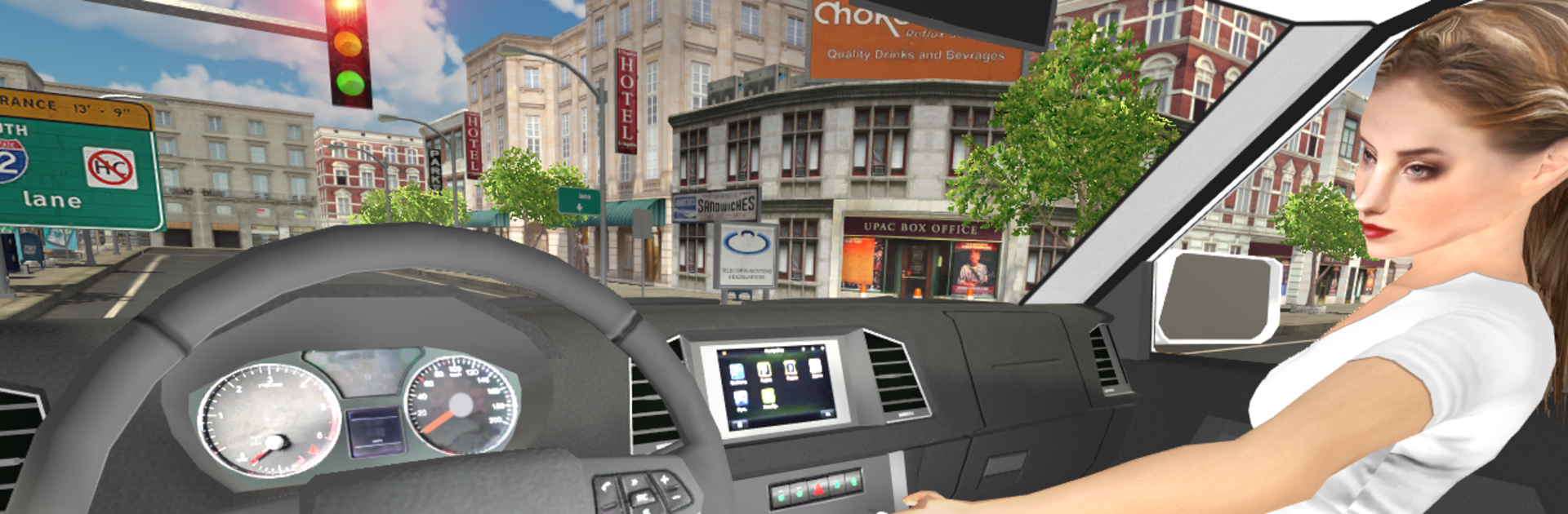
    Like to get a close-up view? First-person mode puts you right in the driver’s seat. Prefer to admire your truck from afar? Flip to third-person and check out the mud splatter.

  • Multiple Game Modes
    Whether you want a solo cruise through the city, free-roam in the desert, or compete online against other drivers, you’re covered. Challenge real players or just take in the scenery at your own pace.

  • Interactive Car Details
    Twist the knobs, fiddle with buttons, or glance around your detailed cockpit. There’s more to your rig than just steering—poke around and see what you find.

  • Customized Racing & Drifting
    If you’re in the mood for a little racing, set your own rules. Music on, wind in your hair, and tires screeching. Drifting through curves feels just right, and it’s even better when you’re the one behind the wheel.

  • Handy Camera Controls
    Adjust your view until you find what feels best. Sometimes you want the wide shot; other times, you need that up-close dashboard adrenaline.

  • Gas Stations & Survival Tips
    Don’t forget to refuel, and keep doors locked if you’re worried about a quick exit (or just like playing it safe).

  • Multiplayer Action
    Head online for city or desert matchups—test your driving chops against real people for a little friendly (or not-so-friendly) competition.

  • Smooth Play on BlueStacks
    Looking for better visuals and tighter controls? Try rolling out on your PC using BlueStacks.

  • Slick Looks
    From shiny paint jobs to dusty tracks, the graphics do justice to every cracked window or fresh set of tire marks.

Just remember: corners aren’t for flooring it and those interactive hints actually save your hide. Have fun poking around and seeing just how much trouble you can handle!

Make your gaming sessions memorable with precise controls that give you an edge in close combats and visuals that pop up, bringing every character to life.


Game Features

Enhancements

  • Macros
  • Multi Instance
  • Multi Instance Sync
  • Script
  • Enhancements
Macros

Macros

Automate the predictable in Offroad Patriot and transform your gameplay with Macros. Get access to inventive Macros in the BlueStacks Macro Community
Multi Instance

Multi Instance

Play Offroad Patriot on one window. And chat with your friend on the other. Press CTRL + Shift + 8 to open the Multi-Instance Manager. And start creating fresh instances or clone an existing one.
Multi Instance Sync

Multi Instance Sync

Play Offroad Patriot with the power of Multi-Instance Sync. Replicate what you are doing on the main instance on all other instances. Level up faster, play more.
Script

Script

Script your way to gaming glory in Offroad Patriot with BlueStacks Script. Write and run a set of commands to automate repeated tasks. Trigger the command by assigning it to any key.
Read More

How to Download and Play Offroad Patriot on PC or Mac

  • Download and install BlueStacks on your PC or Mac

  • Complete Google sign-in to access the Play Store, or do it later

  • Look for Offroad Patriot in the search bar at the top right corner

  • Click to install Offroad Patriot from the search results

  • Complete Google sign-in (if you skipped step 2) to install Offroad Patriot

  • Click the Offroad Patriot icon on the home screen to start playing

video
Watch Video

Minimum System Requirements

With BlueStacks 5, you can get started on a PC that fulfills the following requirements.

  • Operating System

    Microsoft Windows 7 or above, macOS 11 (Big Sur) or above

  • Processor

    Intel, AMD or Apple Silicon Processor

  • RAM

    at least 4GB

  • HDD

    10GB Free Disk Space

Note:

* You must be an Administrator on your PC. Up to date graphics drivers from Microsoft or the chipset vendor.

Offroad Patriot - FAQs

  • How to play Offroad Patriot on Windows PC & Mac?

    Play Offroad Patriot on your PC or Mac by following these simple steps.

    • Click on 'Play Offroad Patriot on PC’ to download BlueStacks
    • Install it and log-in to Google Play Store
    • Launch and play the game.
  • Why is BlueStacks the fastest and safest platform to play games on PC?

    BlueStacks respects your privacy and is always safe and secure to use. It does not carry any malware, spyware, or any sort of additional software that could harm your PC.

    It is engineered to optimize speed and performance for a seamless gaming experience.

  • What are Offroad Patriot PC requirements?

    Minimum requirement to run Offroad Patriot on your PC

    • OS: Microsoft Windows 7 or above MacOS 11 (Big Sur) or above
    • Processor: Intel, AMD or Apple Silicon Processor
    • RAM: Your PC must have at least 4GB of RAM. (Note that having 4GB or more disk space is not a substitute for RAM)
    • HDD: 10GB Free Disk Space.
    • You must be an Administrator on your PC.