Submarine Pirates
Submarine Pirates

Submarine Pirates

Simulation

| Fusion17 Software

Play on PC with BlueStacks or from our cloud

  • Overview
  • Game Features
  • How to Play

Page Modified On: January 09, 2026

Play Submarine Pirates on PC or Mac

Bring your A-game to Submarine Pirates, the Simulation game sensation from Fusion17 Software. Give your gameplay the much-needed boost with precise game controls, high FPS graphics, and top-tier features on your PC or Mac with BlueStacks.

About the Game

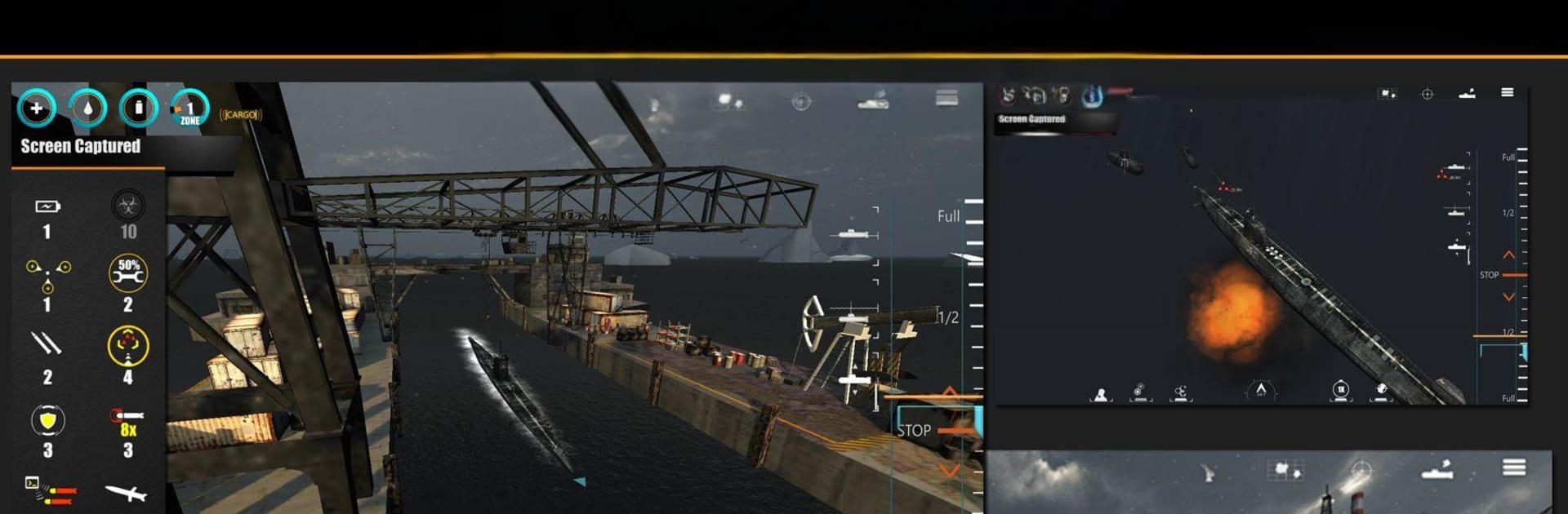
Submarine Pirates from Fusion17 Software puts you at the helm of a stealth attack sub patrolling the frozen edges of the Antarctic. This Simulation blends tactical decision-making with quick, arcade-style action as you protect hidden bases and vital rigs from whoever shows up on your sonar. Expect tight resource management, tricky navigation through moving ice, and wild tech that lets you flip a losing fight on its head.

Game Features

  • Tactical Sub Command: Balance speed, depth, and heading while lining up shots and staying off enemy radar. Every maneuver matters when your turn rate isn’t forgiving.
  • Dynamic Antarctic Map: Navigate shifting ice fields and changing routes. No two patrols feel the same, so you’ll constantly adapt your plan.
  • Unpredictable Encounters: Cross paths with carriers, destroyers, submarines, civilian ships, aircraft, helicopters, and the occasional… unidentified visitor.
  • Sci‑Fi Tools of the Trade: Outfox the enemy with EMP blasts, teleportation tricks, torpedo hacking, defensive shields, and long-range missiles when things get spicy.
  • Deep Upgrades: Tune your sub across dozens of abilities and unlock a hefty pool of upgrade points to shape a build that fits your style.
  • Strategy + Arcade Flow: Plan like a tactician, act like a pilot. Manage supplies, pick targets, and switch from stalking to striking at the right moment.
  • Realistic Handling: Heavy hull, slow turns, tight spaces—thread your way between icebergs or risk scraping steel.
  • Bases and Resupply: Hit floating hubs to reload, repair, and stash valuable gear between engagements.
  • Visual Controls: Adjust graphics settings to match your device and keep the action smooth.
  • Optional PC Play: Prefer a keyboard and mouse? Play Submarine Pirates on BlueStacks for comfy desktop controls without changing the experience.

Ready to top the leaderboard? We bet you do. Let precise controls and sharp visuals optimized on BlueStacks lead you to victory.


Game Features

Enhancements

  • Macros
  • Multi Instance
  • Multi Instance Sync
  • Script
  • Enhancements
Macros

Macros

Automate the predictable in Submarine Pirates and transform your gameplay with Macros. Get access to inventive Macros in the BlueStacks Macro Community
Multi Instance

Multi Instance

Play Submarine Pirates on one window. And chat with your friend on the other. Press CTRL + Shift + 8 to open the Multi-Instance Manager. And start creating fresh instances or clone an existing one.
Multi Instance Sync

Multi Instance Sync

Play Submarine Pirates with the power of Multi-Instance Sync. Replicate what you are doing on the main instance on all other instances. Level up faster, play more.
Script

Script

Script your way to gaming glory in Submarine Pirates with BlueStacks Script. Write and run a set of commands to automate repeated tasks. Trigger the command by assigning it to any key.
Read More

How to Download and Play Submarine Pirates on PC or Mac

  • Download and install BlueStacks on your PC or Mac

  • Complete Google sign-in to access the Play Store, or do it later

  • Look for Submarine Pirates in the search bar at the top right corner

  • Click to install Submarine Pirates from the search results

  • Complete Google sign-in (if you skipped step 2) to install Submarine Pirates

  • Click the Submarine Pirates icon on the home screen to start playing

video
Watch Video

Minimum System Requirements

With BlueStacks 5, you can get started on a PC that fulfills the following requirements.

  • Operating System

    Microsoft Windows 7 or above, macOS 11 (Big Sur) or above

  • Processor

    Intel, AMD or Apple Silicon Processor

  • RAM

    at least 4GB

  • HDD

    10GB Free Disk Space

Note:

* You must be an Administrator on your PC. Up to date graphics drivers from Microsoft or the chipset vendor.

Submarine Pirates - FAQs

  • How to play Submarine Pirates on Windows PC & Mac?

    Play Submarine Pirates on your PC or Mac by following these simple steps.

    • Click on 'Play Submarine Pirates on PC’ to download BlueStacks
    • Install it and log-in to Google Play Store
    • Launch and play the game.
  • Why is BlueStacks the fastest and safest platform to play games on PC?

    BlueStacks respects your privacy and is always safe and secure to use. It does not carry any malware, spyware, or any sort of additional software that could harm your PC.

    It is engineered to optimize speed and performance for a seamless gaming experience.

  • What are Submarine Pirates PC requirements?

    Minimum requirement to run Submarine Pirates on your PC

    • OS: Microsoft Windows 7 or above MacOS 11 (Big Sur) or above
    • Processor: Intel, AMD or Apple Silicon Processor
    • RAM: Your PC must have at least 4GB of RAM. (Note that having 4GB or more disk space is not a substitute for RAM)
    • HDD: 10GB Free Disk Space.
    • You must be an Administrator on your PC.