
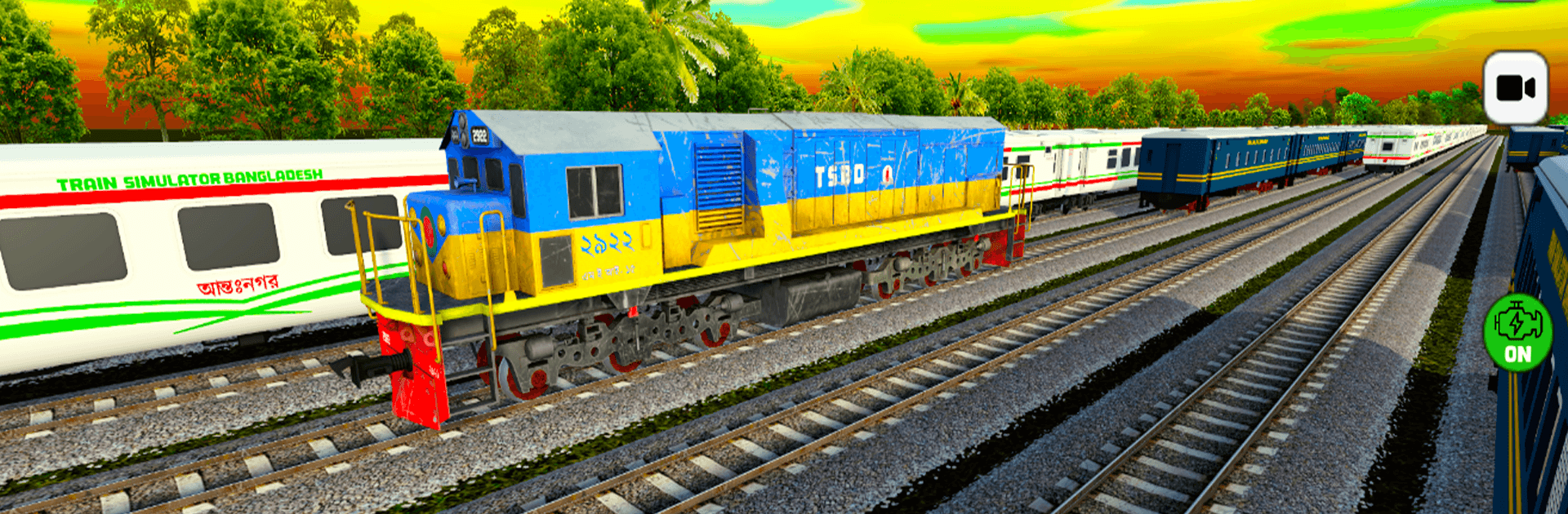
Train Simulator Bangladesh

Train Simulator Bangladesh

Simulation

| Rahamat Studio

Play on PC with BlueStacks or from our cloud

  • Overview
  • Game Features
  • How to Play

Page Modified On: April 15, 2026

Play Train Simulator Bangladesh on PC or Mac

Bring your A-game to Train Simulator Bangladesh, the Simulation game sensation from Rahamat Studio. Give your gameplay the much-needed boost with precise game controls, high FPS graphics, and top-tier features on your PC or Mac with BlueStacks.

About the Game

Train Simulator Bangladesh is a Simulation title from Rahamat Studio that puts you in the driver’s seat of Bangladesh’s railways. You’ll handle departures, manage speed, watch the signals, and bring passengers into busy platforms on time. It’s built for people who love the rhythm of real rail operations, whether you’re squeezing in a quick run on your phone or playing on a bigger screen with BlueStacks.

Game Features

  • Authentic Bangladeshi Routes: Roll through well-known lines that capture the feel of the country’s network—from crowded city stations to long stretches of countryside.
  • Real Operations, Real Rules: Obey signals, mind speed limits, nail your braking points, and line up perfectly on the platform. Smooth when you get it right, unforgiving when you don’t.
  • Day and Night Runs: Tackle early-morning fog, bright afternoons, or late-night services with lighting that shifts the mood and visibility.
  • Locomotives and Coaches: Choose from multiple engines and train formations to match the service you want to run.
  • Immersive Audio: Hear the wheels, horns, and ambient station noise that make each route feel alive.
  • Optimized Performance: Built for mobile with steady frame rates and clean visuals, so the focus stays on driving.
  • Easy, Intuitive Controls: Simple, touch-friendly controls that let you manage throttle, brakes, and doors without fuss.
  • Works Offline: No connection needed for regular play, perfect for long rides or spotty service.
  • Growing Content: More routes, stations, locomotives, and visual upgrades are planned to keep the experience fresh.
  • Play on PC with BlueStacks: Prefer a bigger display and keyboard controls? It runs smoothly there too.

If you’ve been hunting for a Train driving game BD or a Railway simulator BD, this nails the local flavor. It’s a solid pick for anyone seeking a modern train simulator 2025 feel on mobile—a standout train simulator Android fans (বাংলাদেশ ট্রেন গেম) can sink into.

Slay your opponents with your epic moves. Play it your way on BlueStacks and dominate the battlefield.


Game Features

Enhancements

  • Macros
  • Multi Instance
  • Multi Instance Sync
  • Script
  • Enhancements
Macros

Macros

Automate the predictable in Train Simulator Bangladesh and transform your gameplay with Macros. Get access to inventive Macros in the BlueStacks Macro Community
Multi Instance

Multi Instance

Play Train Simulator Bangladesh on one window. And chat with your friend on the other. Press CTRL + Shift + 8 to open the Multi-Instance Manager. And start creating fresh instances or clone an existing one.
Multi Instance Sync

Multi Instance Sync

Play Train Simulator Bangladesh with the power of Multi-Instance Sync. Replicate what you are doing on the main instance on all other instances. Level up faster, play more.
Script

Script

Script your way to gaming glory in Train Simulator Bangladesh with BlueStacks Script. Write and run a set of commands to automate repeated tasks. Trigger the command by assigning it to any key.
Read More

How to Download and Play Train Simulator Bangladesh on PC or Mac

  • Download and install BlueStacks on your PC or Mac

  • Complete Google sign-in to access the Play Store, or do it later

  • Look for Train Simulator Bangladesh in the search bar at the top right corner

  • Click to install Train Simulator Bangladesh from the search results

  • Complete Google sign-in (if you skipped step 2) to install Train Simulator Bangladesh

  • Click the Train Simulator Bangladesh icon on the home screen to start playing

video
Watch Video

Minimum System Requirements

With BlueStacks 5, you can get started on a PC that fulfills the following requirements.

  • Operating System

    Microsoft Windows 7 or above, macOS 11 (Big Sur) or above

  • Processor

    Intel, AMD or Apple Silicon Processor

  • RAM

    at least 4GB

  • HDD

    10GB Free Disk Space

Note:

* You must be an Administrator on your PC. Up to date graphics drivers from Microsoft or the chipset vendor.

Train Simulator Bangladesh - FAQs

  • How to play Train Simulator Bangladesh on Windows PC & Mac?

    Play Train Simulator Bangladesh on your PC or Mac by following these simple steps.

    • Click on 'Play Train Simulator Bangladesh on PC’ to download BlueStacks
    • Install it and log-in to Google Play Store
    • Launch and play the game.
  • Why is BlueStacks the fastest and safest platform to play games on PC?

    BlueStacks respects your privacy and is always safe and secure to use. It does not carry any malware, spyware, or any sort of additional software that could harm your PC.

    It is engineered to optimize speed and performance for a seamless gaming experience.

  • What are Train Simulator Bangladesh PC requirements?

    Minimum requirement to run Train Simulator Bangladesh on your PC

    • OS: Microsoft Windows 7 or above MacOS 11 (Big Sur) or above
    • Processor: Intel, AMD or Apple Silicon Processor
    • RAM: Your PC must have at least 4GB of RAM. (Note that having 4GB or more disk space is not a substitute for RAM)
    • HDD: 10GB Free Disk Space.
    • You must be an Administrator on your PC.







