Turboprop Flight Simulator

Turboprop Flight Simulator

Simulation

| AXgamesoft

Play on PC with BlueStacks or from our cloud

  • Overview
  • Game Features
  • How to Play

Page Modified On: April 07, 2026

Play Turboprop Flight Simulator on PC or Mac

From the innovators and creators at AXgamesoft, Turboprop Flight Simulator is another fun addition to the World of Simulation games. Go beyond your mobile screen and play it bigger and better on your PC or Mac. An immersive experience awaits you.

About the Game

Turboprop Flight Simulator from AXgamesoft is a hands-on Simulation that puts you in the left seat of modern turboprop aircraft. You’ll shuffle cargo, ferry passengers, run search-and-rescue, or just roam the map in everything from rugged military transports to sleek regional airliners and wild tilt‑wing concepts. Prefer a bigger screen and smoother inputs? It plays nicely on BlueStacks, too.

Game Features

  • Authentic turboprop feel — Weight, inertia, and prop behavior make every taxi, takeoff, and landing feel earned, not scripted.
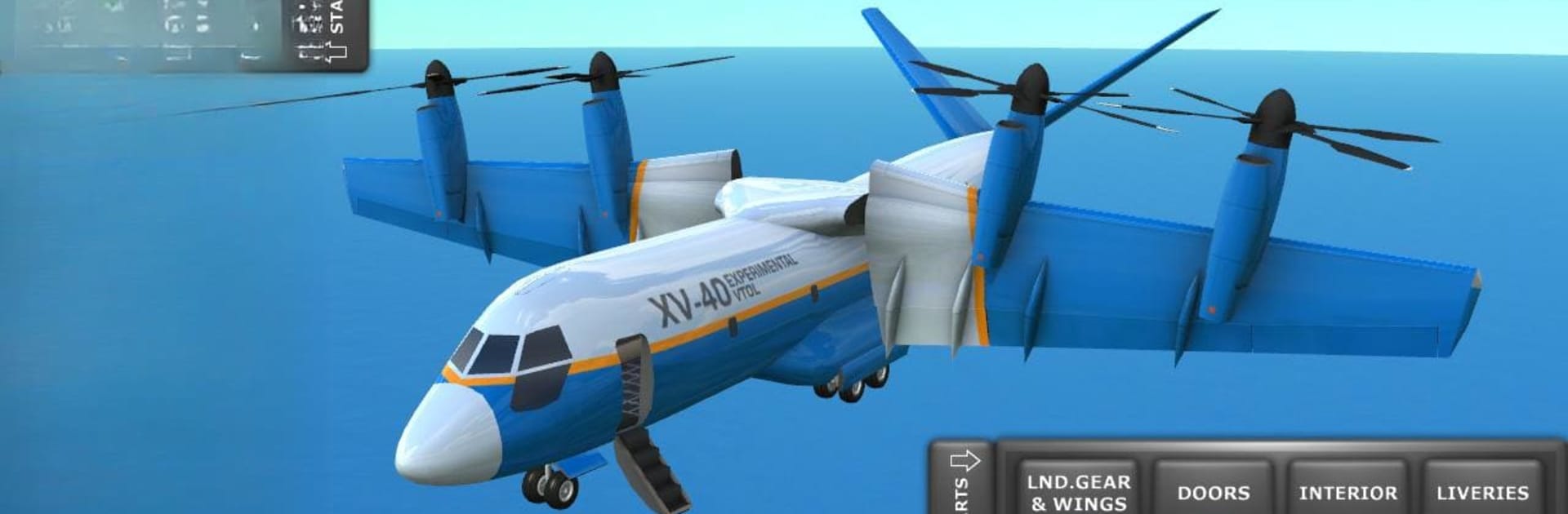
  • A fleet with personality — Fly tactical lifters, coastguard SAR variants, special ops models, regional airliners like the RL‑42/RL‑72, tilt‑wing VTOLs such as the XV‑40, and even nimble seaplanes.
  • Learn as you go — Step-by-step training covers the basics: taxiing, lining up, rotating, flaring, and bringing it home safely.
  • Missions or sandbox — Tackle structured objectives or kick back in free flight and chart your own routes on the map.
  • Go beyond the cockpit — Walk through cabins in first person, flip switches, open doors, drop the cargo ramp, and manage exterior lights.
  • Cargo work, done right — Load and unload freight, roll vehicles into the hold, and perform midair airdrops with the big haulers.
  • Ground-side action — Hop into service vehicles to position loads or just explore airfields from a different angle.
  • Rough strips included — Use paved runways or make do with improvised fields; when space is tight, JATO/L can give you that extra push.
  • Full-flight controls — Rudder, flaps, spoilers, thrust reversers, auto-brakes, and landing gear are all at your fingertips.
  • Views and inputs your way — Swap between captain/copilot seats and external cams; use tilt, on-screen yoke/stick, or a mixed setup.
  • Looks and sounds right — Detailed cockpits and convincing turbine/prop audio add to the immersion without getting in your way.
  • Visible damage model — Clip a wingtip, shear a tail, or break the fuselage if you push too hard; your landings matter.
  • A world to roam — Several islands with plenty of airports, plus unit options for speed, altitude, and distance (metric, aviation standard, or imperial).

Slay your opponents with your epic moves. Play it your way on BlueStacks and dominate the battlefield.


Game Features

Enhancements

  • Macros
  • Multi Instance
  • Multi Instance Sync
  • Script
  • Enhancements
Macros

Macros

Automate the predictable in Turboprop Flight Simulator and transform your gameplay with Macros. Get access to inventive Macros in the BlueStacks Macro Community
Multi Instance

Multi Instance

Play Turboprop Flight Simulator on one window. And chat with your friend on the other. Press CTRL + Shift + 8 to open the Multi-Instance Manager. And start creating fresh instances or clone an existing one.
Multi Instance Sync

Multi Instance Sync

Play Turboprop Flight Simulator with the power of Multi-Instance Sync. Replicate what you are doing on the main instance on all other instances. Level up faster, play more.
Script

Script

Script your way to gaming glory in Turboprop Flight Simulator with BlueStacks Script. Write and run a set of commands to automate repeated tasks. Trigger the command by assigning it to any key.
Read More

How to Download and Play Turboprop Flight Simulator on PC or Mac

  • Download and install BlueStacks on your PC or Mac

  • Complete Google sign-in to access the Play Store, or do it later

  • Look for Turboprop Flight Simulator in the search bar at the top right corner

  • Click to install Turboprop Flight Simulator from the search results

  • Complete Google sign-in (if you skipped step 2) to install Turboprop Flight Simulator

  • Click the Turboprop Flight Simulator icon on the home screen to start playing

video
Watch Video

Minimum System Requirements

With BlueStacks 5, you can get started on a PC that fulfills the following requirements.

  • Operating System

    Microsoft Windows 7 or above, macOS 11 (Big Sur) or above

  • Processor

    Intel, AMD or Apple Silicon Processor

  • RAM

    at least 4GB

  • HDD

    10GB Free Disk Space

Note:

* You must be an Administrator on your PC. Up to date graphics drivers from Microsoft or the chipset vendor.

Turboprop Flight Simulator - FAQs

  • How to play Turboprop Flight Simulator on Windows PC & Mac?

    Play Turboprop Flight Simulator on your PC or Mac by following these simple steps.

    • Click on 'Play Turboprop Flight Simulator on PC’ to download BlueStacks
    • Install it and log-in to Google Play Store
    • Launch and play the game.
  • Why is BlueStacks the fastest and safest platform to play games on PC?

    BlueStacks respects your privacy and is always safe and secure to use. It does not carry any malware, spyware, or any sort of additional software that could harm your PC.

    It is engineered to optimize speed and performance for a seamless gaming experience.

  • What are Turboprop Flight Simulator PC requirements?

    Minimum requirement to run Turboprop Flight Simulator on your PC

    • OS: Microsoft Windows 7 or above MacOS 11 (Big Sur) or above
    • Processor: Intel, AMD or Apple Silicon Processor
    • RAM: Your PC must have at least 4GB of RAM. (Note that having 4GB or more disk space is not a substitute for RAM)
    • HDD: 10GB Free Disk Space.
    • You must be an Administrator on your PC.