
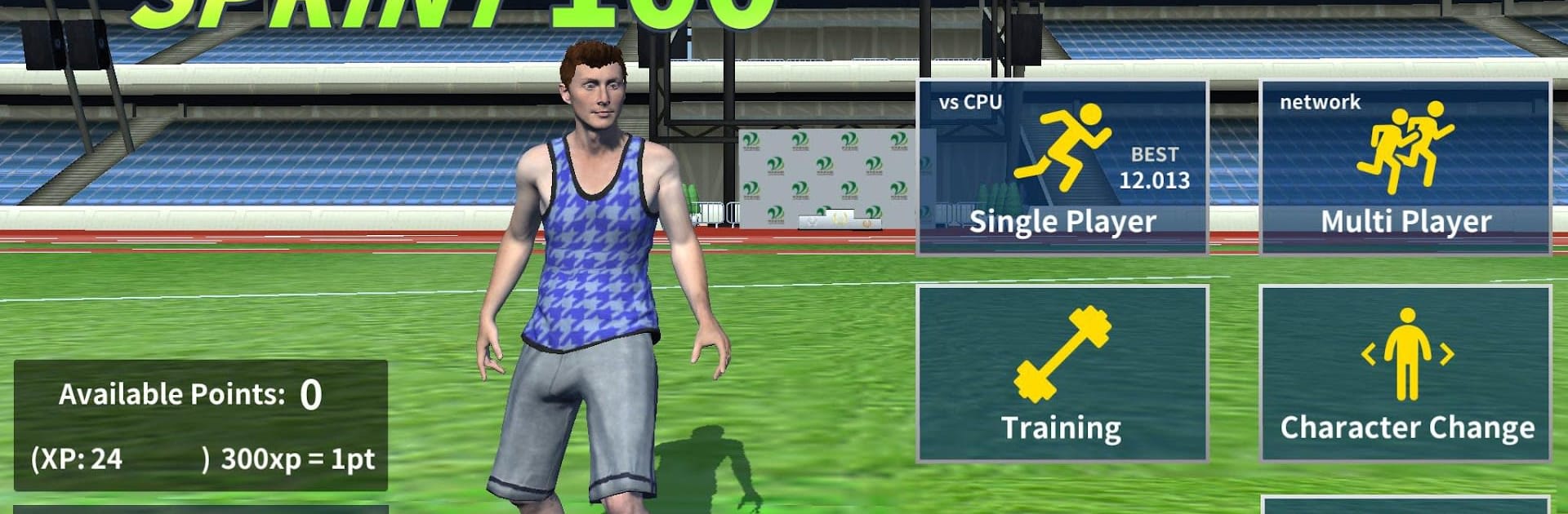
Sprint 100 multiplay supported

Sprint 100 multiplay supported

Sports

| Wasabi Applications (わさびアプリケーションズ株式会社)

Play on PC with BlueStacks or from our cloud

  • Overview
  • Game Features
  • How to Play

Page Modified On: October 10, 2025

Play Sprint 100 multiplay supported on PC or Mac

Bring your A-game to Sprint 100 multiplay supported, the Sports game sensation from Wasabi Applications (わさびアプリケーションズ株式会社). Give your gameplay the much-needed boost with precise game controls, high FPS graphics, and top-tier features on your PC or Mac with BlueStacks.

About the Game

Sprint 100 multiplay supported turns the classic 100-meter dash into a frantic tap race where rhythm matters as much as speed. Alternate the left and right buttons as fast as you can, find your flow, and chase that photo finish against friends or strangers. Made by Wasabi Applications (わさびアプリケーションズ株式会社), this Sports sprint is simple to learn, tough to master, and surprisingly addictive. Prefer a bigger view? You can also play it on your PC with BlueStacks.

Game Features

  • Tap-to-Sprint Core
    Alternate left/right taps to drive your runner forward. It’s pure timing, quick reactions, and a mad dash to the line.

  • Clean 3D Track Vibes
    Race on a polished 3D track with stadium flair, crisp animations, and satisfying start-to-finish momentum.

  • Distinct Athletes
    Collect and run with unique characters, each bringing their own look and personality to the lane.

  • Progress That Feels Good
    Level up to boost performance, shave off milliseconds, and push for personal bests.

  • Real-Time Multiplayer
    Go head-to-head online in short, high-stakes races. Bragging rights included.

  • Olympic-Style Events
    Classic 100m sprint rules—starting signal, explosive start, and a tape you’ll want to break first.

  • Free-to-Play Fun
    Jump in without paying, run a few heats, come back for more—no fuss.

  • Thumb-Burning Challenge
    Those bursts of tapping? Your fingers will feel it—in a good way.

  • Quick Races, Instant Rematches
    Sessions are fast, making it easy to squeeze in “just one more” heat.

  • Best on Newer Devices
    For the smoothest frame rate and snappy inputs, newer hardware is recommended.

Start your journey now. Download the game on BlueStacks, invite your friends, and march on a new adventure.


Game Features

Enhancements

  • Macros
  • Multi Instance
  • Multi Instance Sync
  • Script
  • Enhancements
Macros

Macros

Automate the predictable in Sprint 100 multiplay supported and transform your gameplay with Macros. Get access to inventive Macros in the BlueStacks Macro Community
Multi Instance

Multi Instance

Play Sprint 100 multiplay supported on one window. And chat with your friend on the other. Press CTRL + Shift + 8 to open the Multi-Instance Manager. And start creating fresh instances or clone an existing one.
Multi Instance Sync

Multi Instance Sync

Play Sprint 100 multiplay supported with the power of Multi-Instance Sync. Replicate what you are doing on the main instance on all other instances. Level up faster, play more.
Script

Script

Script your way to gaming glory in Sprint 100 multiplay supported with BlueStacks Script. Write and run a set of commands to automate repeated tasks. Trigger the command by assigning it to any key.
Read More

How to Download and Play Sprint 100 multiplay supported on PC or Mac

  • Download and install BlueStacks on your PC or Mac

  • Complete Google sign-in to access the Play Store, or do it later

  • Look for Sprint 100 multiplay supported in the search bar at the top right corner

  • Click to install Sprint 100 multiplay supported from the search results

  • Complete Google sign-in (if you skipped step 2) to install Sprint 100 multiplay supported

  • Click the Sprint 100 multiplay supported icon on the home screen to start playing

video
Watch Video

Minimum System Requirements

With BlueStacks 5, you can get started on a PC that fulfills the following requirements.

  • Operating System

    Microsoft Windows 7 or above, macOS 11 (Big Sur) or above

  • Processor

    Intel, AMD or Apple Silicon Processor

  • RAM

    at least 4GB

  • HDD

    10GB Free Disk Space

Note:

* You must be an Administrator on your PC. Up to date graphics drivers from Microsoft or the chipset vendor.

Sprint 100 multiplay supported - FAQs

  • How to play Sprint 100 multiplay supported on Windows PC & Mac?

    Play Sprint 100 multiplay supported on your PC or Mac by following these simple steps.

    • Click on 'Play Sprint 100 multiplay supported on PC’ to download BlueStacks
    • Install it and log-in to Google Play Store
    • Launch and play the game.
  • Why is BlueStacks the fastest and safest platform to play games on PC?

    BlueStacks respects your privacy and is always safe and secure to use. It does not carry any malware, spyware, or any sort of additional software that could harm your PC.

    It is engineered to optimize speed and performance for a seamless gaming experience.

  • What are Sprint 100 multiplay supported PC requirements?

    Minimum requirement to run Sprint 100 multiplay supported on your PC

    • OS: Microsoft Windows 7 or above MacOS 11 (Big Sur) or above
    • Processor: Intel, AMD or Apple Silicon Processor
    • RAM: Your PC must have at least 4GB of RAM. (Note that having 4GB or more disk space is not a substitute for RAM)
    • HDD: 10GB Free Disk Space.
    • You must be an Administrator on your PC.







