Cafe Simulator: Coffee&Donuts

Cafe Simulator: Coffee&Donuts

Strategy

| Try balalay games

Play on PC with BlueStacks or from our cloud

  • Overview
  • Game Features
  • How to Play

Page Modified On: January 02, 2026

Play Cafe Simulator: Coffee&Donuts on PC or Mac

Explore a whole new adventure with Cafe Simulator: Coffee&Donuts, a Strategy game created by Try balalay games. Experience great gameplay with BlueStacks, the most popular gaming platform to play Android games on your PC or Mac.

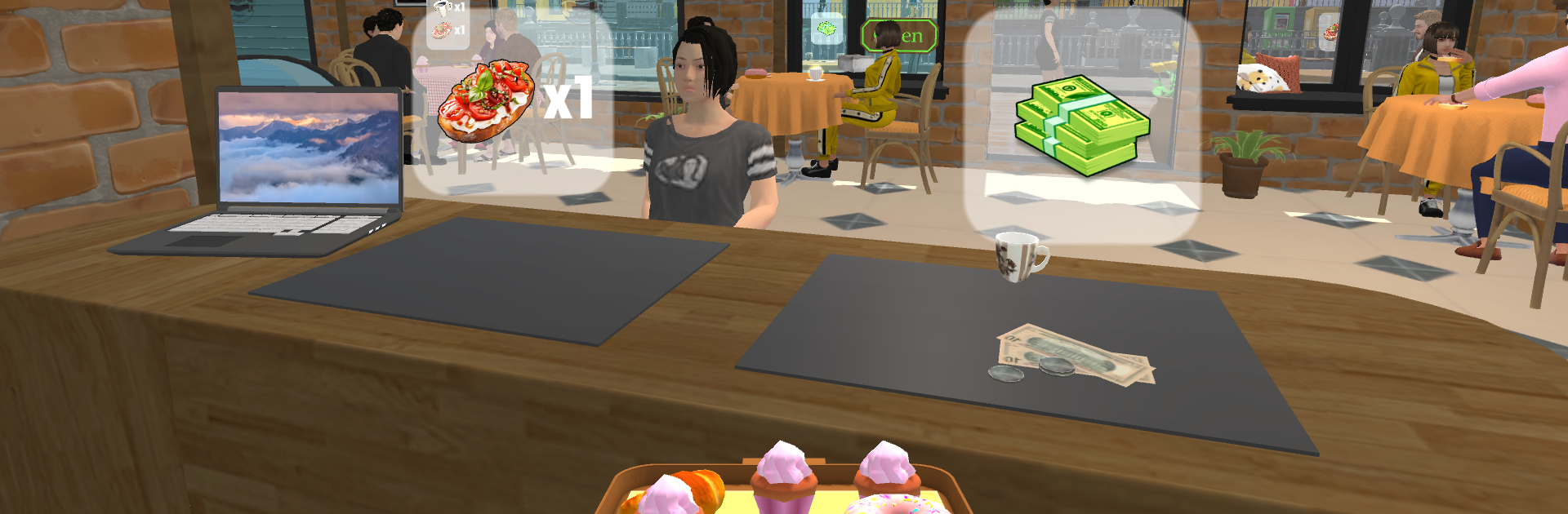
Cafe Simulator: Coffee&Donuts is a chill little management sim where the player actually does the work, not just taps a timer and waits. Orders come in, and every step is hands on. Slicing cake is a quick mini task, juices need to be squeezed, dishes get washed in a soapy swirl, coffee and donuts go out to the counter before they cool. It starts with a tiny street stall and slowly grows into a proper cafe, the flow gets busier but it feels fair, like the game teaches the rhythm as it goes. Customers are not just faceless either, simple dialogue choices can nudge their mood and tips, so service matters.

Between rushes, there is a nice home improvement loop. Walls can be painted, furniture moved around, little decorations bought to make the place feel less plain. Supplies have to be ordered, like croissants and other goods, or the next wave of guests will be staring at empty trays. New equipment opens fresh menu items and speeds up tasks, so the upgrades actually change how it plays, not only numbers. Controls are clean and obvious, no clutter. On PC with BlueStacks, the mouse makes the slicing and clicking very clean, and it is easy to drag items exactly where they need to go. It is the kind of game that is calm, a bit tactile, and oddly satisfying when a line of orders clears out just right.

Get ready for a buttery smooth, high-performance gaming action only on BlueStacks.

Game Features

Enhancements

  • Macros
  • Multi Instance
  • Multi Instance Sync
  • Eco Mode
  • Enhancements
Macros

Macros

Skip the boring parts of a game. Play Cafe Simulator: Coffee&Donuts with Macros and get the edge. Simply record a sequence of commands and execute them at any moment.
Multi Instance

Multi Instance

Why limit to one game on your phone when you can play many on your PC? Open multiple instances of Cafe Simulator: Coffee&Donuts at once with Multi-Instance. Leverage the power of different accounts by doing more.
Multi Instance Sync

Multi Instance Sync

Get the best out of Cafe Simulator: Coffee&Donuts with Multi-Instance Sync. Play the game from different accounts and build your own empire. Use Multi-instance sync to repeat the action in the main BlueStacks instance on all other instances.
Eco Mode

Eco Mode

Find the rarest heroes by making multiple summons in Cafe Simulator: Coffee&Donuts. And while you are at it, reduce your PC’s resource consumption with the Eco Mode. Farm efficiently. Get the best results.
Read More

How to Download and Play Cafe Simulator: Coffee&Donuts on PC or Mac

  • Download and install BlueStacks on your PC or Mac

  • Complete Google sign-in to access the Play Store, or do it later

  • Look for Cafe Simulator: Coffee&Donuts in the search bar at the top right corner

  • Click to install Cafe Simulator: Coffee&Donuts from the search results

  • Complete Google sign-in (if you skipped step 2) to install Cafe Simulator: Coffee&Donuts

  • Click the Cafe Simulator: Coffee&Donuts icon on the home screen to start playing

video
Watch Video

Minimum System Requirements

With BlueStacks 5, you can get started on a PC that fulfills the following requirements.

  • Operating System

    Microsoft Windows 7 or above, macOS 11 (Big Sur) or above

  • Processor

    Intel, AMD or Apple Silicon Processor

  • RAM

    at least 4GB

  • HDD

    10GB Free Disk Space

Note:

* You must be an Administrator on your PC. Up to date graphics drivers from Microsoft or the chipset vendor.

Cafe Simulator: Coffee&Donuts - FAQs

  • How to play Cafe Simulator: Coffee&Donuts on Windows PC & Mac?

    Play Cafe Simulator: Coffee&Donuts on your PC or Mac by following these simple steps.

    • Click on 'Play Cafe Simulator: Coffee&Donuts on PC’ to download BlueStacks
    • Install it and log-in to Google Play Store
    • Launch and play the game.
  • Why is BlueStacks the fastest and safest platform to play games on PC?

    BlueStacks respects your privacy and is always safe and secure to use. It does not carry any malware, spyware, or any sort of additional software that could harm your PC.

    It is engineered to optimize speed and performance for a seamless gaming experience.

  • What are Cafe Simulator: Coffee&Donuts PC requirements?

    Minimum requirement to run Cafe Simulator: Coffee&Donuts on your PC

    • OS: Microsoft Windows 7 or above MacOS 11 (Big Sur) or above
    • Processor: Intel, AMD or Apple Silicon Processor
    • RAM: Your PC must have at least 4GB of RAM. (Note that having 4GB or more disk space is not a substitute for RAM)
    • HDD: 10GB Free Disk Space.
    • You must be an Administrator on your PC.