
Exclusive Gaming Content. And More.
Get the latest updates on the BlueStacks Blog.
See MorePlay on PC with BlueStacks or from our cloud
Page Modified On: December 02, 2025
Step into the World of Dawnmaker, a thrilling Strategy game from the house of Acram Digital sp z o.o.. Play this Android game on BlueStacks App Player and experience immersive gaming on PC or Mac.
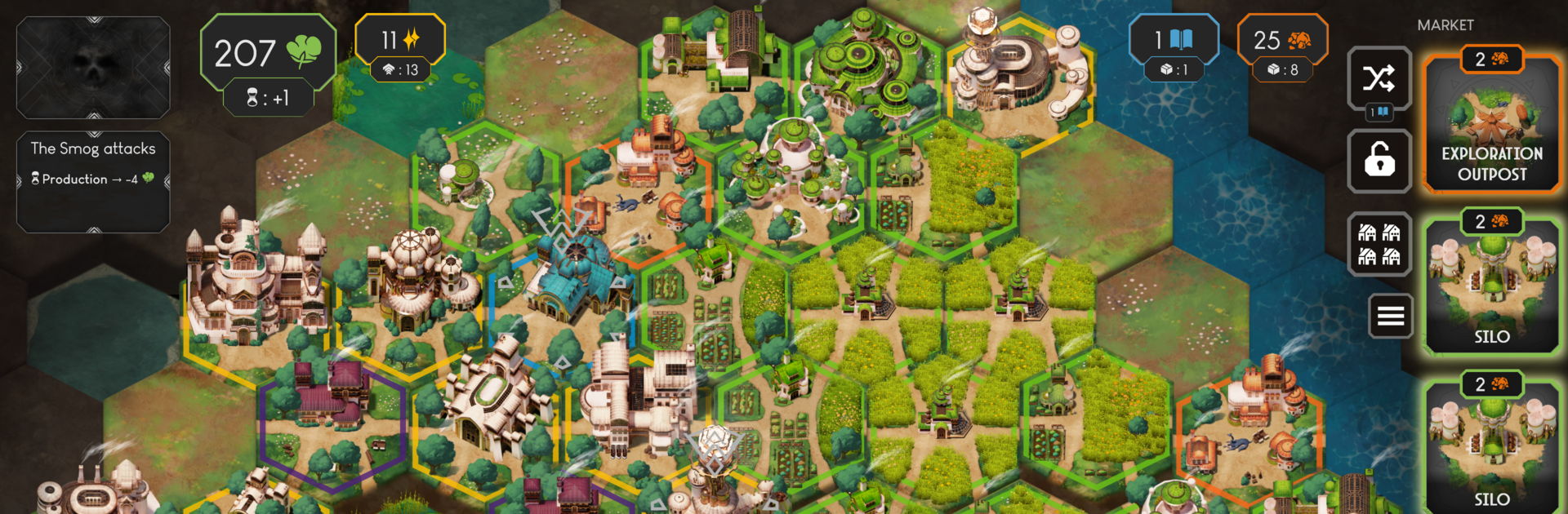
Dawnmaker is a solo strategy game that feels like sitting down with a smart little tabletop puzzle on the screen. The world is wrapped in toxic Smog and the whole run orbits around a central lighthouse. The player builds a tiny city around it, upgrades that lighthouse to push the Smog back, and opens just enough new space to squeeze in the next building that the plan needs. The rules are simple to learn, but the trick is how cards and buildings bounce off each other. Draw a hand, play effects, drop structures in the right spot, and watch how a small change creates a chain that makes everything run smoother.
Space is tight, so placement matters a lot. Farms feed into industry, science opens smarter options, and the rare resource Eclairium sits at the top of that ladder, so planning a few turns ahead pays off. The deck keeps growing with stronger cards as the city improves, and tuning that deck to stay efficient is half the fun. Between regions, the map slowly clears as lighthouses are repaired, and old Empire ruins hand out new tech that nudges a build in a fresh direction next time. On PC with BlueStacks, drag and drop card play and tile placement feel clean, and reading all the little effects is easier on a bigger screen. It is calm on the surface, but the Smog pressure keeps decisions tight, so every turn feels meaningful.
Slay your opponents with your epic moves. Play it your way on BlueStacks and dominate the battlefield.
Skip the boring parts of a game. Play Dawnmaker with Macros and get the edge. Simply record a sequence of commands and execute them at any moment.
Why limit to one game on your phone when you can play many on your PC? Open multiple instances of Dawnmaker at once with Multi-Instance. Leverage the power of different accounts by doing more.
Get the best out of Dawnmaker with Multi-Instance Sync. Play the game from different accounts and build your own empire. Use Multi-instance sync to repeat the action in the main BlueStacks instance on all other instances.
Find the rarest heroes by making multiple summons in Dawnmaker. And while you are at it, reduce your PC’s resource consumption with the Eco Mode. Farm efficiently. Get the best results.
Download and install BlueStacks on your PC or Mac
Complete Google sign-in to access the Play Store, or do it later
Look for Dawnmaker in the search bar at the top right corner
Click to install Dawnmaker from the search results
Complete Google sign-in (if you skipped step 2) to install Dawnmaker
Click the Dawnmaker icon on the home screen to start playing
With BlueStacks 5, you can get started on a PC that fulfills the following requirements.
Microsoft Windows 7 or above, macOS 11 (Big Sur) or above
Intel, AMD or Apple Silicon Processor
at least 4GB
10GB Free Disk Space
* You must be an Administrator on your PC. Up to date graphics drivers from Microsoft or the chipset vendor.

Leave your email and we will notify
you when the game launches
Play Dawnmaker on your PC or Mac by following these simple steps.
BlueStacks respects your privacy and is always safe and secure to use. It does not carry any malware, spyware, or any sort of additional software that could harm your PC.
It is engineered to optimize speed and performance for a seamless gaming experience.
Minimum requirement to run Dawnmaker on your PC

Since you are on your phone, we are going to send you to the Google Play page.
In some cases BlueStacks uses affiliate links when linking to Google Play
BlueStacks 4 is not available on Windows XP. You must have Windows 7 or higher. Windows 10 is recommended.