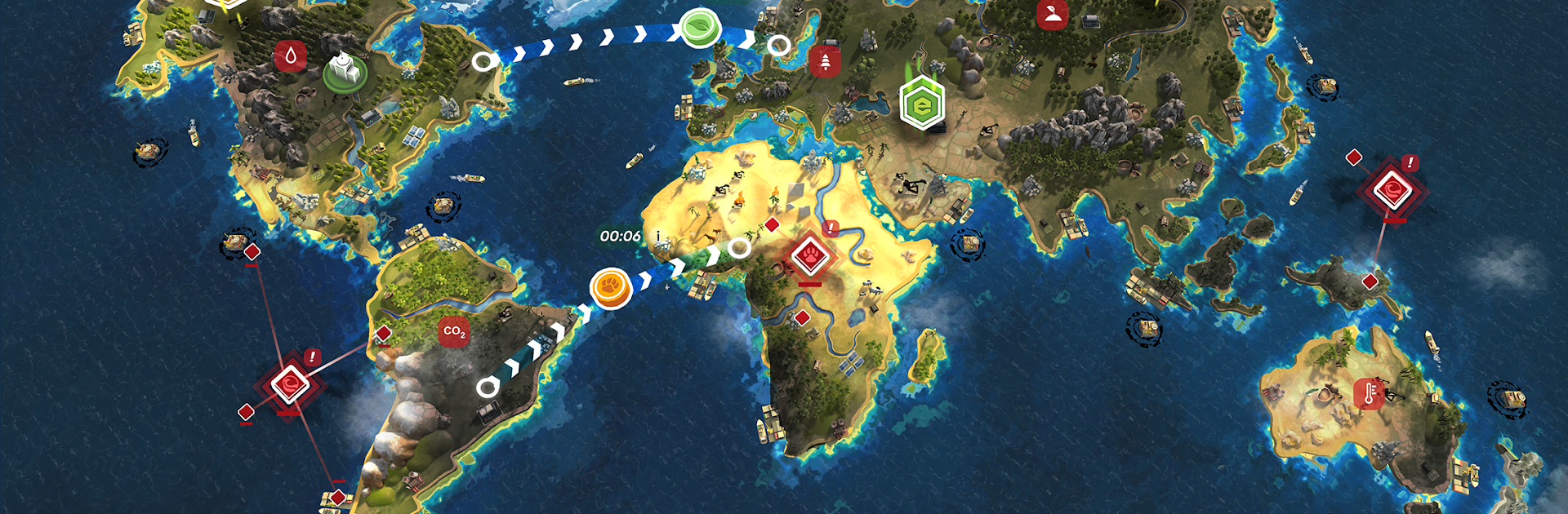
ECO Inc. Green World Sandbox!

ECO Inc. Green World Sandbox!

Strategy

| GameFirst

Play on PC with BlueStacks or from our cloud

  • Overview
  • Game Features
  • How to Play

Page Modified On: November 03, 2025

Play ECO Inc. Green World Sandbox! on PC or Mac

ECO Inc. Green World Sandbox! brings the Strategy genre to life, and throws up exciting challenges for gamers. Developed by GameFirst, this Android game is best experienced on BlueStacks, the World’s #1 app player for PC and Mac users.

ECO Inc. Green World Sandbox! feels like a global management sim where the player tries to pull Earth back from the brink without breaking the economy or public support. Each scenario drops a different mess on the map, from mild pollution to near disaster, and asks for a plan. The loop is all about priorities. Invest in renewables or shore up public health. Push strict policies or keep industry calm. Send volunteers to restore forests, clean coastlines, and handle emergencies while research teams unlock tech that trims emissions and waste. Random events keep poking holes in the plan, like wildfires, droughts, oil spills, even political hiccups, so the player has to adapt instead of cruising on one perfect build.

What stands out is how every slider and decision has a cost. A quick cash boost can slow conservation, a rushed law might tank approval, and ignoring biodiversity bites back later. The species encyclopedia pulls from real endangered lists, so finding animals and protecting habitats actually teaches a thing or two without turning into homework. On PC with BlueStacks, the bigger screen makes map micromanagement easier, hopping between graphs, regions, and diplomacy panels without feeling cramped. It leans more toward thoughtful strategy than flashy action, and some late-game spirals can feel brutal, but when a long term plan finally holds, the win feels earned, not handed out.

Get ready for a buttery smooth, high-performance gaming action only on BlueStacks.

Game Features

Enhancements

  • Macros
  • Multi Instance
  • Multi Instance Sync
  • Eco Mode
  • Enhancements
Macros

Macros

Skip the boring parts of a game. Play ECO Inc. Green World Sandbox! with Macros and get the edge. Simply record a sequence of commands and execute them at any moment.
Multi Instance

Multi Instance

Why limit to one game on your phone when you can play many on your PC? Open multiple instances of ECO Inc. Green World Sandbox! at once with Multi-Instance. Leverage the power of different accounts by doing more.
Multi Instance Sync

Multi Instance Sync

Get the best out of ECO Inc. Green World Sandbox! with Multi-Instance Sync. Play the game from different accounts and build your own empire. Use Multi-instance sync to repeat the action in the main BlueStacks instance on all other instances.
Eco Mode

Eco Mode

Find the rarest heroes by making multiple summons in ECO Inc. Green World Sandbox!. And while you are at it, reduce your PC’s resource consumption with the Eco Mode. Farm efficiently. Get the best results.
Read More

How to Download and Play ECO Inc. Green World Sandbox! on PC or Mac

  • Download and install BlueStacks on your PC or Mac

  • Complete Google sign-in to access the Play Store, or do it later

  • Look for ECO Inc. Green World Sandbox! in the search bar at the top right corner

  • Click to install ECO Inc. Green World Sandbox! from the search results

  • Complete Google sign-in (if you skipped step 2) to install ECO Inc. Green World Sandbox!

  • Click the ECO Inc. Green World Sandbox! icon on the home screen to start playing

video
Watch Video

Minimum System Requirements

With BlueStacks 5, you can get started on a PC that fulfills the following requirements.

  • Operating System

    Microsoft Windows 7 or above, macOS 11 (Big Sur) or above

  • Processor

    Intel, AMD or Apple Silicon Processor

  • RAM

    at least 4GB

  • HDD

    10GB Free Disk Space

Note:

* You must be an Administrator on your PC. Up to date graphics drivers from Microsoft or the chipset vendor.

ECO Inc. Green World Sandbox! - FAQs

  • How to play ECO Inc. Green World Sandbox! on Windows PC & Mac?

    Play ECO Inc. Green World Sandbox! on your PC or Mac by following these simple steps.

    • Click on 'Play ECO Inc. Green World Sandbox! on PC’ to download BlueStacks
    • Install it and log-in to Google Play Store
    • Launch and play the game.
  • Why is BlueStacks the fastest and safest platform to play games on PC?

    BlueStacks respects your privacy and is always safe and secure to use. It does not carry any malware, spyware, or any sort of additional software that could harm your PC.

    It is engineered to optimize speed and performance for a seamless gaming experience.

  • What are ECO Inc. Green World Sandbox! PC requirements?

    Minimum requirement to run ECO Inc. Green World Sandbox! on your PC

    • OS: Microsoft Windows 7 or above MacOS 11 (Big Sur) or above
    • Processor: Intel, AMD or Apple Silicon Processor
    • RAM: Your PC must have at least 4GB of RAM. (Note that having 4GB or more disk space is not a substitute for RAM)
    • HDD: 10GB Free Disk Space.
    • You must be an Administrator on your PC.