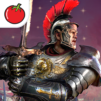
حرب سبارتا: انتقام الابطال

حرب سبارتا: انتقام الابطال

Strategy

| Tamatem Inc.

Play on PC with BlueStacks or from our cloud

  • Overview
  • Game Features
  • How to Play

Page Modified On: December 22, 2025

Play حرب سبارتا: انتقام الابطال on PC or Mac

From the innovators and creators at Tamatem Inc., حرب سبارتا: انتقام الابطال is another fun addition to the World of Strategy games. Go beyond your mobile screen and play it bigger and better on your PC or Mac. An immersive experience awaits you.

Harb Sparta: Vengeance of Heroes plays like a classic kingdom builder with a big focus on live battles. The world is laid out on a huge map, and fights actually happen there in real time, so players watch armies march, collide, and shift. They can jump in to move heroes at the right moment or let the auto controls handle the basics when life gets busy. The hero roster leans into Greek myth, with names like Leonidas, Athena, Heracles, and Spartacus, each with distinct skills that change how an army is built. It is not just stat stacking, more about picking roles and timing, and that part feels satisfying when a plan clicks.

Alliances matter a lot. Groups rally around capturing Mount Olympus, and that brings a bit of politics, some loyalty tests, and plenty of map-wide pushes. The city building side stays simple and clean, so new players can build without wading through clutter, while veterans still have room to min-max routes and troop mixes. Daily events hand out diamonds and other goodies at a steady pace, so progress keeps moving if someone logs in regularly. There is a VIP track with extra perks and quick support, helpful but not mandatory. Full Arabic support is there, seasonal events match local holidays, and players can show their country flag in the city which is a nice touch.

On PC through BlueStacks, the map is easier to read, dragging paths with a mouse feels precise, and chatting or coordinating becomes smoother. Performance holds up during big pushes, though expect the usual timers between upgrades. Overall, it is a strategic war game that rewards planning, teamwork, and those quick mid-battle decisions that turn a near loss into a clean win.

Ready to top the leaderboard? We bet you do. Let precise controls and sharp visuals optimized on BlueStacks lead you to victory.


Game Features

Enhancements

  • Macros
  • Multi Instance
  • Multi Instance Sync
  • Eco Mode
  • Enhancements
Macros

Macros

Skip the boring parts of a game. Play حرب سبارتا: انتقام الابطال with Macros and get the edge. Simply record a sequence of commands and execute them at any moment.
Multi Instance

Multi Instance

Why limit to one game on your phone when you can play many on your PC? Open multiple instances of حرب سبارتا: انتقام الابطال at once with Multi-Instance. Leverage the power of different accounts by doing more.
Multi Instance Sync

Multi Instance Sync

Get the best out of حرب سبارتا: انتقام الابطال with Multi-Instance Sync. Play the game from different accounts and build your own empire. Use Multi-instance sync to repeat the action in the main BlueStacks instance on all other instances.
Eco Mode

Eco Mode

Find the rarest heroes by making multiple summons in حرب سبارتا: انتقام الابطال. And while you are at it, reduce your PC’s resource consumption with the Eco Mode. Farm efficiently. Get the best results.
Read More

How to Download and Play حرب سبارتا: انتقام الابطال on PC or Mac

  • Download and install BlueStacks on your PC or Mac

  • Complete Google sign-in to access the Play Store, or do it later

  • Look for حرب سبارتا: انتقام الابطال in the search bar at the top right corner

  • Click to install حرب سبارتا: انتقام الابطال from the search results

  • Complete Google sign-in (if you skipped step 2) to install حرب سبارتا: انتقام الابطال

  • Click the حرب سبارتا: انتقام الابطال icon on the home screen to start playing

video
Watch Video

Minimum System Requirements

With BlueStacks 5, you can get started on a PC that fulfills the following requirements.

  • Operating System

    Microsoft Windows 7 or above, macOS 11 (Big Sur) or above

  • Processor

    Intel, AMD or Apple Silicon Processor

  • RAM

    at least 4GB

  • HDD

    10GB Free Disk Space

Note:

* You must be an Administrator on your PC. Up to date graphics drivers from Microsoft or the chipset vendor.

حرب سبارتا: انتقام الابطال - FAQs

  • How to play حرب سبارتا: انتقام الابطال on Windows PC & Mac?

    Play حرب سبارتا: انتقام الابطال on your PC or Mac by following these simple steps.

    • Click on 'Play حرب سبارتا: انتقام الابطال on PC’ to download BlueStacks
    • Install it and log-in to Google Play Store
    • Launch and play the game.
  • Why is BlueStacks the fastest and safest platform to play games on PC?

    BlueStacks respects your privacy and is always safe and secure to use. It does not carry any malware, spyware, or any sort of additional software that could harm your PC.

    It is engineered to optimize speed and performance for a seamless gaming experience.

  • What are حرب سبارتا: انتقام الابطال PC requirements?

    Minimum requirement to run حرب سبارتا: انتقام الابطال on your PC

    • OS: Microsoft Windows 7 or above MacOS 11 (Big Sur) or above
    • Processor: Intel, AMD or Apple Silicon Processor
    • RAM: Your PC must have at least 4GB of RAM. (Note that having 4GB or more disk space is not a substitute for RAM)
    • HDD: 10GB Free Disk Space.
    • You must be an Administrator on your PC.