World of Airports
World of Airports

World of Airports

Strategy

| Flyboys.Games

Play on PC with BlueStacks or from our cloud

  • Overview
  • Game Features
  • How to Play

Page Modified On: April 09, 2026

Play World of Airports on PC or Mac

World of Airports™ brings the Strategy genre to life, and throws up exciting challenges for gamers. Developed by Flyboys.Games, this Android game is best experienced on BlueStacks, the World’s #1 app player for PC and Mac users.

About the Game

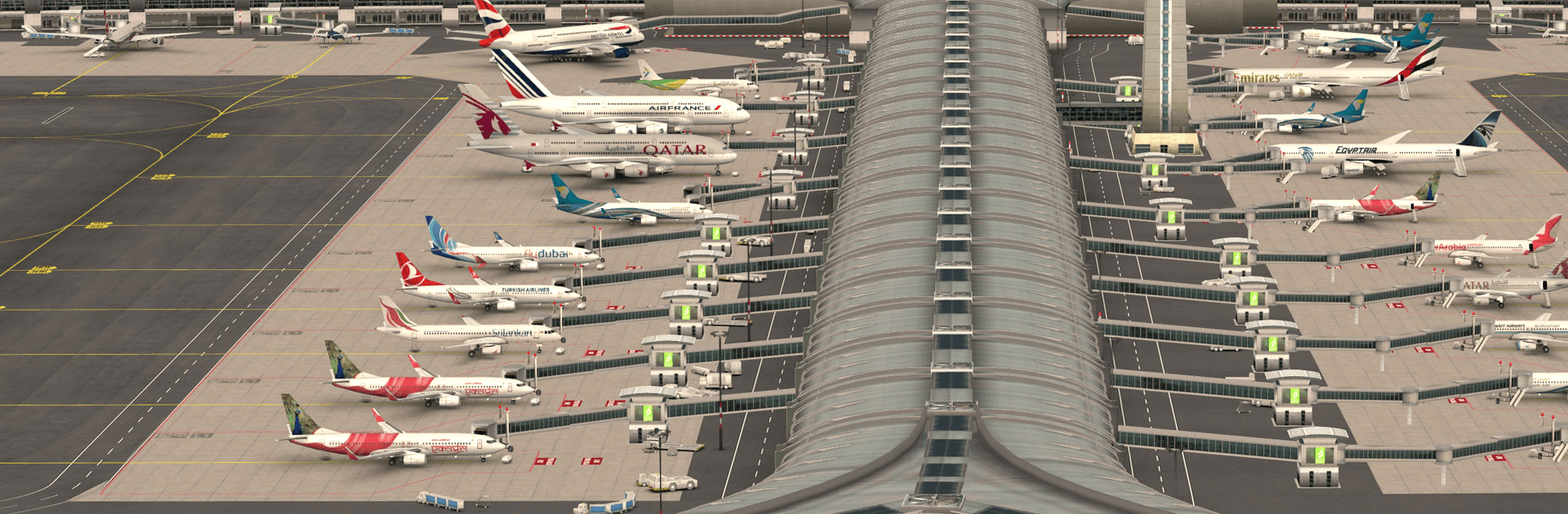
World of Airports™ from Flyboys.Games is a Strategy game about running the kind of busy hubs you’ve only watched from the terminal windows. You’ll coordinate arrivals, departures, and everything in between while growing a network of beautifully modeled airports. It’s hands-on management with a satisfying rhythm—calm one minute, nonstop the next.

Game Features

  • Run a Live Airport: Guide planes to gates, manage turnarounds, and keep ground services moving so the schedule doesn’t slip.
  • ATC and Ground Control: Direct traffic on the runway and apron, balance queues, and make snap decisions when the ramp gets crowded.
  • Realistic 3D Airports: Work at accurately recreated international hubs, each with its own layout, capacity, and quirks.
  • Multiplayer Apron: Service aircraft owned by other players, then send your own fleet to their airports to keep routes active.
  • Build Your Airline: Expand from a small roster to a serious fleet with 80+ realistic planes, from regional workhorses to long-haul giants.
  • Custom Liveries: Give your aircraft a look that stands out—other players will see your designs as they visit.
  • Smart Upgrades: Use earnings to train staff, speed up services, expand facilities, and streamline operations across your airports.
  • Ranks, Events, and Goals: Climb global leaderboards and complete achievements that can trigger special happenings at your hub.
  • Play Comfortably on PC: Prefer a bigger view and precise clicks? World of Airports™ runs smoothly on BlueStacks, making busy ramps easier to manage.

Get ready for a buttery smooth, high-performance gaming action only on BlueStacks.

Game Features

Enhancements

  • Macros
  • Multi Instance
  • Multi Instance Sync
  • Eco Mode
  • Enhancements
Macros

Macros

Skip the boring parts of a game. Play World of Airports with Macros and get the edge. Simply record a sequence of commands and execute them at any moment.
Multi Instance

Multi Instance

Why limit to one game on your phone when you can play many on your PC? Open multiple instances of World of Airports at once with Multi-Instance. Leverage the power of different accounts by doing more.
Multi Instance Sync

Multi Instance Sync

Get the best out of World of Airports with Multi-Instance Sync. Play the game from different accounts and build your own empire. Use Multi-instance sync to repeat the action in the main BlueStacks instance on all other instances.
Eco Mode

Eco Mode

Find the rarest heroes by making multiple summons in World of Airports. And while you are at it, reduce your PC’s resource consumption with the Eco Mode. Farm efficiently. Get the best results.
Read More

How to Download and Play World of Airports on PC or Mac

  • Download and install BlueStacks on your PC or Mac

  • Complete Google sign-in to access the Play Store, or do it later

  • Look for World of Airports in the search bar at the top right corner

  • Click to install World of Airports from the search results

  • Complete Google sign-in (if you skipped step 2) to install World of Airports

  • Click the World of Airports icon on the home screen to start playing

video
Watch Video

Minimum System Requirements

With BlueStacks 5, you can get started on a PC that fulfills the following requirements.

  • Operating System

    Microsoft Windows 7 or above, macOS 11 (Big Sur) or above

  • Processor

    Intel, AMD or Apple Silicon Processor

  • RAM

    at least 4GB

  • HDD

    10GB Free Disk Space

Note:

* You must be an Administrator on your PC. Up to date graphics drivers from Microsoft or the chipset vendor.

World of Airports - FAQs

  • How to play World of Airports on Windows PC & Mac?

    Play World of Airports on your PC or Mac by following these simple steps.

    • Click on 'Play World of Airports on PC’ to download BlueStacks
    • Install it and log-in to Google Play Store
    • Launch and play the game.
  • Why is BlueStacks the fastest and safest platform to play games on PC?

    BlueStacks respects your privacy and is always safe and secure to use. It does not carry any malware, spyware, or any sort of additional software that could harm your PC.

    It is engineered to optimize speed and performance for a seamless gaming experience.

  • What are World of Airports PC requirements?

    Minimum requirement to run World of Airports on your PC

    • OS: Microsoft Windows 7 or above MacOS 11 (Big Sur) or above
    • Processor: Intel, AMD or Apple Silicon Processor
    • RAM: Your PC must have at least 4GB of RAM. (Note that having 4GB or more disk space is not a substitute for RAM)
    • HDD: 10GB Free Disk Space.
    • You must be an Administrator on your PC.