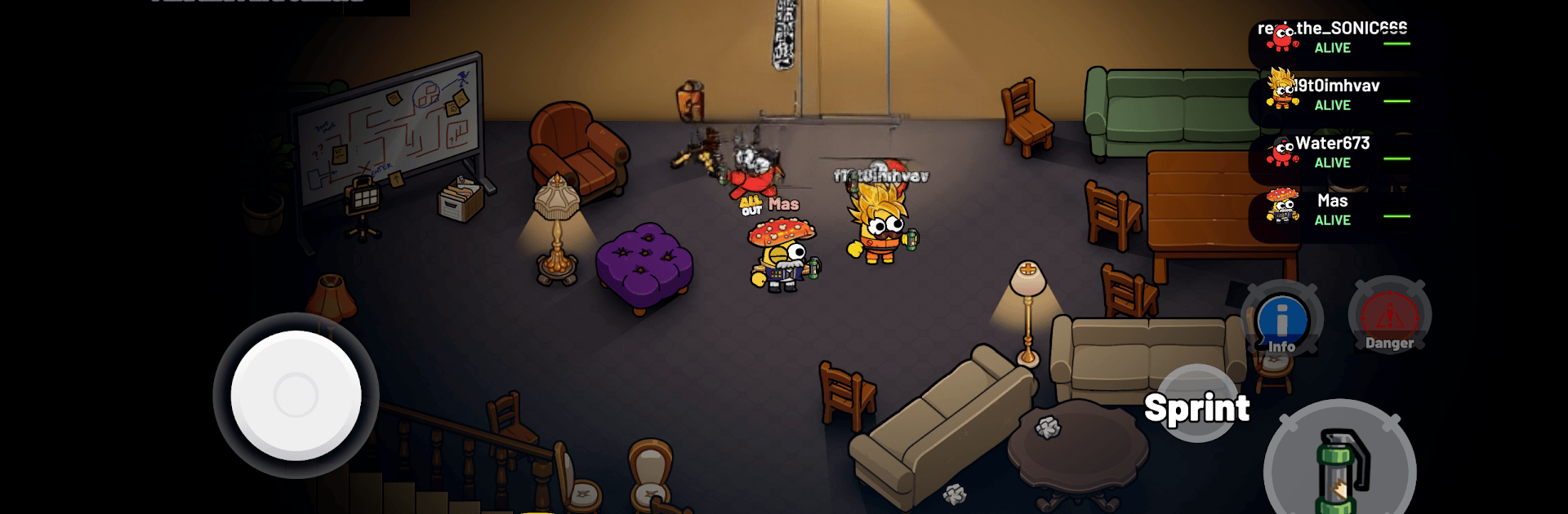
Backrooms: Multiplayer Horror

Backrooms: Multiplayer Horror

Action

| All Out Games

Play on PC with BlueStacks or from our cloud

  • Overview
  • Game Features
  • How to Play

Page Modified On: September 18, 2026

Play Backrooms: Multiplayer Horror on PC or Mac

Bring your A-game to Backrooms: Multiplayer Horror, the Action game sensation from All Out Games. Give your gameplay the much-needed boost with precise game controls, high FPS graphics, and top-tier features on your PC or Mac with BlueStacks.

About the Game

Backrooms: Multiplayer Horror is an Action game where your nerves and teamwork get tested in an endless maze of humming lights and empty, echoing rooms. Each match pits a group of survivors trying to complete objectives against one player who becomes the lurking terror hunting them down. Want a cleaner look and steady performance? It runs smoothly on BlueStacks, too.

Game Features

  • Asymmetrical roles: Every round, one player becomes the monster while the rest try to outsmart it—same map, totally different pressure.
  • Play with friends or match fast: Squad up in a lobby with your crew or hop into online matchmaking and meet new teammates (or future victims).
  • Teamwork that actually matters: Coordinate routes, share info, and decide whether to split up for speed or stick together for safety—both choices have risks.
  • Monster gameplay with real agency: Cut off escape paths, ambush in tight corridors, and use the maze’s dead ends to keep survivors guessing.
  • Objective-driven escapes: Power up areas, unlock blocked paths, and tick off tasks that open the way to the final exit—if you make it that far.
  • Maze-like zones to master: Navigate eerie hallways, flickering lights, and empty rooms that twist your sense of direction and turn corners into jump scares.
  • Tense chases and near-misses: Expect breathless sprints, last-second door slams, and that sinking “it’s right behind me” feeling.
  • Fresh outcomes every match: Different roles, shifting strategies, and player behavior keep each round unpredictable and replayable.

BlueStacks gives you more room to focus on the game and less time adjusting around mobile limitations.


Game Features

Enhancements

  • Macros
  • Multi Instance
  • Multi Instance Sync
  • Eco Mode
  • Enhancements
Macros

Macros

Skip the boring parts of a game. Play Backrooms: Multiplayer Horror with Macros and get the edge. Simply record a sequence of commands and execute them at any moment.
Multi Instance

Multi Instance

Why limit to one game on your phone when you can play many on your PC? Open multiple instances of Backrooms: Multiplayer Horror at once with Multi-Instance. Leverage the power of different accounts by doing more.
Multi Instance Sync

Multi Instance Sync

Get the best out of Backrooms: Multiplayer Horror with Multi-Instance Sync. Play the game from different accounts and build your own empire. Use Multi-instance sync to repeat the action in the main BlueStacks instance on all other instances.
Eco Mode

Eco Mode

Find the rarest heroes by making multiple summons in Backrooms: Multiplayer Horror. And while you are at it, reduce your PC’s resource consumption with the Eco Mode. Farm efficiently. Get the best results.
Read More

How to Download and Play Backrooms: Multiplayer Horror on PC or Mac

  • Download and install BlueStacks on your PC or Mac

  • Complete Google sign-in to access the Play Store, or do it later

  • Look for Backrooms: Multiplayer Horror in the search bar at the top right corner

  • Click to install Backrooms: Multiplayer Horror from the search results

  • Complete Google sign-in (if you skipped step 2) to install Backrooms: Multiplayer Horror

  • Click the Backrooms: Multiplayer Horror icon on the home screen to start playing

video
Watch Video

Minimum System Requirements

With BlueStacks 5, you can get started on a PC that fulfills the following requirements.

  • Operating System

    Microsoft Windows 7 or above, macOS 11 (Big Sur) or above

  • Processor

    Intel, AMD or Apple Silicon Processor

  • RAM

    at least 4GB

  • HDD

    10GB Free Disk Space

Note:

* You must be an Administrator on your PC. Up to date graphics drivers from Microsoft or the chipset vendor.

Backrooms: Multiplayer Horror - FAQs

  • How to play Backrooms: Multiplayer Horror on Windows PC & Mac?

    Play Backrooms: Multiplayer Horror on your PC or Mac by following these simple steps.

    • Click on 'Play Backrooms: Multiplayer Horror on PC’ to download BlueStacks
    • Install it and log-in to Google Play Store
    • Launch and play the game.
  • Why is BlueStacks the fastest and safest platform to play games on PC?

    BlueStacks respects your privacy and is always safe and secure to use. It does not carry any malware, spyware, or any sort of additional software that could harm your PC.

    It is engineered to optimize speed and performance for a seamless gaming experience.

  • What are Backrooms: Multiplayer Horror PC requirements?

    Minimum requirement to run Backrooms: Multiplayer Horror on your PC

    • OS: Microsoft Windows 7 or above MacOS 11 (Big Sur) or above
    • Processor: Intel, AMD or Apple Silicon Processor
    • RAM: Your PC must have at least 4GB of RAM. (Note that having 4GB or more disk space is not a substitute for RAM)
    • HDD: 10GB Free Disk Space.
    • You must be an Administrator on your PC.