Bola Capture
Bola Capture

Bola Capture

Action

| KAYAC Inc.

Play on PC with BlueStacks or from our cloud

  • Overview
  • Game Features
  • How to Play

Page Modified On: August 20, 2026

Play Bola Capture on PC or Mac

Explore a whole new adventure with Bola Capture, a Action game created by KAYAC Inc.. Experience great gameplay with BlueStacks, the most popular gaming platform to play Android games on your PC or Mac.

About the Game

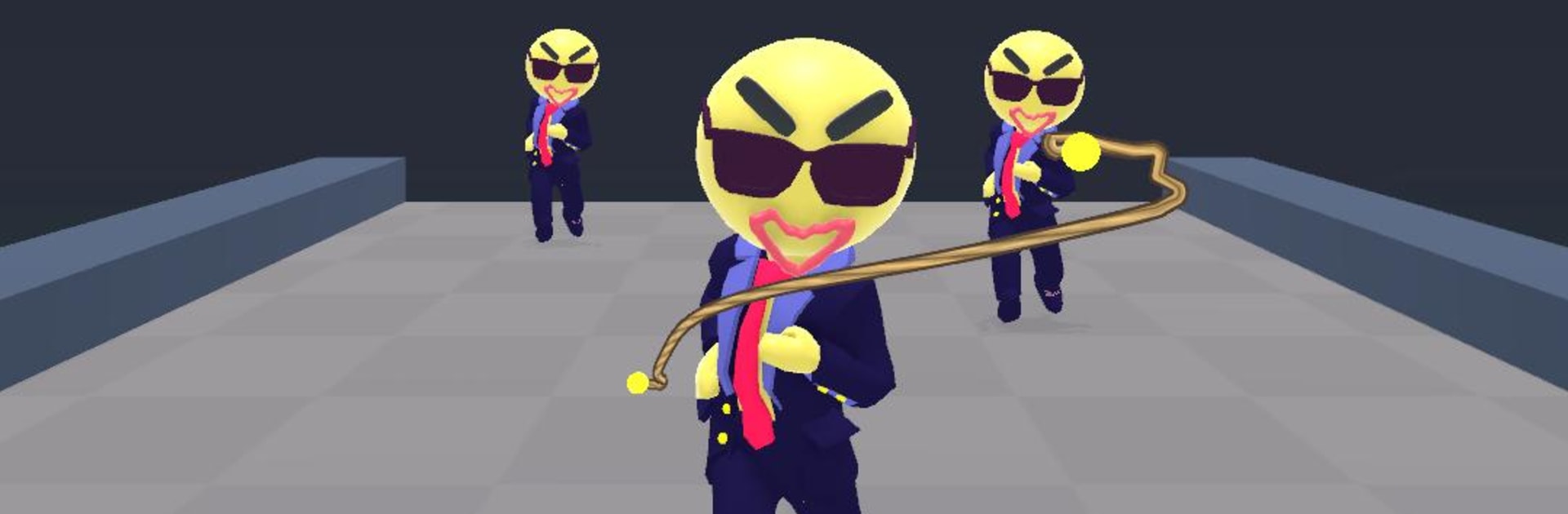
Bola Capture is all about that one perfect toss — you sketch a quick line, the weighted cord spins out, and suddenly everything’s tied up in glorious chaos. This is an Action toybox built on real physics and expressive ragdolls, where every throw tells a slightly different story. It’s fast, playful, and surprisingly tactical; it also runs nicely on BlueStacks if you like a bit more room to aim.

Game Features

  • Draw-to-Throw Controls: Drag to sketch your throw, then release to send the bola spinning in the direction you drew; longer lines mean longer rope and wider sweeps.
  • Cinematic Whip: Watch the cord sail out in slick slow motion, giving you a clear look at spins, arcs, and last-second snags.
  • Physics-Driven Mayhem: No canned animations here—wrap a leg and they stumble naturally, bundle a crowd and they cinch together, and dropped gear clatters exactly where it should.
  • Tether and Pin: Latch targets to lampposts, girders, or steel trusses to keep them put once they’re wrapped.
  • Three-Bola Juggling: Keep up to three throws in the air at once for big sweeps, quick follow-ups, or that clutch cleanup shot.
  • Short vs. Long Strokes: Long lines travel farther and scoop multiple targets; short flicks snap tight for precise, close-quarters catches.
  • Compact, Punchy Stages: Tackle ten bite-size scenarios, from a windy rooftop and a cluttered office to a boxing ring frame and a frantic street chase.
  • Expressive Reactions: Sunglasses fly, eyes widen, and everyone squirms or glares as the cord tightens—tiny touches that sell every moment.
  • One-Hand Friendly: Designed for portrait play with no timers or game-over screens; miss a toss, toss again, and keep the chaos rolling.
  • Fresh Every Throw: Because it’s all simulated, the same move never lands exactly the same way twice.

Ready to top the leaderboard? We bet you do. Let precise controls and sharp visuals optimized on BlueStacks lead you to victory.


Game Features

Enhancements

  • Macros
  • Multi Instance
  • Multi Instance Sync
  • Eco Mode
  • Enhancements
Macros

Macros

Skip the boring parts of a game. Play Bola Capture with Macros and get the edge. Simply record a sequence of commands and execute them at any moment.
Multi Instance

Multi Instance

Why limit to one game on your phone when you can play many on your PC? Open multiple instances of Bola Capture at once with Multi-Instance. Leverage the power of different accounts by doing more.
Multi Instance Sync

Multi Instance Sync

Get the best out of Bola Capture with Multi-Instance Sync. Play the game from different accounts and build your own empire. Use Multi-instance sync to repeat the action in the main BlueStacks instance on all other instances.
Eco Mode

Eco Mode

Find the rarest heroes by making multiple summons in Bola Capture. And while you are at it, reduce your PC’s resource consumption with the Eco Mode. Farm efficiently. Get the best results.
Read More

How to Download and Play Bola Capture on PC or Mac

  • Download and install BlueStacks on your PC or Mac

  • Complete Google sign-in to access the Play Store, or do it later

  • Look for Bola Capture in the search bar at the top right corner

  • Click to install Bola Capture from the search results

  • Complete Google sign-in (if you skipped step 2) to install Bola Capture

  • Click the Bola Capture icon on the home screen to start playing

video
Watch Video

Minimum System Requirements

With BlueStacks 5, you can get started on a PC that fulfills the following requirements.

  • Operating System

    Microsoft Windows 7 or above, macOS 11 (Big Sur) or above

  • Processor

    Intel, AMD or Apple Silicon Processor

  • RAM

    at least 4GB

  • HDD

    10GB Free Disk Space

Note:

* You must be an Administrator on your PC. Up to date graphics drivers from Microsoft or the chipset vendor.

Bola Capture - FAQs

  • How to play Bola Capture on Windows PC & Mac?

    Play Bola Capture on your PC or Mac by following these simple steps.

    • Click on 'Play Bola Capture on PC’ to download BlueStacks
    • Install it and log-in to Google Play Store
    • Launch and play the game.
  • Why is BlueStacks the fastest and safest platform to play games on PC?

    BlueStacks respects your privacy and is always safe and secure to use. It does not carry any malware, spyware, or any sort of additional software that could harm your PC.

    It is engineered to optimize speed and performance for a seamless gaming experience.

  • What are Bola Capture PC requirements?

    Minimum requirement to run Bola Capture on your PC

    • OS: Microsoft Windows 7 or above MacOS 11 (Big Sur) or above
    • Processor: Intel, AMD or Apple Silicon Processor
    • RAM: Your PC must have at least 4GB of RAM. (Note that having 4GB or more disk space is not a substitute for RAM)
    • HDD: 10GB Free Disk Space.
    • You must be an Administrator on your PC.