Chompers.io
Chompers.io

Chompers.io

Action

| Night Steed S.C.

Play on PC with BlueStacks or from our cloud

  • Overview
  • Game Features
  • How to Play

Page Modified On: December 15, 2025

Play Chompers.io on PC or Mac

From the innovators and creators at Night Steed S.C., Chompers.io is another fun addition to the World of Action games. Go beyond your mobile screen and play it bigger and better on your PC or Mac. An immersive experience awaits you.

About the Game

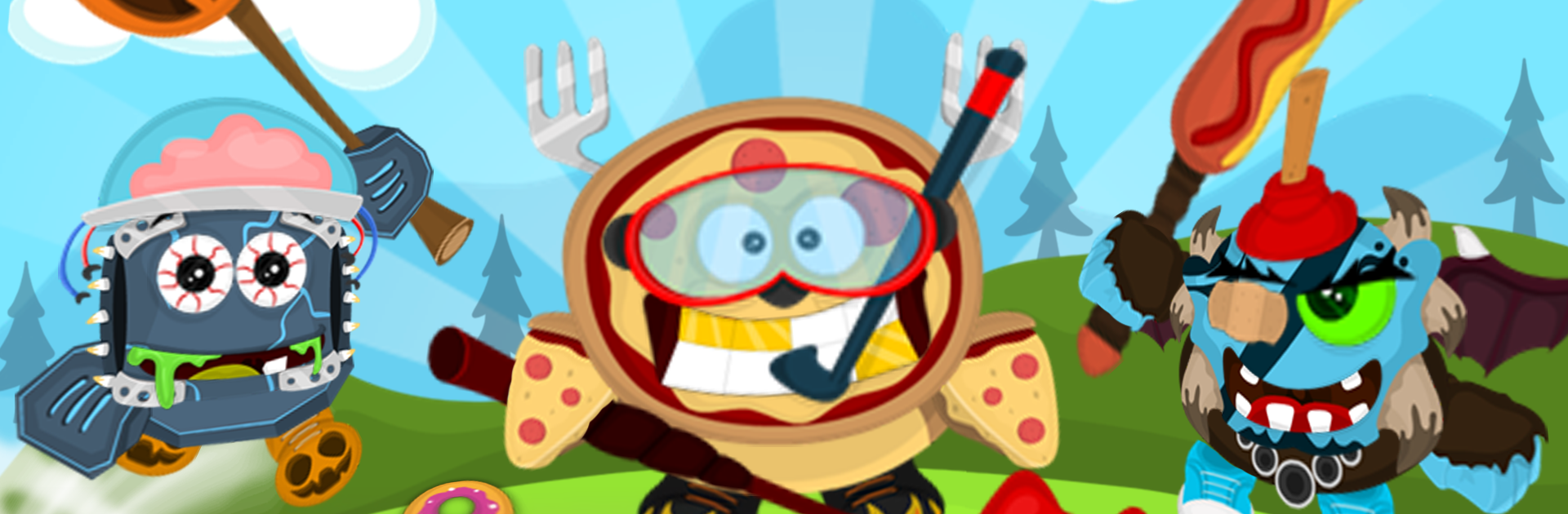
Chompers.io is a fast, snack-fueled Action brawl where tiny magical critters try to become the biggest menace on the map. You roam a crowded battlefield gobbling up sweets, swatting pests, and clashing with other players—always one step from glory or a quick KO. It’s simple to pick up, surprisingly tactical, and gloriously chaotic, courtesy of Night Steed S.C.

Game Features

  • Snack-powered growth: Munch candy and take down enemies to gain experience, grow larger, and tower over the competition.
  • High stakes, one hit: You’re powerful, but fragile—one clean hit can end your run. Play bold, or play crafty.
  • Speed boost with a cost: Tap a burst of speed to chase a target or bail out of danger. It burns your hard-earned XP, so time it well.
  • Wild weapons, silly to serious: Swing a tree branch, poke with a trident, brandish a royal scepter, bonk with a banana, or zap with a fishy wand. Each pick gives your Chomper a distinct vibe.
  • Bugs to bash: Squash roaming critters for quick XP and keep your growth rolling between player skirmishes.
  • Chests, coins, and gems: Collect currency to open surprise chests packed with wearable goodies that change how your Chomper looks.
  • Millions of looks: Hats, shoes, eyes, mouths, and weapon skins combine into more than 24 million possible styles. Make a beast that’s unmistakably yours.
  • Smooth, simple controls: Use the on-screen stick to move, tap to attack, and hit the boost when it’s time to sprint.
  • Play your way: Jump in for quick rounds on mobile, or run it on BlueStacks if you like playing with a keyboard and mouse.

Start your journey now. Download the game on BlueStacks, invite your friends, and march on a new adventure.


Game Features

Enhancements

  • Macros
  • Multi Instance
  • Multi Instance Sync
  • Eco Mode
  • Enhancements
Macros

Macros

Skip the boring parts of a game. Play Chompers.io with Macros and get the edge. Simply record a sequence of commands and execute them at any moment.
Multi Instance

Multi Instance

Why limit to one game on your phone when you can play many on your PC? Open multiple instances of Chompers.io at once with Multi-Instance. Leverage the power of different accounts by doing more.
Multi Instance Sync

Multi Instance Sync

Get the best out of Chompers.io with Multi-Instance Sync. Play the game from different accounts and build your own empire. Use Multi-instance sync to repeat the action in the main BlueStacks instance on all other instances.
Eco Mode

Eco Mode

Find the rarest heroes by making multiple summons in Chompers.io. And while you are at it, reduce your PC’s resource consumption with the Eco Mode. Farm efficiently. Get the best results.
Read More

How to Download and Play Chompers.io on PC or Mac

  • Download and install BlueStacks on your PC or Mac

  • Complete Google sign-in to access the Play Store, or do it later

  • Look for Chompers.io in the search bar at the top right corner

  • Click to install Chompers.io from the search results

  • Complete Google sign-in (if you skipped step 2) to install Chompers.io

  • Click the Chompers.io icon on the home screen to start playing

video
Watch Video

Minimum System Requirements

With BlueStacks 5, you can get started on a PC that fulfills the following requirements.

  • Operating System

    Microsoft Windows 7 or above, macOS 11 (Big Sur) or above

  • Processor

    Intel, AMD or Apple Silicon Processor

  • RAM

    at least 4GB

  • HDD

    10GB Free Disk Space

Note:

* You must be an Administrator on your PC. Up to date graphics drivers from Microsoft or the chipset vendor.

Chompers.io - FAQs

  • How to play Chompers.io on Windows PC & Mac?

    Play Chompers.io on your PC or Mac by following these simple steps.

    • Click on 'Play Chompers.io on PC’ to download BlueStacks
    • Install it and log-in to Google Play Store
    • Launch and play the game.
  • Why is BlueStacks the fastest and safest platform to play games on PC?

    BlueStacks respects your privacy and is always safe and secure to use. It does not carry any malware, spyware, or any sort of additional software that could harm your PC.

    It is engineered to optimize speed and performance for a seamless gaming experience.

  • What are Chompers.io PC requirements?

    Minimum requirement to run Chompers.io on your PC

    • OS: Microsoft Windows 7 or above MacOS 11 (Big Sur) or above
    • Processor: Intel, AMD or Apple Silicon Processor
    • RAM: Your PC must have at least 4GB of RAM. (Note that having 4GB or more disk space is not a substitute for RAM)
    • HDD: 10GB Free Disk Space.
    • You must be an Administrator on your PC.