Drone Combat: Modern War 3D

Drone Combat: Modern War 3D

Action

| Frenzy Games Studio

Play on PC with BlueStacks or from our cloud

  • Overview
  • Game Features
  • How to Play

Page Modified On: September 07, 2026

Play Drone Combat: Modern War 3D on PC or Mac

Play Drone Combat: Modern War 3D by Frenzy Games Studio on PC or Mac with BlueStacks. Use a bigger screen, mouse and keyboard controls, and smoother performance while you play.

About the Game

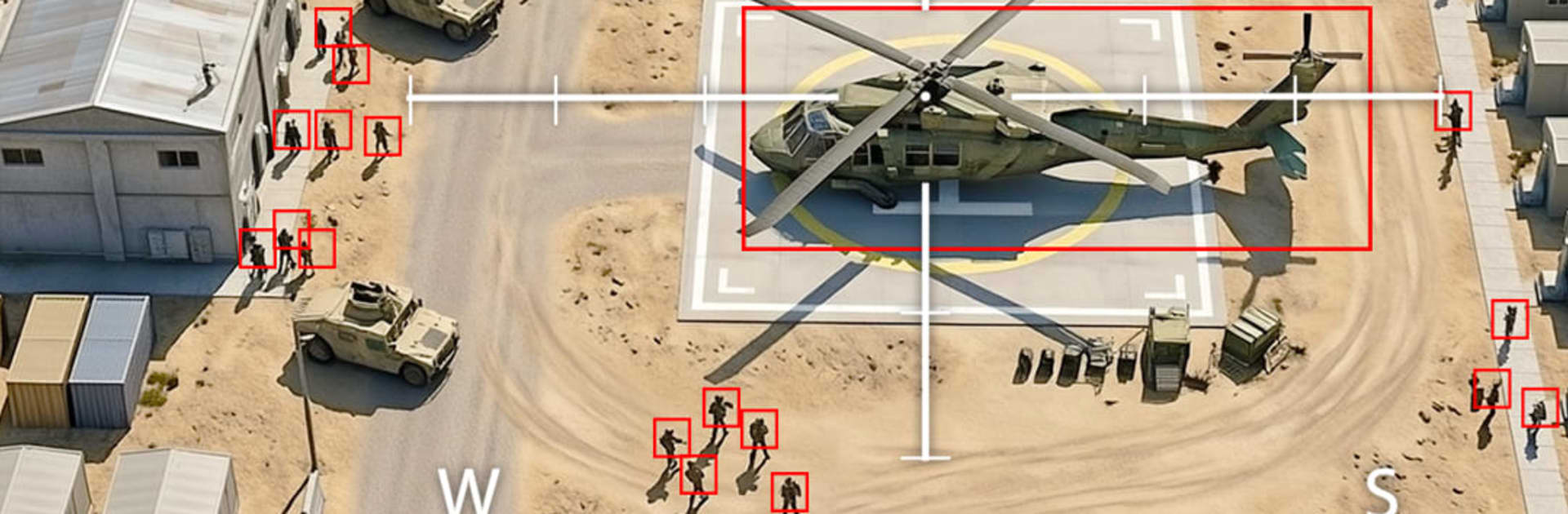
Drone Combat: Modern War 3D hands you the stick of modern UAVs and drops you straight into active war zones. This Action experience blends the precision of a flight sim with the snap decisions of battlefield combat—guided strikes, tense recon runs, convoy escorts, and more, all playable offline. If you’re into drone simulator games, air combat simulators, or tactical shooting games, you’ll feel right at home. Prefer a bigger screen? It also plays nicely on BlueStacks.

Game Features

  • Authentic UAV handling: Smooth, responsive flight lets you manage altitude, speed, and turning so lining up shots actually feels earned.
  • Mission variety: Strike high-value targets, escort allies, hold defensive lines, scout ahead, and survive wave-based assaults across changing hot zones.
  • Full combat toolkit: Fire off missiles, rockets, bombs, and cannons, timing salvos to shred armor, disable bases, or clear a path for friendlies.
  • Tactical support role: Coordinate with ground units—cover convoys, take out air defenses, and flip tough fights by hitting priority threats first.
  • Sensors that matter: Use thermal FLIR and zoom cameras to spot camouflaged vehicles, track movement through smoke, and confirm targets before you commit.
  • Offline single-player: Jump into complete missions anytime, no connection needed.
  • 3D battlefields: Detailed terrain, cinematic effects, and punchy audio make flybys, explosions, and near-misses feel close and loud.
  • Progression that counts: Upgrade armor, radar, maneuverability, stealth, and weapon systems to sharpen your edge each sortie.
  • Unlockable UAV roster: Earn and field drones tuned for reconnaissance, support roles, and direct combat domination.
  • Smart pacing: Short, high-intensity sorties reward careful planning, clean execution, and quick thinking under pressure.

BlueStacks gives you more room to focus on the game and less time adjusting around mobile limitations.


Game Features

Enhancements

  • Macros
  • Multi Instance
  • Multi Instance Sync
  • Eco Mode
  • Enhancements
Macros

Macros

Skip the boring parts of a game. Play Drone Combat: Modern War 3D with Macros and get the edge. Simply record a sequence of commands and execute them at any moment.
Multi Instance

Multi Instance

Why limit to one game on your phone when you can play many on your PC? Open multiple instances of Drone Combat: Modern War 3D at once with Multi-Instance. Leverage the power of different accounts by doing more.
Multi Instance Sync

Multi Instance Sync

Get the best out of Drone Combat: Modern War 3D with Multi-Instance Sync. Play the game from different accounts and build your own empire. Use Multi-instance sync to repeat the action in the main BlueStacks instance on all other instances.
Eco Mode

Eco Mode

Find the rarest heroes by making multiple summons in Drone Combat: Modern War 3D. And while you are at it, reduce your PC’s resource consumption with the Eco Mode. Farm efficiently. Get the best results.
Read More

How to Download and Play Drone Combat: Modern War 3D on PC or Mac

  • Download and install BlueStacks on your PC or Mac

  • Complete Google sign-in to access the Play Store, or do it later

  • Look for Drone Combat: Modern War 3D in the search bar at the top right corner

  • Click to install Drone Combat: Modern War 3D from the search results

  • Complete Google sign-in (if you skipped step 2) to install Drone Combat: Modern War 3D

  • Click the Drone Combat: Modern War 3D icon on the home screen to start playing

video
Watch Video

Minimum System Requirements

With BlueStacks 5, you can get started on a PC that fulfills the following requirements.

  • Operating System

    Microsoft Windows 7 or above, macOS 11 (Big Sur) or above

  • Processor

    Intel, AMD or Apple Silicon Processor

  • RAM

    at least 4GB

  • HDD

    10GB Free Disk Space

Note:

* You must be an Administrator on your PC. Up to date graphics drivers from Microsoft or the chipset vendor.

Drone Combat: Modern War 3D - FAQs

  • How to play Drone Combat: Modern War 3D on Windows PC & Mac?

    Play Drone Combat: Modern War 3D on your PC or Mac by following these simple steps.

    • Click on 'Play Drone Combat: Modern War 3D on PC’ to download BlueStacks
    • Install it and log-in to Google Play Store
    • Launch and play the game.
  • Why is BlueStacks the fastest and safest platform to play games on PC?

    BlueStacks respects your privacy and is always safe and secure to use. It does not carry any malware, spyware, or any sort of additional software that could harm your PC.

    It is engineered to optimize speed and performance for a seamless gaming experience.

  • What are Drone Combat: Modern War 3D PC requirements?

    Minimum requirement to run Drone Combat: Modern War 3D on your PC

    • OS: Microsoft Windows 7 or above MacOS 11 (Big Sur) or above
    • Processor: Intel, AMD or Apple Silicon Processor
    • RAM: Your PC must have at least 4GB of RAM. (Note that having 4GB or more disk space is not a substitute for RAM)
    • HDD: 10GB Free Disk Space.
    • You must be an Administrator on your PC.