フェスバ プラス
フェスバ プラス

フェスバ プラス

Action

| COLOPL, Inc.

Play on PC with BlueStacks or from our cloud

  • Overview
  • Game Features
  • How to Play

Page Modified On: January 09, 2026

Play フェスバ プラス on PC or Mac

Bring your A-game to フェスバ プラス, the Action game sensation from COLOPL, Inc.. Give your gameplay the much-needed boost with precise game controls, high FPS graphics, and top-tier features on your PC or Mac with BlueStacks.

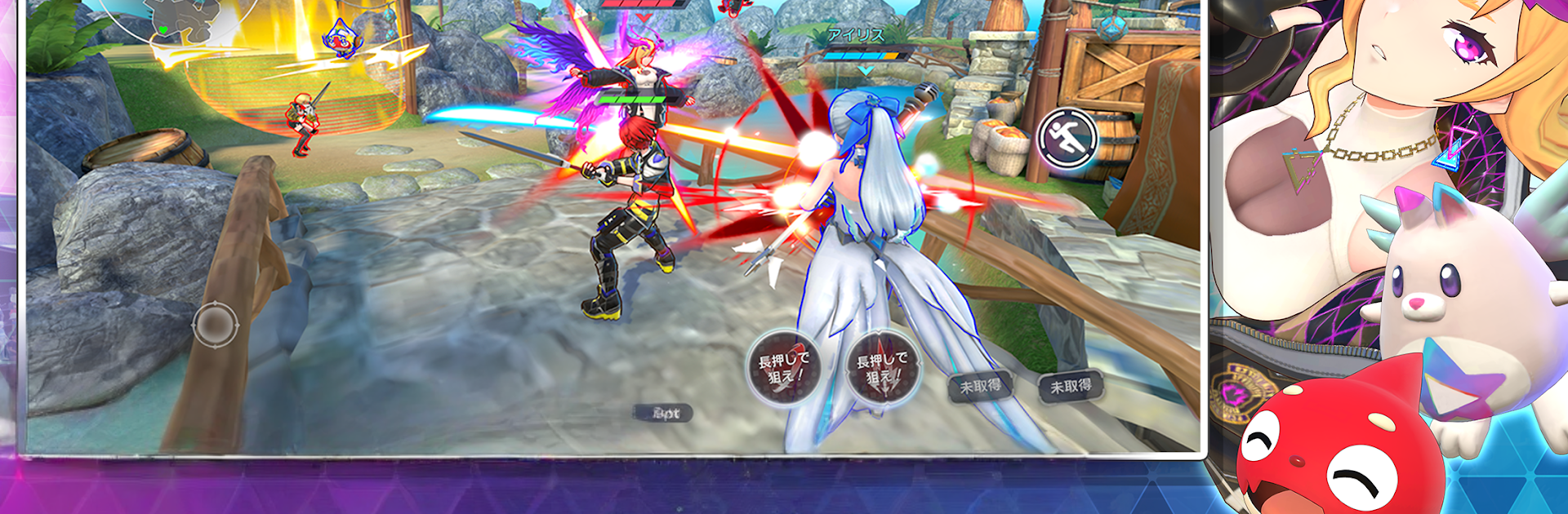
Festival Battle Plus feels like a flashy party brawler mixed with a live show. Matches run about five minutes, set on a huge floating arena where heroes zip around, pop skills, and try to steal the spotlight. Even when a hero goes down, they are not out. Assist Mode lets them jump back in as a helper, blocking enemies or boosting allies, so nobody just sits and waits. The roster pulls in characters from different worlds, all cloned in with sci fi tech, so team comps get weird in a fun way. Controls are simple and quick to read, but timing skills and swapping heroes between modes keeps it from turning into button mash. There are dance emotes, flashy entrances, and little showoff moments that make it feel like a festival as much as a fight.

Outside the brawls, it leans hard into style. There are loads of outfits and gear made for this game, so a tank can look like a runway star, or the other way around. The built in Festival Channel is a cool touch. Players can stream their matches right inside the game, others can watch, predict placements, and ride the chaos together. Character stories add some flavor, and there are bigger episodes that cross over with familiar series. On PC with BlueStacks, movement and aiming feel cleaner on mouse and keyboard, plus the big screen helps when the arena turns into fireworks. Events toss out generous gacha pulls, so new heroes and skins roll in often, and the lobby never feels quiet.

Slay your opponents with your epic moves. Play it your way on BlueStacks and dominate the battlefield.


Game Features

Enhancements

  • Macros
  • Rerolling
  • Eco Mode
  • Multi Instance Sync
  • Enhancements
Macros

Macros

Focus more on the fun part of the game, skip the tedious aspects. Master フェスバ プラス with Macros. Record yourself completing the monotonous tasks you wish to automate and replay them later with just one keypress.
Rerolling

Rerolling

Speed up the rerolling process in フェスバ プラス. Perform multiple summons and keep looking for the best Heroes. Use Multi-Instance sync to replicate the rerolling mechanism in all instances.
Eco Mode

Eco Mode

Farm in-game resources with ease in フェスバ プラス. Enable the Eco Mode when running the game in multiple instances. And lower your PC's resource consumption.
Multi Instance Sync

Multi Instance Sync

With the Multi-instance Sync, you can do even more in フェスバ プラス. Sync the action of the main instance and repeat them in real time for all other instances. Sync and sit back, let the game progress unfold.
Read More

How to Download and Play フェスバ プラス on PC or Mac

  • Download and install BlueStacks on your PC or Mac

  • Complete Google sign-in to access the Play Store, or do it later

  • Look for フェスバ プラス in the search bar at the top right corner

  • Click to install フェスバ プラス from the search results

  • Complete Google sign-in (if you skipped step 2) to install フェスバ プラス

  • Click the フェスバ プラス icon on the home screen to start playing

video
Watch Video

Minimum System Requirements

With BlueStacks 5, you can get started on a PC that fulfills the following requirements.

  • Operating System

    Microsoft Windows 7 or above, macOS 11 (Big Sur) or above

  • Processor

    Intel, AMD or Apple Silicon Processor

  • RAM

    at least 4GB

  • HDD

    10GB Free Disk Space

Note:

* You must be an Administrator on your PC. Up to date graphics drivers from Microsoft or the chipset vendor.

フェスバ プラス - FAQs

  • How to play フェスバ プラス on Windows PC & Mac?

    Play フェスバ プラス on your PC or Mac by following these simple steps.

    • Click on 'Play フェスバ プラス on PC’ to download BlueStacks
    • Install it and log-in to Google Play Store
    • Launch and play the game.
  • Why is BlueStacks the fastest and safest platform to play games on PC?

    BlueStacks respects your privacy and is always safe and secure to use. It does not carry any malware, spyware, or any sort of additional software that could harm your PC.

    It is engineered to optimize speed and performance for a seamless gaming experience.

  • What are フェスバ プラス PC requirements?

    Minimum requirement to run フェスバ プラス on your PC

    • OS: Microsoft Windows 7 or above MacOS 11 (Big Sur) or above
    • Processor: Intel, AMD or Apple Silicon Processor
    • RAM: Your PC must have at least 4GB of RAM. (Note that having 4GB or more disk space is not a substitute for RAM)
    • HDD: 10GB Free Disk Space.
    • You must be an Administrator on your PC.