
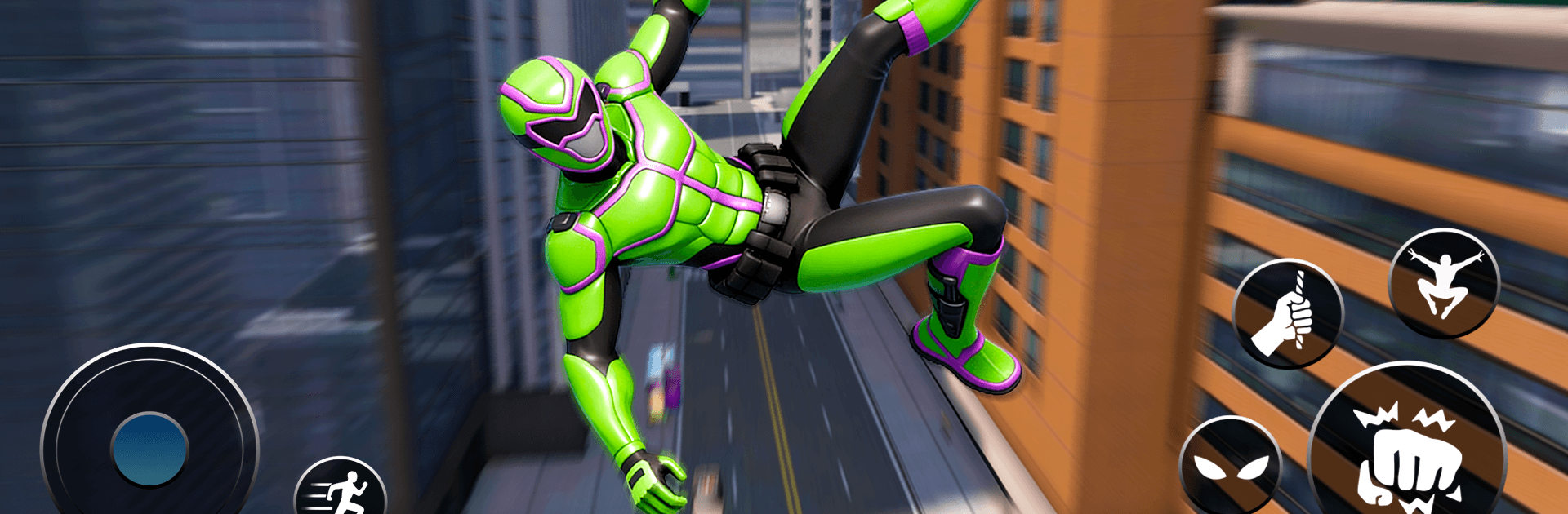
Flying Warrior: City Legends

Flying Warrior: City Legends

Action

| Galaxy Legend Game Studio

Play on PC with BlueStacks or from our cloud

  • Overview
  • Game Features
  • How to Play

Page Modified On: May 18, 2026

Play Flying Warrior: City Legends on PC or Mac

Join millions to experience Flying Warrior: City Legends, an exciting Action game from Galaxy Legend Game Studio. With BlueStacks App Player, you are always a step ahead of your opponent, ready to outplay them with faster gameplay and better control with the mouse and keyboard on your PC or Mac.

About the Game

Flying Warrior: City Legends throws you into a buzzing metropolis where the sky is your playground and trouble never takes a day off. You’re a high-tech hero with a knack for speed, style, and split-second decisions—glide past glass towers, crash bad guys’ plans, and pull off stunts that feel ridiculously smooth. It’s an open-world Action adventure from Galaxy Legend Game Studio, and it feels right at home on mobile or on BlueStacks if you prefer a bigger screen and tighter controls.

Game Features

  • Sky-First Movement: Glide, boost, and dive through the skyline with fluid controls that make weaving between skyscrapers second nature.
  • Grapple and Swing: Fire up advanced hook gear to sling yourself across blocks, vault to rooftops, and chain momentum like a pro.
  • Heroic Missions: Break up crimes, rescue civilians in a pinch, chase down fleeing villains, and clear out hostile zones at street level or from above.
  • Kinetic Combat: Mix punches, kicks, slams, and special powers, then carry the fight into the air with slick aerial attacks and crowd-control moves.
  • Weapons and Upgrades: Unlock blasters, cannons, melee options, explosives, and a range of hero suits—tune your loadout to match your style.
  • City to Explore: Roam rooftops, neon-lit streets, and tight alleyways across multiple districts, each packed with vertical routes and smart shortcuts.
  • Stunts and Physics: Nail flips, sky dives, hook jumps, and stylish takedowns; master momentum to string together risky (and very fun) maneuvers.
  • Open-World Flow: A living city with dynamic objectives—pick what to handle next and keep the action moving your way.

Slay your opponents with your epic moves. Play it your way on BlueStacks and dominate the battlefield.


Game Features

Enhancements

  • Macros
  • Multi Instance
  • Multi Instance Sync
  • Eco Mode
  • Enhancements
Macros

Macros

Skip the boring parts of a game. Play Flying Warrior: City Legends with Macros and get the edge. Simply record a sequence of commands and execute them at any moment.
Multi Instance

Multi Instance

Why limit to one game on your phone when you can play many on your PC? Open multiple instances of Flying Warrior: City Legends at once with Multi-Instance. Leverage the power of different accounts by doing more.
Multi Instance Sync

Multi Instance Sync

Get the best out of Flying Warrior: City Legends with Multi-Instance Sync. Play the game from different accounts and build your own empire. Use Multi-instance sync to repeat the action in the main BlueStacks instance on all other instances.
Eco Mode

Eco Mode

Find the rarest heroes by making multiple summons in Flying Warrior: City Legends. And while you are at it, reduce your PC’s resource consumption with the Eco Mode. Farm efficiently. Get the best results.
Read More

How to Download and Play Flying Warrior: City Legends on PC or Mac

  • Download and install BlueStacks on your PC or Mac

  • Complete Google sign-in to access the Play Store, or do it later

  • Look for Flying Warrior: City Legends in the search bar at the top right corner

  • Click to install Flying Warrior: City Legends from the search results

  • Complete Google sign-in (if you skipped step 2) to install Flying Warrior: City Legends

  • Click the Flying Warrior: City Legends icon on the home screen to start playing

video
Watch Video

Minimum System Requirements

With BlueStacks 5, you can get started on a PC that fulfills the following requirements.

  • Operating System

    Microsoft Windows 7 or above, macOS 11 (Big Sur) or above

  • Processor

    Intel, AMD or Apple Silicon Processor

  • RAM

    at least 4GB

  • HDD

    10GB Free Disk Space

Note:

* You must be an Administrator on your PC. Up to date graphics drivers from Microsoft or the chipset vendor.

Flying Warrior: City Legends - FAQs

  • How to play Flying Warrior: City Legends on Windows PC & Mac?

    Play Flying Warrior: City Legends on your PC or Mac by following these simple steps.

    • Click on 'Play Flying Warrior: City Legends on PC’ to download BlueStacks
    • Install it and log-in to Google Play Store
    • Launch and play the game.
  • Why is BlueStacks the fastest and safest platform to play games on PC?

    BlueStacks respects your privacy and is always safe and secure to use. It does not carry any malware, spyware, or any sort of additional software that could harm your PC.

    It is engineered to optimize speed and performance for a seamless gaming experience.

  • What are Flying Warrior: City Legends PC requirements?

    Minimum requirement to run Flying Warrior: City Legends on your PC

    • OS: Microsoft Windows 7 or above MacOS 11 (Big Sur) or above
    • Processor: Intel, AMD or Apple Silicon Processor
    • RAM: Your PC must have at least 4GB of RAM. (Note that having 4GB or more disk space is not a substitute for RAM)
    • HDD: 10GB Free Disk Space.
    • You must be an Administrator on your PC.







