Once Human
Once Human

Once Human

Action

| Exptional Global

BlueStacks Verified

Play on PC with BlueStacks or from our cloud

  • Overview
  • Tips & Tricks
  • Game Features
  • How to Play

Page Modified On: April 10, 2026

Play Once Human on PC or Mac

Once Human is an Action game developed by Exptional Global. BlueStacks app player is the best platform to play this Android game on your PC or Mac for an immersive gaming experience.

About the Game

Once Human puts you in a post-apocalyptic world where you have to fight for survival. It gives you room to team up with your friends, build a sanctuary, and do so much more. You have to harness Stardust’s powers to fight the enemies and rebuild the world piece by piece.

Game Features

  • Survival Hunt Mode: Join forces with others in your quest to defeat the ancient horrors. Come up with effective strategies and think fast to outsmart your enemies and restore balance.
  • Base Building: Construct your base anywhere on the map and customize it however you see fit. You can add a kitchen, patio, garage, and armory to keep your weapons and deadly traps.
  • Multiple Deviation Pals: Once Human gives you access to a variety of powerful creatures, such as alpacas, blue dragons, and others. You can collect them to join your team. These creatures are built to fight by your side, help gather resources, and keep your territory running.

Once Human makes it incredibly easy for players to navigate and control their avatar’s movements. You can simply use a keyboard or gamepad controller to play the game.

How to Play? 

Download Once Human for free from the Google Play Store using the BlueStacks app player.

Game Features

Enhancements

  • Macros
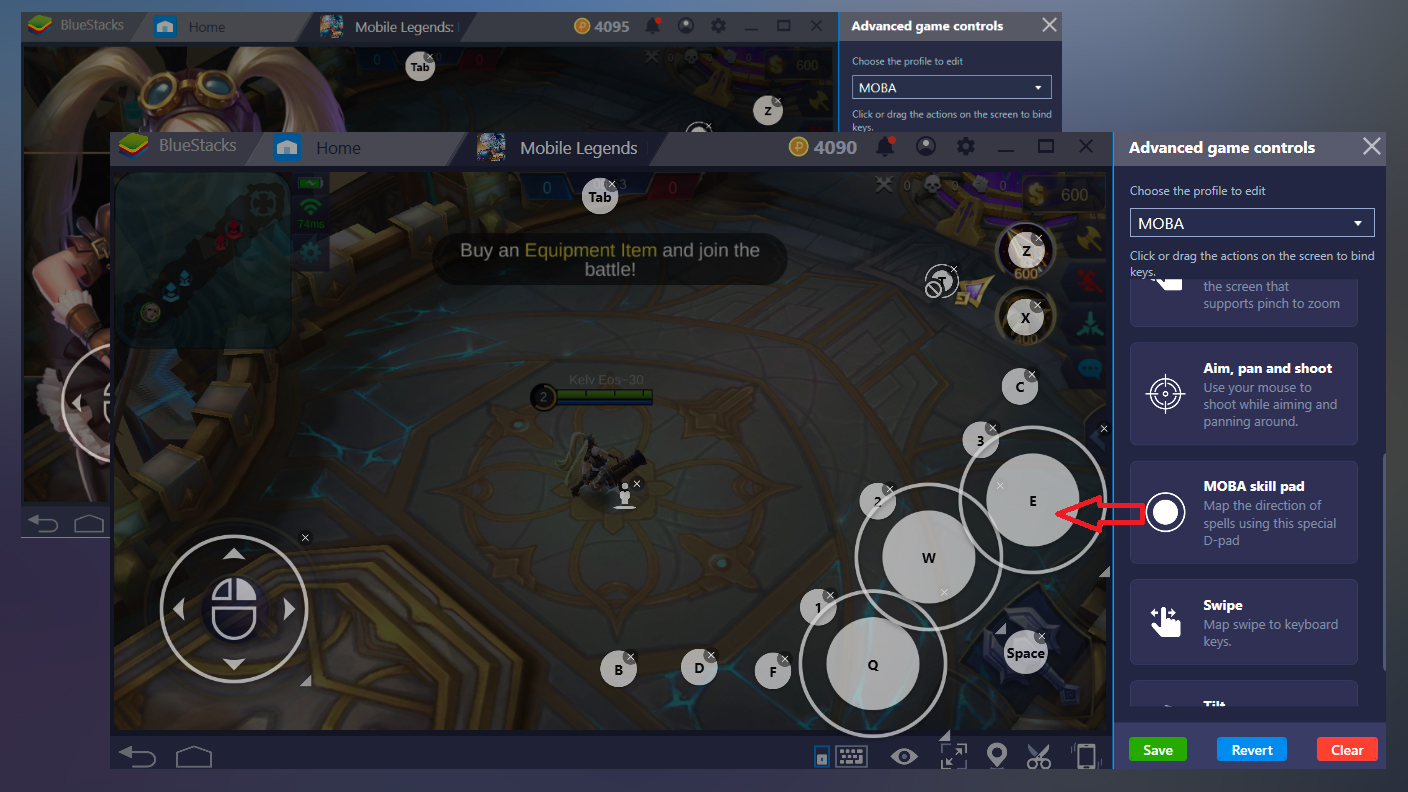
  • MOBA Mode
  • Multi Instance Sync
  • Script
  • Enhancements
Macros

Macros

More Gaming, less effort Level up faster in Once Human with BlueStacks Macros. Bind a sequence of recorded actions with one button and skip the predictable.
MOBA Mode

MOBA Mode

Play Once Human like any PC MOBA, with your keyboard and mouse and get the desired and precise controls. Crush your opponents with superior hand-eye coordination and faster response time with MOBA movements and skill cast modes.
Multi Instance Sync

Multi Instance Sync

Your strategy. Our tools. Play Once Human from multiple accounts. Sync the main instance to replicate an action on all other instances.
Script

Script

Play Once Human with the cutting-edge Script feature. Automate moves that require repetition. To create and run a Script, click on 'Script' in ‘Advance Game Controls’.
Read More

How to Download and Play Once Human on PC or Mac

  • Download and install BlueStacks on your PC or Mac

  • Complete Google sign-in to access the Play Store, or do it later

  • Look for Once Human in the search bar at the top right corner

  • Click to install Once Human from the search results

  • Complete Google sign-in (if you skipped step 2) to install Once Human

  • Click the Once Human icon on the home screen to start playing

video
Watch Video

Minimum System Requirements

With BlueStacks 5, you can get started on a PC that fulfills the following requirements.

  • Operating System

    Microsoft Windows 7 or above, macOS 11 (Big Sur) or above

  • Processor

    Intel, AMD or Apple Silicon Processor

  • RAM

    at least 4GB

  • HDD

    10GB Free Disk Space

Note:

* You must be an Administrator on your PC. Up to date graphics drivers from Microsoft or the chipset vendor.

Once Human - FAQs

  • How to play Once Human on Windows PC & Mac?

    Play Once Human on your PC or Mac by following these simple steps.

    • Click on 'Play Once Human on PC’ to download BlueStacks
    • Install it and log-in to Google Play Store
    • Launch and play the game.
  • Why is BlueStacks the fastest and safest platform to play games on PC?

    BlueStacks respects your privacy and is always safe and secure to use. It does not carry any malware, spyware, or any sort of additional software that could harm your PC.

    It is engineered to optimize speed and performance for a seamless gaming experience.

  • What are Once Human PC requirements?

    Minimum requirement to run Once Human on your PC

    • OS: Microsoft Windows 7 or above MacOS 11 (Big Sur) or above
    • Processor: Intel, AMD or Apple Silicon Processor
    • RAM: Your PC must have at least 4GB of RAM. (Note that having 4GB or more disk space is not a substitute for RAM)
    • HDD: 10GB Free Disk Space.
    • You must be an Administrator on your PC.