Frontier Animal Hunting: Desert Shooting 17

Frontier Animal Hunting: Desert Shooting 17

Action

| Stunt Racing Games

Play on PC with BlueStacks or from our cloud

  • Overview
  • Game Features
  • How to Play

Page Modified On: August 29, 2025

Play Frontier Animal Hunting: Desert Shooting 17 on PC or Mac

Join millions to experience Frontier Animal Hunting: Desert Shooting 17, an exciting Action game from Stunt Racing Games. With BlueStacks App Player, you are always a step ahead of your opponent, ready to outplay them with faster gameplay and better control with the mouse and keyboard on your PC or Mac.

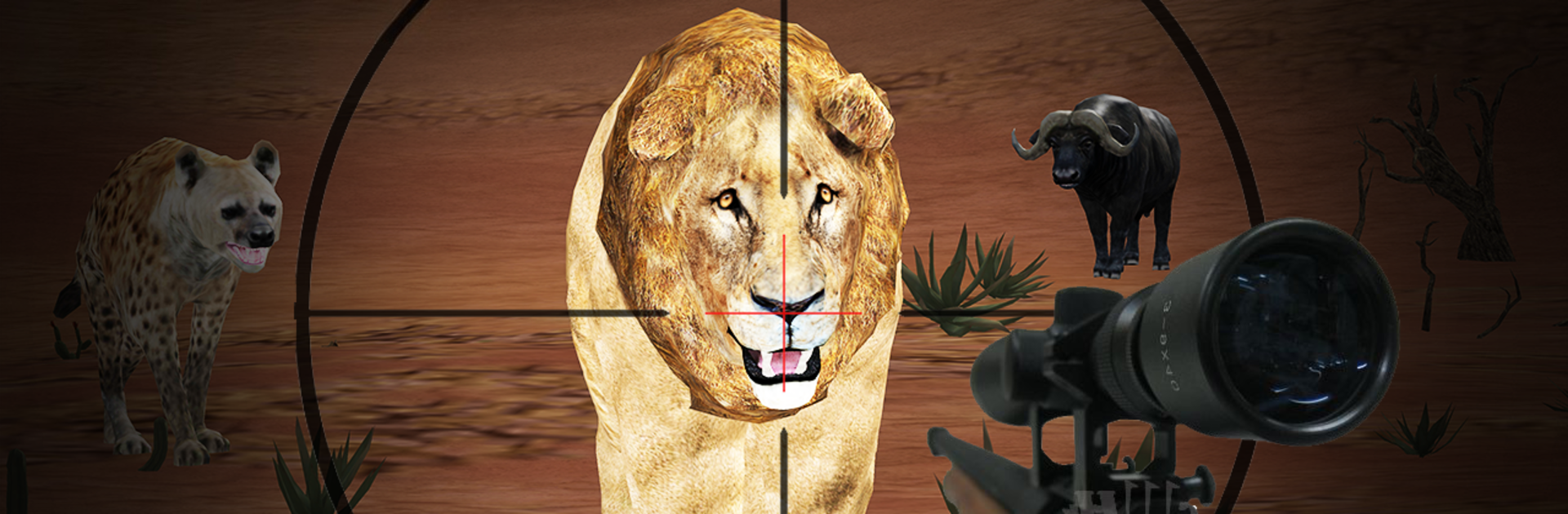
Frontier Animal Hunting: Desert Shooting 17 is a straight shot of desert hunting without a lot of fluff. It drops the player into wide, dusty maps with a sniper rifle and a checklist of animals to track. Lions, tigers, hyenas, and buffalo roam around, and they do not just pose for photos. They wander, they run, and if the player misses, they can rush in and knock the round to a quick end. The loop is about finding a good angle, holding a steady scope, and picking clean shots while keeping an eye on what might be creeping in from the side.

The missions move fast and each one is focused on a set number of targets, so it feels more like quick hunting challenges than a long safari. Controls are simple first person shooter stuff, which helps when a target starts zigzagging. The sound cues are useful, with footsteps and growls giving away trouble before it hits. Graphics lean on bold shapes and clear silhouettes, so spotting movement in the sand is easy enough. Playing on PC with BlueStacks is nice for this one, since a mouse makes aiming snappier and the bigger screen makes those distant specks easier to read. It is all about sharpening aim, staying calm, and clearing out the quota to move on to the next hunt.

Get ready for a buttery smooth, high-performance gaming action only on BlueStacks.

Game Features

Enhancements

  • Macros
  • Multi Instance
  • Multi Instance Sync
  • Eco Mode
  • Enhancements
Macros

Macros

Skip the boring parts of a game. Play Frontier Animal Hunting: Desert Shooting 17 with Macros and get the edge. Simply record a sequence of commands and execute them at any moment.
Multi Instance

Multi Instance

Why limit to one game on your phone when you can play many on your PC? Open multiple instances of Frontier Animal Hunting: Desert Shooting 17 at once with Multi-Instance. Leverage the power of different accounts by doing more.
Multi Instance Sync

Multi Instance Sync

Get the best out of Frontier Animal Hunting: Desert Shooting 17 with Multi-Instance Sync. Play the game from different accounts and build your own empire. Use Multi-instance sync to repeat the action in the main BlueStacks instance on all other instances.
Eco Mode

Eco Mode

Find the rarest heroes by making multiple summons in Frontier Animal Hunting: Desert Shooting 17. And while you are at it, reduce your PC’s resource consumption with the Eco Mode. Farm efficiently. Get the best results.
Read More

How to Download and Play Frontier Animal Hunting: Desert Shooting 17 on PC or Mac

  • Download and install BlueStacks on your PC or Mac

  • Complete Google sign-in to access the Play Store, or do it later

  • Look for Frontier Animal Hunting: Desert Shooting 17 in the search bar at the top right corner

  • Click to install Frontier Animal Hunting: Desert Shooting 17 from the search results

  • Complete Google sign-in (if you skipped step 2) to install Frontier Animal Hunting: Desert Shooting 17

  • Click the Frontier Animal Hunting: Desert Shooting 17 icon on the home screen to start playing

video
Watch Video

Minimum System Requirements

With BlueStacks 5, you can get started on a PC that fulfills the following requirements.

  • Operating System

    Microsoft Windows 7 or above, macOS 11 (Big Sur) or above

  • Processor

    Intel, AMD or Apple Silicon Processor

  • RAM

    at least 4GB

  • HDD

    10GB Free Disk Space

Note:

* You must be an Administrator on your PC. Up to date graphics drivers from Microsoft or the chipset vendor.

Frontier Animal Hunting: Desert Shooting 17 - FAQs

  • How to play Frontier Animal Hunting: Desert Shooting 17 on Windows PC & Mac?

    Play Frontier Animal Hunting: Desert Shooting 17 on your PC or Mac by following these simple steps.

    • Click on 'Play Frontier Animal Hunting: Desert Shooting 17 on PC’ to download BlueStacks
    • Install it and log-in to Google Play Store
    • Launch and play the game.
  • Why is BlueStacks the fastest and safest platform to play games on PC?

    BlueStacks respects your privacy and is always safe and secure to use. It does not carry any malware, spyware, or any sort of additional software that could harm your PC.

    It is engineered to optimize speed and performance for a seamless gaming experience.

  • What are Frontier Animal Hunting: Desert Shooting 17 PC requirements?

    Minimum requirement to run Frontier Animal Hunting: Desert Shooting 17 on your PC

    • OS: Microsoft Windows 7 or above MacOS 11 (Big Sur) or above
    • Processor: Intel, AMD or Apple Silicon Processor
    • RAM: Your PC must have at least 4GB of RAM. (Note that having 4GB or more disk space is not a substitute for RAM)
    • HDD: 10GB Free Disk Space.
    • You must be an Administrator on your PC.