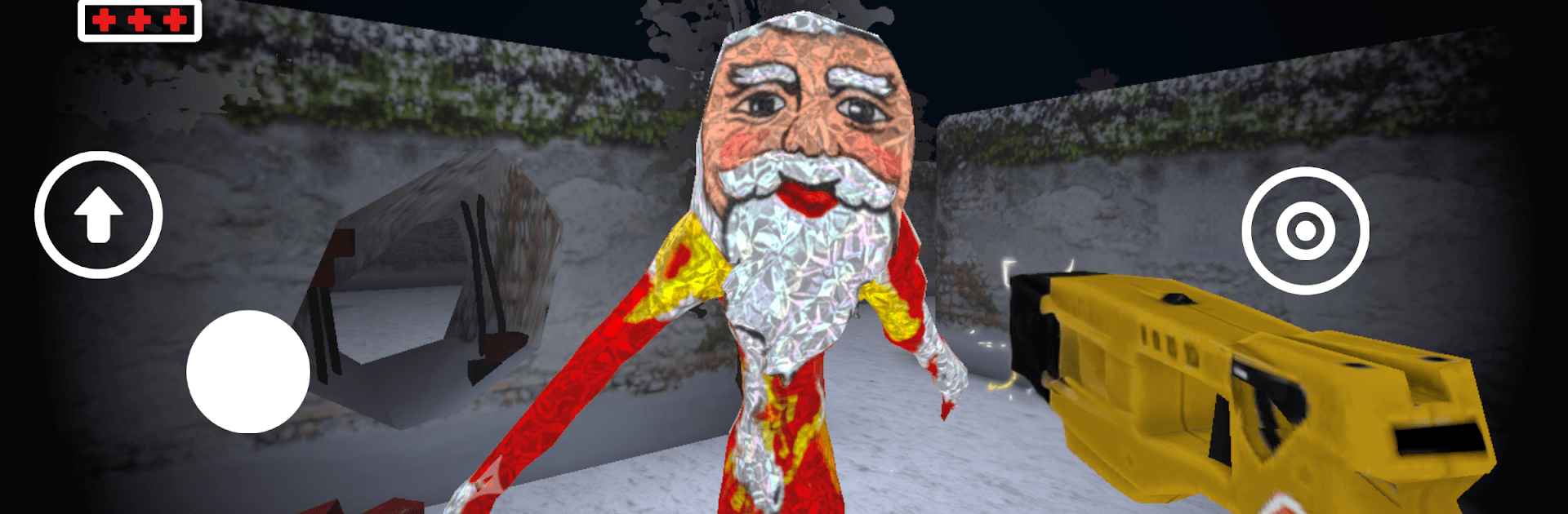
Goo Goo Gaga: Scary Factory

Goo Goo Gaga: Scary Factory

Action

| BekoCan Games

Play on PC with BlueStacks or from our cloud

  • Overview
  • Game Features
  • How to Play

Page Modified On: April 07, 2026

Play Goo Goo Gaga: Scary Factory on PC or Mac

From the innovators and creators at BekoCan Games, Goo Goo Gaga: Scary Factory is another fun addition to the World of Action games. Go beyond your mobile screen and play it bigger and better on your PC or Mac. An immersive experience awaits you.

About the Game

Goo Goo Gaga: Scary Factory is an Action horror from BekoCan Games that turns a sweet night shift into a sticky nightmare. You’re the security guard on duty when a blast rips through the world’s most famous chocolate plant, flooding corridors with dangerous goo and waking the factory’s chocolate Santas into freaky humanoid and spider-like hunters. Your goal’s simple on paper: find the valves, shut the leak, and make it out in one piece.

Game Features

  • Survival with teeth: You’re not powerless, but you’re not a tank either. Manage your nerves, listen for movement, and keep moving while the pressure climbs.

  • Stun Gun, short relief: Use a Stun Gun to briefly drop evolved chocolate creatures. Shots buy time, not safety—make every squeeze count.

  • Maze-like factory garden: The grounds twist into a confusing labyrinth. Trace your path, clock landmarks, and track which corners you’ve actually cleared.

  • Two kinds of nightmares: Expect relentless humanoid Santas and a skittering spider form that loves blind spots. Both will push you into mistakes.

  • Valve-hunting tension: Valves are hidden across the complex. Close each one to slow the chocolate surge, then plan your exit route before things get worse.

  • Moody 3D atmosphere: Dark corridors, echoing machinery, and glossy puddles create that “don’t stop walking” feeling from the first step.

  • Meme meets menace: The Goo Goo Gaga joke gets twisted into a full-on survival scenario that’s weirdly funny until it isn’t.

  • Play your way: Touch works great on mobile, and it runs smoothly on PC with BlueStacks if you want a bigger screen and steady controls.

Start your journey now. Download the game on BlueStacks, invite your friends, and march on a new adventure.


Game Features

Enhancements

  • Macros
  • Multi Instance
  • Multi Instance Sync
  • Eco Mode
  • Enhancements
Macros

Macros

Skip the boring parts of a game. Play Goo Goo Gaga: Scary Factory with Macros and get the edge. Simply record a sequence of commands and execute them at any moment.
Multi Instance

Multi Instance

Why limit to one game on your phone when you can play many on your PC? Open multiple instances of Goo Goo Gaga: Scary Factory at once with Multi-Instance. Leverage the power of different accounts by doing more.
Multi Instance Sync

Multi Instance Sync

Get the best out of Goo Goo Gaga: Scary Factory with Multi-Instance Sync. Play the game from different accounts and build your own empire. Use Multi-instance sync to repeat the action in the main BlueStacks instance on all other instances.
Eco Mode

Eco Mode

Find the rarest heroes by making multiple summons in Goo Goo Gaga: Scary Factory. And while you are at it, reduce your PC’s resource consumption with the Eco Mode. Farm efficiently. Get the best results.
Read More

How to Download and Play Goo Goo Gaga: Scary Factory on PC or Mac

  • Download and install BlueStacks on your PC or Mac

  • Complete Google sign-in to access the Play Store, or do it later

  • Look for Goo Goo Gaga: Scary Factory in the search bar at the top right corner

  • Click to install Goo Goo Gaga: Scary Factory from the search results

  • Complete Google sign-in (if you skipped step 2) to install Goo Goo Gaga: Scary Factory

  • Click the Goo Goo Gaga: Scary Factory icon on the home screen to start playing

video
Watch Video

Minimum System Requirements

With BlueStacks 5, you can get started on a PC that fulfills the following requirements.

  • Operating System

    Microsoft Windows 7 or above, macOS 11 (Big Sur) or above

  • Processor

    Intel, AMD or Apple Silicon Processor

  • RAM

    at least 4GB

  • HDD

    10GB Free Disk Space

Note:

* You must be an Administrator on your PC. Up to date graphics drivers from Microsoft or the chipset vendor.

Goo Goo Gaga: Scary Factory - FAQs

  • How to play Goo Goo Gaga: Scary Factory on Windows PC & Mac?

    Play Goo Goo Gaga: Scary Factory on your PC or Mac by following these simple steps.

    • Click on 'Play Goo Goo Gaga: Scary Factory on PC’ to download BlueStacks
    • Install it and log-in to Google Play Store
    • Launch and play the game.
  • Why is BlueStacks the fastest and safest platform to play games on PC?

    BlueStacks respects your privacy and is always safe and secure to use. It does not carry any malware, spyware, or any sort of additional software that could harm your PC.

    It is engineered to optimize speed and performance for a seamless gaming experience.

  • What are Goo Goo Gaga: Scary Factory PC requirements?

    Minimum requirement to run Goo Goo Gaga: Scary Factory on your PC

    • OS: Microsoft Windows 7 or above MacOS 11 (Big Sur) or above
    • Processor: Intel, AMD or Apple Silicon Processor
    • RAM: Your PC must have at least 4GB of RAM. (Note that having 4GB or more disk space is not a substitute for RAM)
    • HDD: 10GB Free Disk Space.
    • You must be an Administrator on your PC.