Gorilla Tag
Gorilla Tag

Gorilla Tag

Action

| Games Stop Studio

Play on PC with BlueStacks or from our cloud

  • Overview
  • Game Features
  • How to Play

Page Modified On: August 31, 2026

Play Gorilla Tag on PC or Mac

Gorilla Tag by Games Stop Studio has plenty to keep you busy. BlueStacks lets you play it on PC or Mac with more screen space, better control, and fewer mobile limits.

About the Game

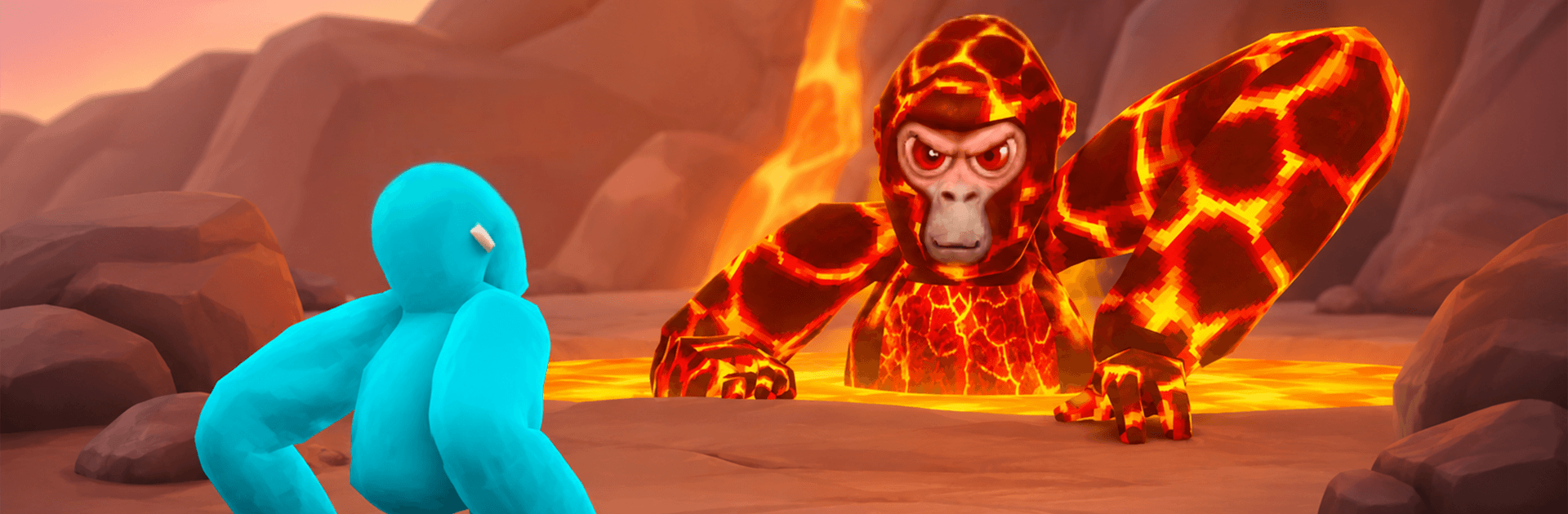
Gorilla Tag is a wild, first-person playground where you literally move like a gorilla—no fancy gadgets, just your arms doing the work. It’s an Action experience that turns running, climbing, and leaping into pure, physical-feeling fun across forests, caves, and sky-high platforms. Whether you’re goofing around in casual rooms or chasing wins in ranked, it’s fast, frantic, and surprisingly deep.

Game Features

  • Arm-powered movement: Push off walls, vault over ledges, and scramble up trees using only your hands—simple to grasp, endlessly satisfying to master.
  • Big skill ceiling, big payoffs: New players can get moving in minutes, while veterans string together wild routes, tight wall runs, and stylish escapes.
  • Traversal toys galore: Grab ropes, ride ziplines, swim through water, and pilot hang gliders or hoverboards to keep momentum flowing.
  • Diverse maps and vibes: Sprint through the classic forest, balance on platforms in the clouds, and explore echoing caverns far underground.
  • Play your way, together: Jump into laid-back minigames with friends or lock in for sweaty chases and ranked competition when you’re feeling spicy.
  • Thriving creator scene: Community tools like Share My Blocks and hubs such as Virtual Stump pour out fresh maps and ideas you can’t possibly keep up with.
  • Bold experimental modes: From protective twists like Guardian to eerie challenges in Ghost Reactor, limited-run experiments keep the meta feeling new.
  • Clean, comfy on PC: Running Gorilla Tag with BlueStacks feels snappy and crisp, great for settling in and finding matches with friends.

Ready to top the leaderboard? We bet you do. Let precise controls and sharp visuals optimized on BlueStacks lead you to victory.


Game Features

Enhancements

  • Macros
  • Multi Instance
  • Multi Instance Sync
  • Eco Mode
  • Enhancements
Macros

Macros

Skip the boring parts of a game. Play Gorilla Tag with Macros and get the edge. Simply record a sequence of commands and execute them at any moment.
Multi Instance

Multi Instance

Why limit to one game on your phone when you can play many on your PC? Open multiple instances of Gorilla Tag at once with Multi-Instance. Leverage the power of different accounts by doing more.
Multi Instance Sync

Multi Instance Sync

Get the best out of Gorilla Tag with Multi-Instance Sync. Play the game from different accounts and build your own empire. Use Multi-instance sync to repeat the action in the main BlueStacks instance on all other instances.
Eco Mode

Eco Mode

Find the rarest heroes by making multiple summons in Gorilla Tag. And while you are at it, reduce your PC’s resource consumption with the Eco Mode. Farm efficiently. Get the best results.
Read More

How to Download and Play Gorilla Tag on PC or Mac

  • Download and install BlueStacks on your PC or Mac

  • Complete Google sign-in to access the Play Store, or do it later

  • Look for Gorilla Tag in the search bar at the top right corner

  • Click to install Gorilla Tag from the search results

  • Complete Google sign-in (if you skipped step 2) to install Gorilla Tag

  • Click the Gorilla Tag icon on the home screen to start playing

video
Watch Video

Minimum System Requirements

With BlueStacks 5, you can get started on a PC that fulfills the following requirements.

  • Operating System

    Microsoft Windows 7 or above, macOS 11 (Big Sur) or above

  • Processor

    Intel, AMD or Apple Silicon Processor

  • RAM

    at least 4GB

  • HDD

    10GB Free Disk Space

Note:

* You must be an Administrator on your PC. Up to date graphics drivers from Microsoft or the chipset vendor.

Gorilla Tag - FAQs

  • How to play Gorilla Tag on Windows PC & Mac?

    Play Gorilla Tag on your PC or Mac by following these simple steps.

    • Click on 'Play Gorilla Tag on PC’ to download BlueStacks
    • Install it and log-in to Google Play Store
    • Launch and play the game.
  • Why is BlueStacks the fastest and safest platform to play games on PC?

    BlueStacks respects your privacy and is always safe and secure to use. It does not carry any malware, spyware, or any sort of additional software that could harm your PC.

    It is engineered to optimize speed and performance for a seamless gaming experience.

  • What are Gorilla Tag PC requirements?

    Minimum requirement to run Gorilla Tag on your PC

    • OS: Microsoft Windows 7 or above MacOS 11 (Big Sur) or above
    • Processor: Intel, AMD or Apple Silicon Processor
    • RAM: Your PC must have at least 4GB of RAM. (Note that having 4GB or more disk space is not a substitute for RAM)
    • HDD: 10GB Free Disk Space.
    • You must be an Administrator on your PC.